

Mô tả
Fatal message to Telegram monitors your WordPress site for fatal PHP errors and instantly sends detailed crash reports to your Telegram chat.
Built for developers and sysadmins, this plugin provides early crash detection using a custom MU-plugin loader to hook into PHP before other plugins are even initialized.
Features
- 📡 Sends fatal PHP errors (E_ERROR, E_PARSE, etc.) directly to Telegram
- ⚙️ Configurable via WordPress admin (Tools > Fatal message to Telegram)
- 🧱 Loads early using a mu-plugin for maximum reliability
- 🔐 Automatically installs/removes the loader during plugin activation/remove
- 💬 Includes developer-friendly helper functions for manual debugging
Helper Functions
Sends a plain string message to your configured Telegram chat.
_fttg(“Just a test string”);
Sends each key-value pair of an array as a separate Telegram message.
_fttg_array([‘a’ => 1, ‘b’ => 2, ‘c’ => ‘hello’]);
External services
This plugin connects to the following external services:
Telegram Bot API
Used to send login alert messages to your Telegram bot/chat.
🔗 Telegram API Docs
📜 Telegram Privacy Policy
Data sent: Chat ID, bot token (from your settings), and message with IP/location/user agent info.
Data is only sent when someone logs in and notifications are enabled.
All data is not stored locally exclude Chat ID, bot token from your settings.
Ảnh màn hình

Search for @BotFather in Telegram | Create new bot in @BotFather | Find and copy your chat ID here: https://api.telegram.org/bot your_token/getUpdates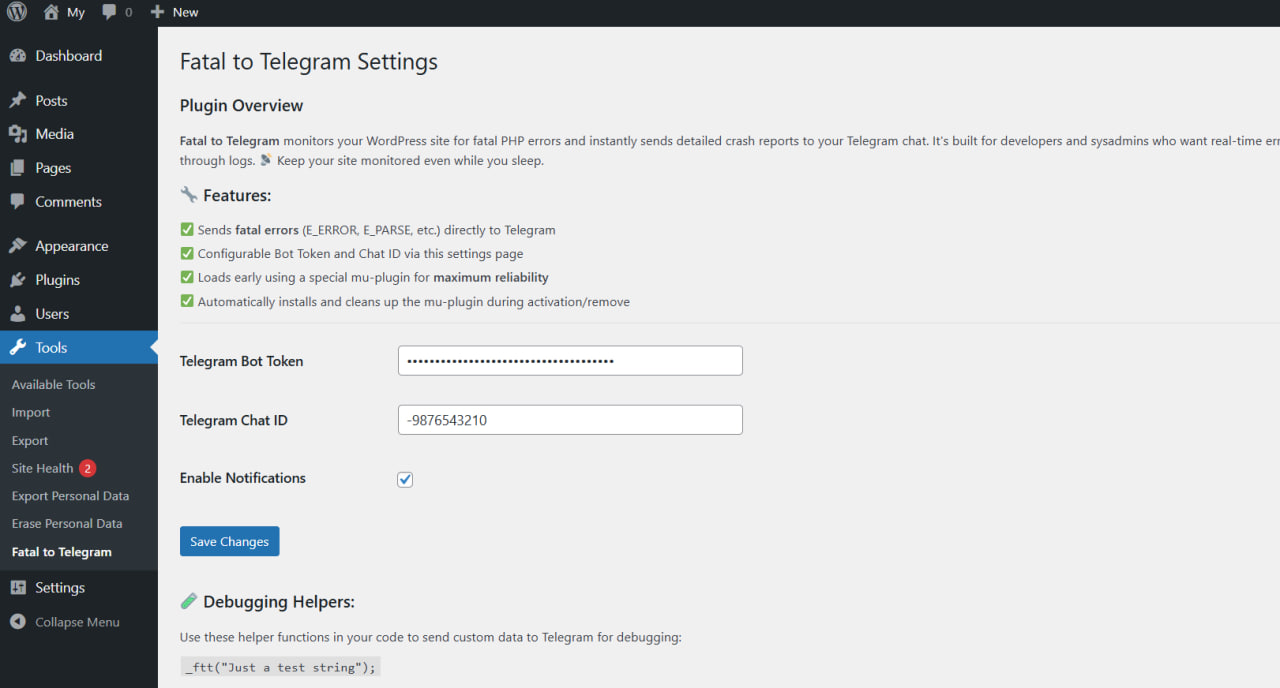
Paste bot token and chat ID into plugin settings: Tools > Fatal message to Telegram.
Cài đặt
USING WORDPRESS PLUGIN INSTALLER
- Go to your WordPress Dashboard, ‘Plugins > Add New’.
- Search for ‘Fatal message to Telegram’.
- Click ‘Install’ and then ‘Activate’.
- Done!
MANUAL INSTALLATION
- Download the ‘fatal-to-telegram’ zip file.
- Extract the content and copy to the
/wp-content/plugins/directory of your WordPress installation. - Navigate to your WordPress dashboard, ‘Plugins > Installed Plugins’.
- Find the ‘Fatal message to Telegram’ plugin and activate.
- Done!
СREATE A TELEGRAM BOT
- Open Telegram and search for the user @BotFather.
- Type
/startand follow instructions to create a new bot. - Choose a name and a username for your bot.
- After creation, BotFather will send you a token (example: 123456789:ABCdefGHIjkLmnoPQRstuVWxyZ).
- Find and copy your chat ID here: https://api.telegram.org/bot
your_token/getUpdates. - Paste bot token and chat ID into plugin settings: Tools > Fatal message to Telegram.
Hỏi đáp
-
I installed the plugin but it does not work
-
- Check active checkbox “Enable Notifications” in plugin setting page: Tools > Fatal message to Telegram.
- Сheck the correctness of the data input:
2.1. Token (for example: 0123456789:TOKEN_CHARS)
2.2. Chat-id (for example: -9876543210)
-
Is Fatal message to Telegram free?
-
Fatal message to Telegram is a 100% free WordPress plugin without any limitations on its features.
-
How to create a Telegram bot?
-
- Open Telegram and search for the user @BotFather.
- Type
/startand follow instructions to create a new bot. - Choose a name and a username for your bot.
- After creation, BotFather will send you a token (example: 123456789:ABCdefGHIjkLmnoPQRstuVWxyZ).
- Find and copy your chat ID here: https://api.telegram.org/bot
your_token/getUpdates. - Paste bot token and chat ID into plugin settings: Tools > Fatal message to Telegram.
See Screenshots section below for a step-by-step guide with images.
Đánh giá
Không có đánh giá nào cho plugin này.
Người đóng góp & Lập trình viên
“Fatal message to Telegram” là mã nguồn mở. Những người sau đã đóng góp vào plugin này.
Những người đóng góp
“Fatal message to Telegram” đã được dịch qua 1 ngôn ngữ. Cảm ơn những người tham gia dịch vì đóng góp của họ.
Dịch “Fatal message to Telegram” sang ngôn ngữ của bạn.
Muốn tham gia phát triển?
Duyệt code, check out SVN repository, hoặc theo dõi nhật ký phát triển qua RSS.
Nhật ký thay đổi
1.0
- Initial release
1.1
- [Changed] Change Plugin Name (Fatal to Telegram -> Fatal message to Telegram)
- [Changed] Change to the prefix function and constant names(ftt -> fttg)
- [Added] Added information to the setting-page about the operation of the telegram bot and the limitations of the Telegram API
1.2
- [Fixed] Compliance with the verification Plugin Check (PCP) 1.5.0 standards
1.3
- [Added] Added translation into Russian
1.4
- [Added] Added External service Info
- [Added] Added screenshot and step-by-step guide on how to create a Telegram bot, obtain a token, and find your chat ID.
- [Added] Tested up to: 6.8.1