
Mô tả
This plugin allows users to clone posts of any type, or copy them to new drafts for further editing.
Nó hoạt động như nào:
-
Tại ‘Sửa bài’/’Sửa trang’, bạn có thể bấm vào liên kết ‘Nhân đôi’ bên dưới tên bài viết/trang: nó sẽ tạo một bản sao ngay lập tức và đưa về danh sách.
-
Tại ‘Sửa bài’/’Sửa trang’, bạn có thể chọn một hoặc nhiều mục, sau đó chọn ‘Nhân đôi’ trong ‘Tác vụ’ để sao chép tất cả một lần.
-
Tại ‘Sửa bài’/’Sửa trang’, bạn có thể bấm liên kết ‘Bản nháp mới’ bên dưới tên bài viết/trang.
-
Tại màn hình sửa bài viết, bạn có thể bấm vào ‘Sao chép thành bản nháp mới’ bên trên “Hủy”/”Chuyển vào thùng tác” hoặc ở thanh admin.
-
Khi xem bài viết dưới dạng đăng nhập, bạn có thể bấm vào ‘Sao chép thành bản nháp’ trong thanh admin.
3, 4 và 5 sẽ đưa đến sửa trang nháp: thay đổi theo cách bạn muốn, bấm vào ‘Đăng’ và bạn đã hoàn thành.
Ngoài ra còn có template tag, để bạn có thể đặt vào trong template của bạn và nhân đôi bài viết/trang từ bên ngoài giao diện. Bấm vào liên kết sẽ đưa bạn đến sửa trang nháp, như liên kết ở thanh admin.
Duplicate Post has many useful settings to customize its behavior and restrict its use to certain roles or post types. Check out the extensive documentation on yoast.com and our developer docs.
Đóng góp
If you find this useful and if you want to contribute, there are two ways:
- Submit your bug reports, suggestions and requests for features on GitHub;
- Nếu bạn muốn dịch plugin sang ngôn ngữ của bạn (chỉ là một vài cụm từ thôi), bạn có thể sử dụng dự án dịch;
Ảnh màn hình

Classic editor. 
Block editor. 
Post list. 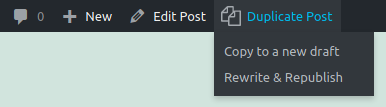
Admin bar menu. 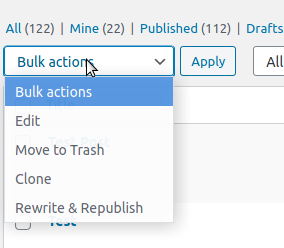
Bulk actions. 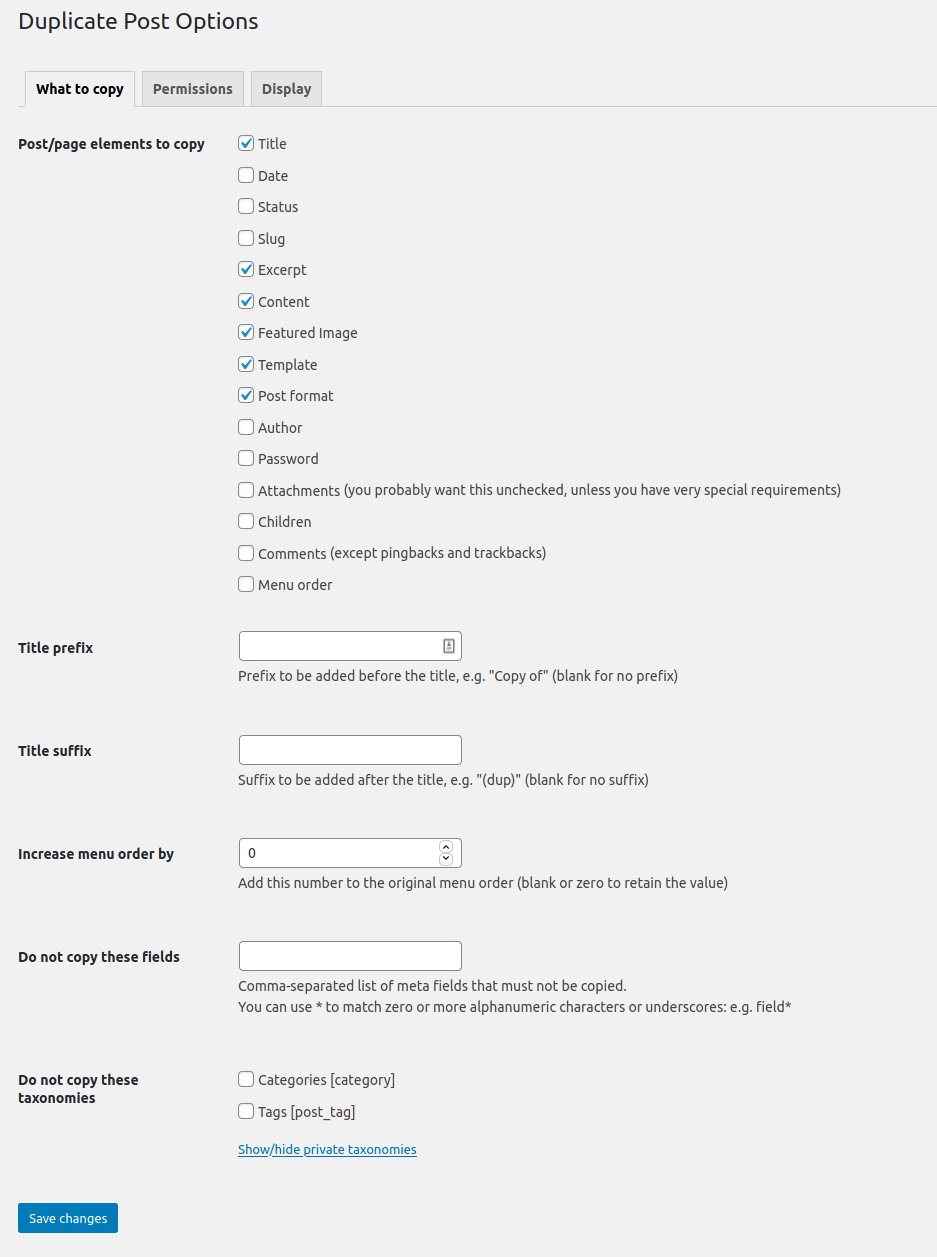
Trang tùy chọn.
Cài đặt
Sử dụng tính năng Cài mới của WordPress, tìm “Duplicate Post”, hoặc tải về và:
- Unzip the archive on your computer
- Tải thư mục
duplicate-postvào trong thư mục/wp-content/plugins/ - Kích hoạt plugin qua menu ‘Plugin’ trong WordPress
- Đi đến Cài đặt -> Duplicate Post và tùy chỉnh hành vi khi cần
Hỏi đáp
-
Plugin không hoạt động, vì sao?
-
Đầu tiên, hãy kiểm tra phiên bản WordPress: plugin không làm việc trên các phiên bản cũ nữa. Hãy đảm bảo nâng cấp lên phiên bản mới nhất của plugin.
Sau đó thử ngừng kích hoạt và kích hoạt trở lại, một số người dùng đã nói rằng việc này sẽ giải quyết được một vài vấn đề.
Hãy chú ý đến tab “Permissions” trong Cài đặt: hãy chắc chắn plugin đã được bật cho đúng vai trò người dùng và post type.
Nếu nó vẫn không hoạt động, có thể là xung đột với các plugin khác: hãy viết vào diễn đàn và chúng tôi sẽ tìm giải pháp (thực tế bạn có thể thử tắt toàn bộ plugin và bật lại từng cái để xem cái nào xung đột… Nhưng chỉ làm thế nếu bạn biết mình đang làm gì, tôi sẽ không chịu trách nhiệm nếu bạn gặp vấn đề với điều này).
-
Plugin chưa được dịch qua ngôn ngữ của tôi!
-
Từ phiên bản 3.0 bản dịch plugin được quản lý bởi WordPress.org và plugin được tải lên mà không có tệp ngôn ngữ, nên hãy cập nhật bản dịch ở Bảng tin->Cập nhật.
If Duplicate Post is still in English, or if there are some untranslated strings, you can help translating to your language: you only need a WordPress.org account.
Đánh giá


Người đóng góp & Lập trình viên
“Yoast Duplicate Post” là mã nguồn mở. Những người sau đã đóng góp vào plugin này.
Những người đóng góp

“Yoast Duplicate Post” đã được dịch qua 51 ngôn ngữ. Cảm ơn những người tham gia dịch vì đóng góp của họ.
Dịch “Yoast Duplicate Post” sang ngôn ngữ của bạn.
Muốn tham gia phát triển?
Duyệt code, check out SVN repository, hoặc theo dõi nhật ký phát triển qua RSS.
Nhật ký thay đổi
4.6
Release date: 2026-03-09
Introduces smoother post duplication, more reliable rewrite workflows, and better compatibility across languages and configurations. Read more here!
Enhancements
- Improves the compatibility with the Block Editor.
- Improves the style of the Copy to a new draft and Rewrite & Republish actions in the Block Editor.
- Replaces the metabox with a sidebar panel in the Block Editor.
Bugfixes
- Fixes a bug where cloning an attachment did not copy its caption as expected. Props to @masteradhoc.
- Fixes a bug where cloning an attachment did not copy its description as expected.
- Fixes a bug where notices would not be appearing in the block editor, throwing console errors, with some locales.
- Fixes a bug where Rewrite & Republish copies could remain orphaned, blocking editors from creating a new Rewrite & Republish copy for the original post.
- Fixes a bug where the block editor button were not styled if the admin bar links where not present.
- Fixes a bug where translations where missing in the buttons and the notices in the Block Editor. Props to @petitphp.
Other
- Improves security of the Bulk Clone action and the republishing of a copy.
- Adds
duplicate_post_before_republishandduplicate_post_after_republishaction hooks fired before and after republishing. Props to @piscis. - Deprecates the
dp_duplicate_postanddp_duplicate_pagehooks and introduces a new unifiedduplicate_post_after_duplicatedaction hook that replaces them. The new hook includes the post type as a fourth parameter for flexible filtering. - Sets the minimum supported WordPress version to 6.8.
- Sets the WordPress tested up to version to 6.9.
- Drops compatibility with PHP < 7.4.
- Verified compatibility with PHP up to version 8.5.
- Fixes the Developer Guide link that was leading to a non-existent page. Props to @masteradhoc.
- Fixes the documentation link to use a shortlink. Props to @masteradhoc.
- Improves how the translations are loaded by relying on the WordPress mechanism for that. Props to @swissspidy.
- Improves discoverability of security policy in Packagist.
- Users requiring this package via [WP]Packagist can now use the
composer/installersv2.
4.5
Release date: 2022-06-28
Enhancements
- Improves the impact of the plugin on the performance of the site by avoiding useless calls on the
gettextfilter.
Bugfixes
- Fixes a bug where a section in the Classic Editor’s submitbox would be displayed with incorrect margins.
Other
- Sets the WordPress tested up to version to 6.0.
Earlier versions
For the changelog of earlier versions, please refer to the changelog on yoast.com.