

Mô tả
Clone Posts and Pages easily. Duplicate your pages, posts saving time. Preset all new cloned post with the prelesected status (draft, private, public, pending).
Plugin : Homepage
If you like this plugin, please rate and review.
If you have any question, suggestion or issue, please post here.
How to use
- First Activate Plugin.
- Go Select to Clone My Post settings Menu from Settings Tab and savings settings.
- Then Create New Post/Page or Use old.
- After click on duplicate this link, then cloned post/page will be created and saved as draft,publish,pending,private depending upon settings.
Clone My Post Pro additional options
- **Add prefix to the cloned title.
- **Add suffix to the cloned title.
- **choose which roles are enabled to clone posts
- **Future Upgrade and Support
Ảnh màn hình

Access the settings 
Clone My Post Settings Screen 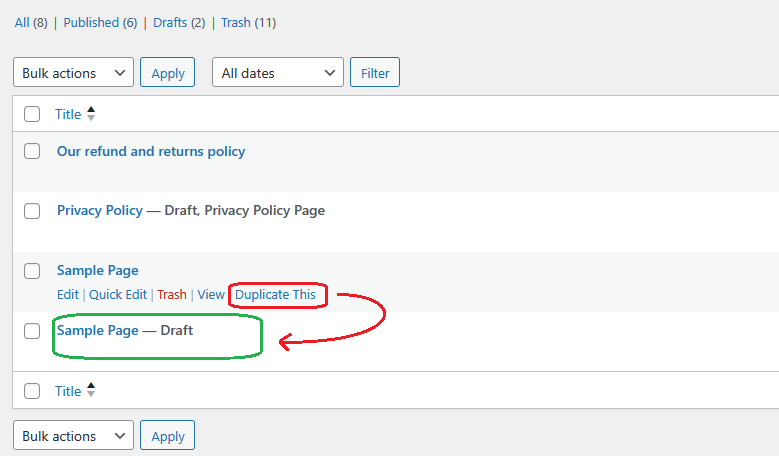
Select Option from Settings Page.
Cài đặt
- Upload the
clone-my-postfolder to the directory/wp-content/plugins/. - Activate the plugin using the ‘Plugins’ menu in WordPress.
Đánh giá
Không có đánh giá nào cho plugin này.
Người đóng góp & Lập trình viên

“Clone My Post” đã được dịch qua 1 ngôn ngữ. Cảm ơn những người tham gia dịch vì đóng góp của họ.
Dịch “Clone My Post” sang ngôn ngữ của bạn.
Muốn tham gia phát triển?
Duyệt code, check out SVN repository, hoặc theo dõi nhật ký phát triển qua RSS.
Nhật ký thay đổi
1.0.1
- Initial release