

Descripción
Customize your wordpress login page to make it looks different, yo can change the logo image, page background color, form background and label color.
Features
- Change the logo image
- Set custom logo image height
- Change the page background
- Change the login form background
- Change the login form label color
- Add a custom message
Bugs or technical hints
Please give us feedback, contribute and file technical bugs on GitHub Repo.
Credits
Developed by Manuel Padilla
Capturas
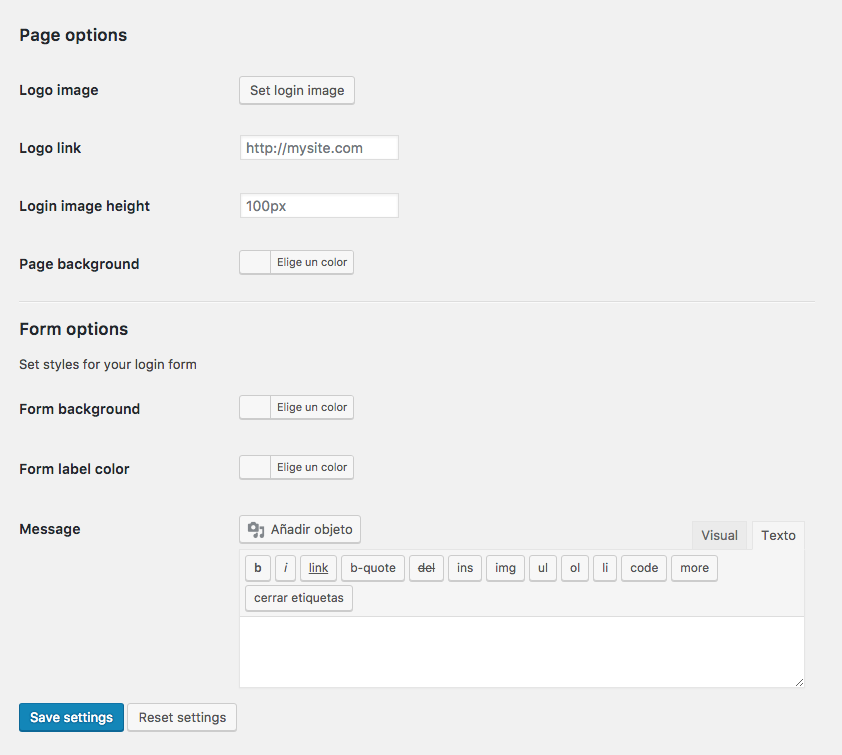
Plugin options
Instalación
Using The WordPress Dashboard
- Navigate to the ‘Add New’ in the plugins dashboard
- Search for ‘MP Customize Login Page’
- Click ‘Install Now’
- Activate the plugin on the Plugin dashboard
- Go to Settings > MP Customize Login Page
Uploading in WordPress Dashboard
- Navigate to the ‘Add New’ in the plugins dashboard
- Navigate to the ‘Upload’ area
- Select mp-customize-login-page.zip from your computer
- Click ‘Install Now’
- Activate the plugin in the Plugin dashboard
- Go to Settings > MP Customize Login Page
Using FTP
- Download mp-customize-login-page.zip
- Extract the mp-customize-login-page directory to your computer
- Upload the mp-customize-login-page directory to the /wp-content/plugins/ directory
- Activate the plugin in the Plugin’s dashboard
- Go to Settings > MP Customize Login Page
Preguntas frecuentes
- Installation Instructions
-
Using The WordPress Dashboard
- Navigate to the ‘Add New’ in the plugins dashboard
- Search for ‘MP Customize Login Page’
- Click ‘Install Now’
- Activate the plugin on the Plugin dashboard
- Go to Settings > MP Customize Login Page
Uploading in WordPress Dashboard
- Navigate to the ‘Add New’ in the plugins dashboard
- Navigate to the ‘Upload’ area
- Select mp-customize-login-page.zip from your computer
- Click ‘Install Now’
- Activate the plugin in the Plugin dashboard
- Go to Settings > MP Customize Login Page
Using FTP
- Download mp-customize-login-page.zip
- Extract the mp-customize-login-page directory to your computer
- Upload the mp-customize-login-page directory to the /wp-content/plugins/ directory
- Activate the plugin in the Plugin’s dashboard
- Go to Settings > MP Customize Login Page
Reseñas
No hay reseñas para este plugin.
Colaboradores y desarrolladores
«MP Customize Login Page» es un software de código abierto. Las siguientes personas han colaborado con este plugin.
Colaboradores
Traduce «MP Customize Login Page» a tu idioma.
¿Interesado en el desarrollo?
Revisa el código , echa un vistazo al repositorio SVN o suscríbete al registro de desarrollo por RSS.