

تفصیل
WP Notify Me is a plugin that allows you to receive notifications by email when a publication changes its status.
The available status are the following:
- Published Post
- Update Post
- Scheduler Post
- Save as Draft
- Delete Post
- Saving as Private
- Saving as Pending Review
Note.- Use wp_email function to send email.
Languages:
– English
– Spanish (Spain and Mexico)
– French.
اسکرین شاٹس
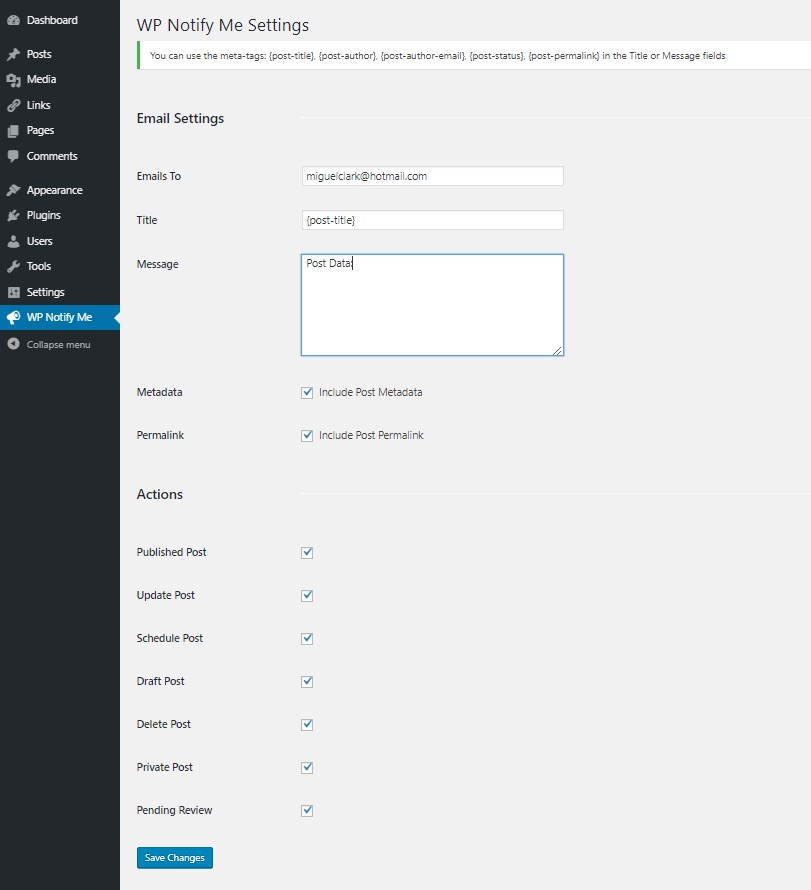
These are the plugin configuration options. 
The mail data, title, and body of the message. You can also indicate if you want to include the metadata and the permalink. 
The Actions that can be configured for sending the notice. 
You can use the meta-tags to create a personalized message. 
If the Include Metadata box is checked, the Title, Author, Email, Status and Permalink data will be added in the message field, in addition to the text in the Message field.
انسٹالیشن
Installing the plugin is easy. Just follow these steps:
- Upload the entire wp-notify-me folder to the /wp-content/plugins/ directory.
- Activate the plugin through the "Plugins” menu in WordPress.
You will find "Notify Me” menu in your WordPress admin panel.
عمومی سوالات
- Can you only notify in Entries?
-
Yes, at the moment the plugin only works with Post Entries.
- Can the notification be sent to more than one email?
-
Yes, in the email to section, email addresses separated by comma should be provided
- Can I suggest new features for the plugin?
-
Of course, all suggestions and / or contributions are welcome.
جائزے
There are no reviews for this plugin.
شراکت دار اور ڈیویلپرز
“WP Notify Me” اوپن سورس سافٹ ویئر ہے۔ مندرجہ ذیل لوگوں نے اس پلگ ان میں حصہ لیا:
شراکت دار
“WP Notify Me” کا 4 زبانوں میں ترجمہ کیا گیا ہے۔ تعاون کے لیے مترجمین کا شکریہ۔
“WP Notify Me” کا اپنی زبان میں ترجمہ کریں۔
ڈویلپمینٹ میں دلچسپی ہے؟
کوڈ براؤز کریں، ایس این وی ریپوزیٹری کو چیک کریں یا ڈویلپمینٹ لاگ کو سبسکرائب کریں بذریعہ آر ایس ایس۔
چینج لاگ
1.2
- Set Meta-tags {post-permalink} and {post-status} correctly
- Change mail function to wp_mail
1.1
- Meta-tags were added to be used in the Title or Message field of the Email.
1.0
- Initial version