
تفصیل
- In China, the reason of Gravatar avatar can not be accessed is not the Gravatar site server unstable, it is the firewall problem, so the solution is to use the DuoShuo.com Gravatar avatar URL: "http://gravatar.duoshuo.com”.
- 在国内(中国大陆), Gravatar 头像无法稳定访问的原因不是因为 Gravatar 网站服务器不稳定,而是国内防火墙的问题,解决的办法是替换成 "http://gravatar.duoshuo.com” 。
- SVN Build Version: 1156728
اسکرین شاٹس
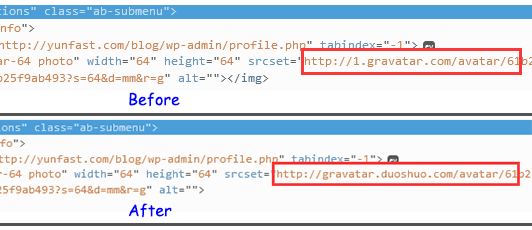
Enable DuoShuo Gravatar URL. 启用 DuoShuo 头像URL。
انسٹالیشن
- Upload
wp-duoshuo-gravatarfolder to the/wp-content/plugins/directory. 上传文件夹“wp-duoshuo-gravatar”到“/wp-content/plugins/”目录。 - Activate the plugin through the ‘Plugins’ menu in WordPress. 在仪表盘插件菜单中激活该插件。
عمومی سوالات
插件失效请先确认是否有启用其他同类插件或者代码导致互相冲突。 邮箱:[email protected]
جائزے
There are no reviews for this plugin.
شراکت دار اور ڈیویلپرز
“WP-DuoShuo-Gravatar” اوپن سورس سافٹ ویئر ہے۔ مندرجہ ذیل لوگوں نے اس پلگ ان میں حصہ لیا:
شراکت دار
“WP-DuoShuo-Gravatar” کا اپنی زبان میں ترجمہ کریں۔
ڈویلپمینٹ میں دلچسپی ہے؟
کوڈ براؤز کریں، ایس این وی ریپوزیٹری کو چیک کریں یا ڈویلپمینٹ لاگ کو سبسکرائب کریں بذریعہ آر ایس ایس۔
چینج لاگ
1.0
- First Version. (首发版本).