

تفصیل
The plugin is designed to measure the height, width and margins of elements on the page during the preview when editing. It also shows the absolute and relative positions of elements.
In auto-correction mode, the program can automatically detect the borders of elements and correct inaccuracies in cursor positioning. Auto-correction occurs at the end of the measurement.
The plugin does not affect the appearance and html code of the page when its published.
Tested on browsers: Yandex v20.8.3.115, Google Chrome v85.0.4183.121, Opera v70.0.3728.189, Microsoft Edge v85.0.564.51, Firefox v78.0.2.
Usage
- Install and activate the plugin.
- Open an existing page for editing or create a new one.
- Make a preview of the page.
- Move the cursor to an element.
- Press the "M” key on your keyboard to enable measurement mode.
- Use the left mouse button to measure. There are two possible ways:
measure from click to click;
tap and pull. - Press the "M” key again to disable measurement mode.
Additional features:
press the "A” key on your keyboard to turn auto-correction mode on or off;
use the "Esc” key to remove unnecessary measurement elements from the screen.
اسکرین شاٹس

Press the "M” key on your keyboard to enable and disable the measurement mode. 
The cursor becomes a crosshair. Its absolute coordinates are displayed next to it. 
Use the left mouse button to measure. There are two possible ways: measure from click to click or tap and pull. 
The absolute coordinates of the element, as well as its width and height, are displayed. 
When the cursor is inside the element, its absolute and relative coordinates are displayed. 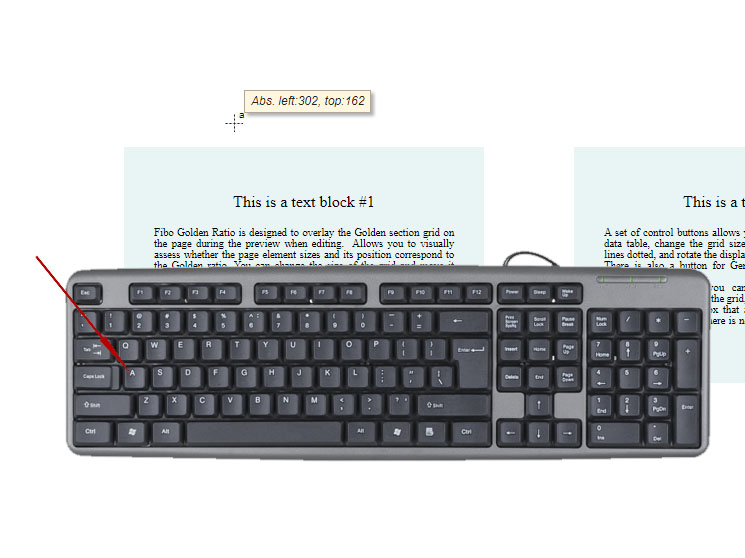
To turn auto-correction mode on or off, press the "A” key on your keyboard. Appearance of the cursor in auto-correction mode. 
Measuring the distance between blocks. 
The cursor and lines are clearly visible on both dark and light page backgrounds.
جائزے

شراکت دار اور ڈیویلپرز
“Measuring Ruler” اوپن سورس سافٹ ویئر ہے۔ مندرجہ ذیل لوگوں نے اس پلگ ان میں حصہ لیا:
شراکت دار
“Measuring Ruler” کا اپنی زبان میں ترجمہ کریں۔
ڈویلپمینٹ میں دلچسپی ہے؟
کوڈ براؤز کریں، ایس این وی ریپوزیٹری کو چیک کریں یا ڈویلپمینٹ لاگ کو سبسکرائب کریں بذریعہ آر ایس ایس۔
چینج لاگ
1.1 (05.12.2020)
- Added a comma in the block data string.
- Added an auto-correction mode indicator next to the crosshair cursor.
- Added automatic correction of inaccuracies in setting the cursor on an element.
- Fixed flickering on the system cursor when you move it.
1.0 (24.11.2020)
- Initial release