

تفصیل
This plugin allows to set some security improvements to your WordPress site. Blocking attempts of scan from WPScan and other similar tools.
A few methods you want prevent to scan:
- Disable robots.txt
- Disable detect User Agent
- Disable XML-RPC
- Remove generator info
- Prevent advanced fingerprinting
- Remove version number
- Stop plugin enumeration
- Prevent username enumeration
- Prevent wpconfig enumeration
اسکرین شاٹس
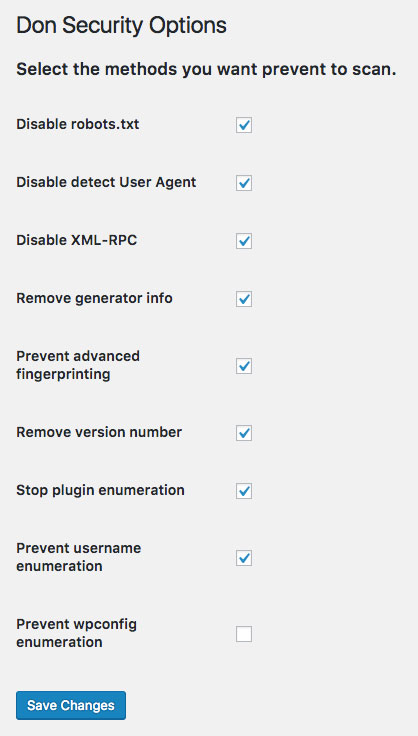
Screenshot ‘screenshot-1.png’ show options of plugin. 
Screenshot ‘screenshot-2.png’ WPScan in action and site blocking the attempt of get information.
انسٹالیشن
This section describes how to install the plugin and get it working.
- Upload ‘don-security’ to the ‘/wp-content/plugins/’ directory
- Activate the plugin through the ‘Plugins’ menu in WordPress
- Click on the new menu item "Configuration \ Security” and select what you want to block.
جائزے

مئی 17, 2017
Very nice job. Useful and handy.

مئی 16, 2017
Such a great plugin to take care your WordPress site, block anything you need.
شراکت دار اور ڈیویلپرز
“Don Security” اوپن سورس سافٹ ویئر ہے۔ مندرجہ ذیل لوگوں نے اس پلگ ان میں حصہ لیا:
شراکت دار
“Don Security” کا اپنی زبان میں ترجمہ کریں۔
ڈویلپمینٹ میں دلچسپی ہے؟
کوڈ براؤز کریں، ایس این وی ریپوزیٹری کو چیک کریں یا ڈویلپمینٹ لاگ کو سبسکرائب کریں بذریعہ آر ایس ایس۔
چینج لاگ
1.0.2
- Image changes and svg icon
1.0.1
- Adding translate support, starting with English and Portuguese Brazil
1.0.0
- First version published.