Universal Smart TV Remote -PRO2.0.6p
Publisher Description


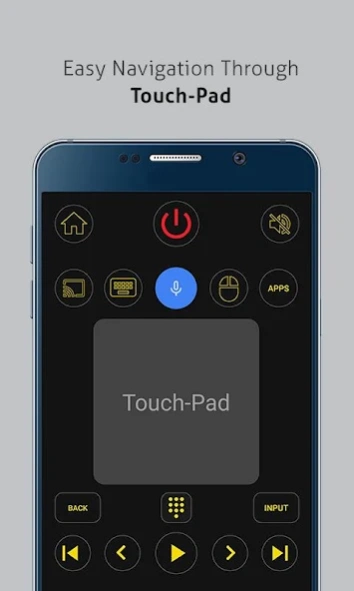

Universal TV Remote for Smart and IR TVs in more than 100 countries.
The No.1 Universal TV Remote Control - Smart and IR Remotes App in more than 100 countries.The only setting you have to make is to connect the mobile device and Smart TV on the same WiFi Network and you are ready to go.
Now you can
Cast media files
stored on your mobile phone to your Smart TV screen.
Smart TV functionalities
>> Voice Search
>> Power Control.
>> Mute / Volume Control.
>>
Smart Sharing / Casting:
View your Pictures and Videos, and listen to music on your TV.
>> Mouse Navigation and Easy Keyboard.
>> Input
>> Home
>> Apps installed on your TV.
>> Channel lists / Up / Down.
>> Play / Stop / Reverse / Fast Forward.
>> Up / Down / Left / Right Navigation.
The simplicity which this app offers to its users has been acknowledged and appreciated widely throughout the world.
So, Get rid of the annoying regular temper problems caused by:
• Losing your remote,
• Batteries worn out,
• Smacking your little sibling for breaking the remote,
• Biting and / or boiling your batteries in water hoping it would result in magically recharging them, etc.
Just right before one of your favourite TV season or show is about to start, OR your favourite sports game is about to begin, OR you want to watch news and your TV remote control is not within your reach.
No setup required. Just select your TV brand and start using it.
Very Useful
It is always good and easy to use a single Universal remote control device to control all you electronic equipments. As mobile phone has become a major gadget that people always carry with them, so having an application installed on your mobile device that works as a TV remote control will make your life easier.
Very easy to Contact Us
CodeMatics very cordial Customer Support is here to assist you in anything you need. Our team is working continuously to include maximum TV brands and functionalities. The smart remote control app is being updated accordingly.
If your brand is not listed or the TV remote control application is not working with your television, please drop us an email with your TV brand and remote model. We will work on to make this application compatible with your TV brand.
Features of Traditional IR Universal Remote Control:
• Power ON / OFF Control.
• AV / TV.
• Mute / Un-Mute.
• Channel Digits buttons.
• Channel index and lists.
• Volume Up Control.
• Volume Down Control.
• Channel Up Control.
• Channel Down Control.
• Menu Button with up / down and left / right Controls.
• Red / Green / Blue / Yellow (Multiple purpose soft keys).
Note:
• Phone or Tablet with
built in IR blaster
is required for the Traditional IR TV devices.
• For
Smart TVs / devices
, both the smartTV device and user's mobile device must be connected to the same network.
• This app is compatible with the TV brands / models currently available in the app. This is an unofficial TV remote application for these Television brands.
•
"Email us"
the Model of your TV and we will try our best to make it available as soon as we possibly can. Your patience and positive feedback will be highly appreciated.
ENJOY!!!!
Your feedback is very important to us.
About Universal Smart TV Remote -PRO
The company that develops Universal Smart TV Remote -PRO is CodeMatics Media Solutions. The latest version released by its developer is 2.0.6p.
To install Universal Smart TV Remote -PRO on your Android device, just click the green Continue To App button above to start the installation process. The app is listed on our website since 2025-08-28 and was downloaded 136 times. We have already checked if the download link is safe, however for your own protection we recommend that you scan the downloaded app with your antivirus. Your antivirus may detect the Universal Smart TV Remote -PRO as malware as malware if the download link to codematics.universal.tv.remote.tvremote.control.pro is broken.
How to install Universal Smart TV Remote -PRO on your Android device:
- Click on the Continue To App button on our website. This will redirect you to Google Play.
- Once the Universal Smart TV Remote -PRO is shown in the Google Play listing of your Android device, you can start its download and installation. Tap on the Install button located below the search bar and to the right of the app icon.
- A pop-up window with the permissions required by Universal Smart TV Remote -PRO will be shown. Click on Accept to continue the process.
- Universal Smart TV Remote -PRO will be downloaded onto your device, displaying a progress. Once the download completes, the installation will start and you'll get a notification after the installation is finished.
Program Details
System requirements
Download information
Pricing
Version History
version 2.0.6p
posted on 2025-08-28
Improved design as per the feedback received from our valued users.
Faster discovery of Smart TVs and Devices.
Your feedback is always welcomed and appreciated.
Stay Happy :)
version 2.0.4p
posted on 2024-07-09
Faster discovery of Smart TVs and Devices.
Your feedback is always welcomed and appreciated.
Stay Happy :)
version 2.0.1p
posted on 2023-09-06
Minor fixes.
Your feedback is always welcomed and appreciated.
Stay Happy :)
version 2.0.0p
posted on 2023-09-01
Your feedback is always welcomed and appreciated.
Stay Happy :)
version 1.0.23
posted on 2021-01-21
VIZIO SmartCast TV Remote
is available now.
SAMSUNG Smart TV Remote
is available now.
For LG smart TV, code will now be required only for the first time.
Picture OFF and Picture Mode buttons made available in Sony Bravia Android TVs
Your feedback is always welcomed and appreciated.
Stay Happy :)
version 1.0.21
posted on 2020-03-21
SAMSUNG Smart TV Remote
is available now.
For LG smart TV, code will be required only for the first time now.
Picture OFF and Picture Mode buttons made available in Sony Bravia Android TVs
Your feedback is always welcomed and appreciated.
Stay Happy :)
version 1.0.19
posted on 2020-02-13
SAMSUNG Smart TV Remote
is available now. For LG smart TV, code will be required only for the first time now. Your feedback is always welcomed and appreciated. Stay Happy :)
version 1.0.18
posted on 2019-05-08
Sony Bravia Code issue resolved. Thanks Jim for the feedback.
New Main Screen Design. Android and Roku support added for new smart TV brands.
Sony Bravia Android TV remote included. Powerful voice search, touchpad and keyboard.
LG smartTV, Roku, Android TV, Apple TV and Google Chromecast.
Smart features include easy navigation through Mouse Pad and efficient input through keyboard.
Smart Media casting and sharing
version 1.0.13
posted on 2016-08-18
New Design.,Multiple NEW TV brands added.
