
Опис
Basically, this systems installs 2 tables in the db:
– the entry table
– the time table
Whenever you create an entry you can associate it with a time table. Each cell is free to fill with whatever you want. No formatting is done.
Then you can use a shortcode with the entry id as a parameter.
The plugin has been translated in spanish and french so far.
For more information check the plugin homepage:
http://www.fifteenpeas.com/blog/wordpress-weekly-time-table-plugin/
Скріншоти

The Wtt menu 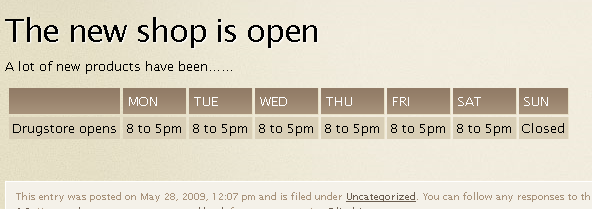
A client’s view using the shortcode 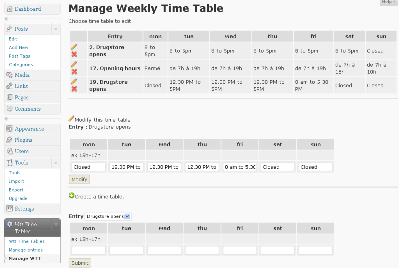
Admin WTT management
Встановлення
- Upload the ‘wttPlugIn’ folder to the ‘/wp-content/plugins/’ directory
- Activate the plugin through the ‘Plugins’ menu in WordPress
- Go to Settings on the Admin Panel and set it up
Use this shortcode anywhere :
[wttdsp entry_id=5] where 5 is the id of the time table…or [wttdsp entry_id=5,17,8] for multiple entries.
Часті питання
- Can I add multiple entries to a timetable ?
-
Yes, just use a list of IDs separated by a comma instead of one ID (v1.2)
- Can I use the timetable in spanish ?
-
yes, just use the locale folder inside the weekly time yable plugin folder to put your translations (v1.2)
Spanish and french are already in place.
Відгуки
Для цього плагіна немає відгуків.
Учасники та розробники
“Weekly TimeTable – WordPress PlugIn” — проект з відкритим вихідним кодом. В розвиток плагіну внесли свій вклад наступні учасники:
Учасники
Перекладіть “Weekly TimeTable – WordPress PlugIn” на вашу мову.
Цікавитесь розробкою?
Перегляньте код, перегляньте сховище SVN або підпишіться на журнал розробки за допомогою RSS.
Журнал змін
1.3
- Spanish and French Translation available
1.2
- I18n ready
- Possibility to add multiple entries (shortcode with ID list) for one time table
- Possibility to enter html as entries
- translated in spanish and french
1.0
First Version