

Опис
This plugin allows you to create many-to-many relationships between posts of any type: post, page, custom post types, etc.
Configure post 2 post connections easily in a friendly interface.
The new connection metaboxes will appear on the related post edition pages. Search text, post type and term combo filter available as option for it.
Use the standard WP_Query() and get_posts() to get the related posts.
Solid-rock relationships: use his own database table, updated on post status change and removed on post deletion.
Getting related: the WP_Query way
// inside main loop, current post ID (p2p_rel_post_id) not needed, current post will be used if you don't set it:

$args = array(
    'p2p_rel_key'        => 'prod_to_bars',  // This is your connection key name. Required.
    'p2p_rel_post_id'    => 1,               // The post ID. Inside main loop dont needed.
    'p2p_rel_direction'  => 'any',           // The connection direction. 'any' by default. Optional. Explained below. ( can be 'any' | 'from_to' | 'to_from' )

    // Of course, here you can add the standard WP arguments you need: post type, status, dates, pagination, etc.
);

// (at this point, as any other WP looping):

// The Query
$the_query = new WP_Query( $args );

// The Loop
if ( $the_query->have_posts() ) {
    echo '<ul>';
    while ( $the_query->have_posts() ) {
        $the_query->the_post();
        echo '<li>' . get_the_title() . '</li>';
    }
    echo '</ul>';
} else {
    // no posts found
    echo '<p>Nothing related</p>';
}

// Restore original Post Data
wp_reset_postdata();
Getting related: the get_posts() way
// inside main loop, current post ID (p2p_rel_post_id) not needed, current post will be used if you don't set it:

$args = array(
    'p2p_rel_key'        => 'prod_to_bars', // This is your connection key name. Required.
    'p2p_rel_post_id'    => 1,              // The post ID. Inside main loop dont needed
    'p2p_rel_direction'  => 'any',          // The connection direction. 'any' by default. Optional. Explained below. ( can be 'any' | 'from_to' | 'to_from' )
    'post_type'          => 'any',          // The filtered post types, can be an array. Optional. 'post' by default. (can be 'any' for all)
    'suppress_filters'   => false           // Required

    // Of course, here you can add the standard WP arguments you need: post type, status, dates, pagination, etc.
);

// (at this point, as any other WP looping):

$rel_posts = get_posts ( $args );

print_r( $rel_posts );
Getting related: getting it raw
// inside main loop, current post ID (element_id) not needed, current post will be used if you don't set it:

$args = array(
    'key'           => 'prod_to_bars',  // This is your connection key name. Required.
    'element_id'    => 1,               // The post ID. Inside main loop dont needed.
    'element_type'  => 'any',           // The filtered post types, can be an array. Optional. 'post' by default. (can be 'any' for all)
    'status'        => 'any'            // The filtered post status, can be an array. Optional. 'publish' by default. (can be 'any' for all)
    'direction'     => 'any',           // The connection direction. 'any' by default. Optional. Explained below. ( can be 'any' | 'from_to' | 'to_from' )
);

global $P2P_Relationships;
$rel_posts = $P2P_Relationships->get_raw ( $args );

// Only an array of related post IDs, not the posts objects.
print_r ( $rel_posts );
The connection direction
By default, the connections are bidirectional (any). However, you can get related posts only in one direction: ‘from_to’ or ‘to_from’.
You can do the same logic at interface level for your users in the backoffice: you can setup your connection hidding the from metabox or the to metabox (UI mode setting).
Скріншоти

Relations settings 
Relation settings (details) 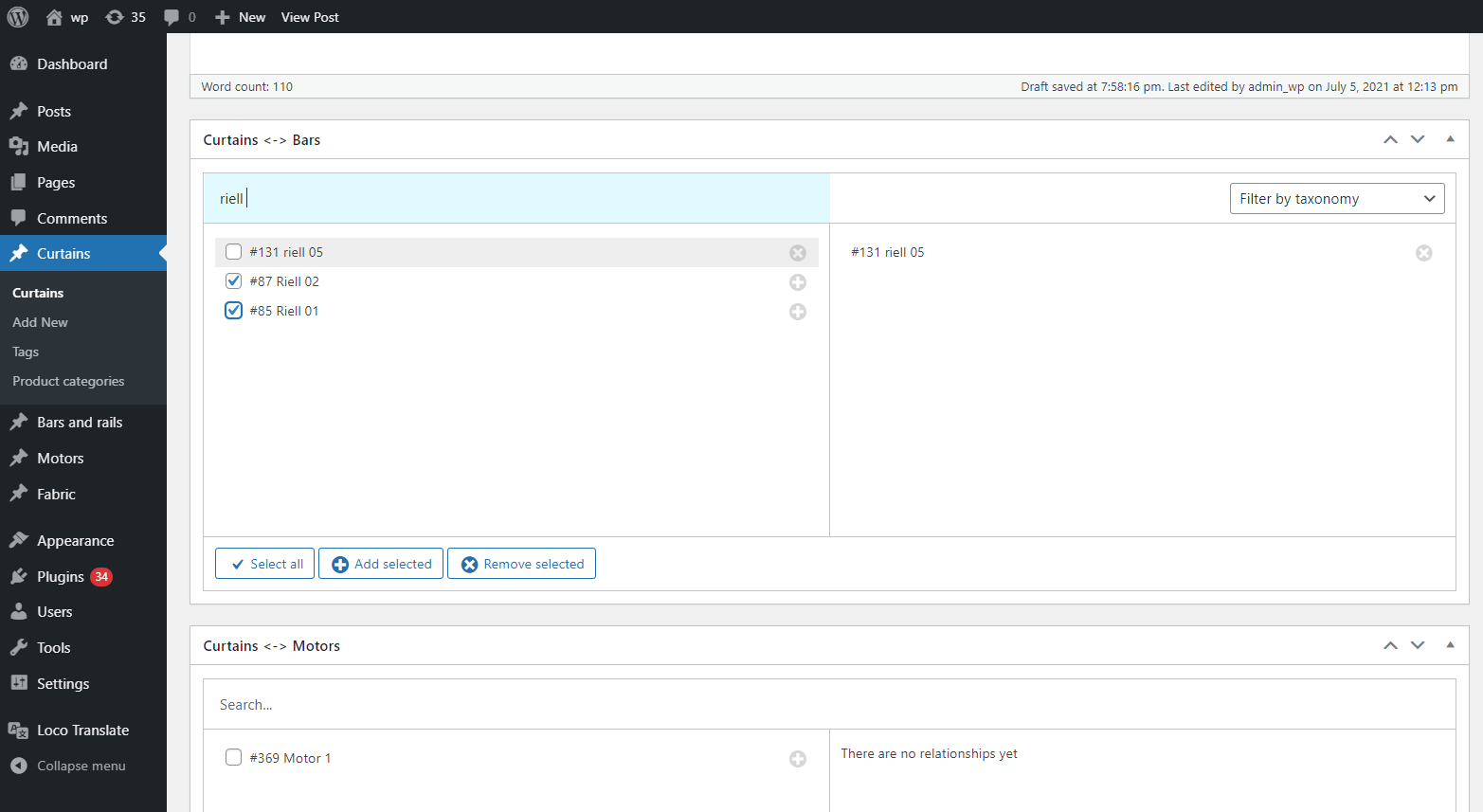
Relationships metaboxes on custom post type edition
Встановлення
See Installing Plugins.
After activating it, go to Settings > P2P Relationships, and create your new post 2 post connections.
Часті питання
-
Is this plugin an add-on for Advanced Custom Fields (ACF)?
-
No. This plugin is an stand-alone add-on for WordPress. However, it cover the gap of ACF about many-to-many post connections, and can be used together.
-
Where are the post connections stored?
-
This plugin store connecitons in his own table on database, instead of post meta.
This gives you a more efficient queries and a solid-rock connections consistency.
The DB table is named: {WP prefix}p2p_relationships
-
Double metabox issue on post edition pages
-
If you need relationships between posts and posts, or products and products, etc. Hide one of two metaboxes (UI mode setting) to avoid double metabox issue (FROM and TO same metaboxes relation in the same page).
Відгуки

Учасники та розробники
“Posts 2 Posts Relationships” — проект з відкритим вихідним кодом. В розвиток плагіну внесли свій вклад наступні учасники:
Учасники
“Posts 2 Posts Relationships” було перекладено на 1 локалізацію. Дякуємо перекладачам за їх роботу.
Перекладіть “Posts 2 Posts Relationships” на вашу мову.
Цікавитесь розробкою?
Перегляньте код, перегляньте сховище SVN або підпишіться на журнал розробки за допомогою RSS.
Журнал змін
1.0.0 – 2021-07-19
- Checked for WordPress 5.8
- Added warning and removal option for orphan relationships
- Text-domain changed to the same as plugin slug: posts-2-posts-relationships
0.0.2 – 2021-07-13
- Solved admin pane layout broken issue
0.0.1 – 2021-07-07
- Hello world!