
Опис
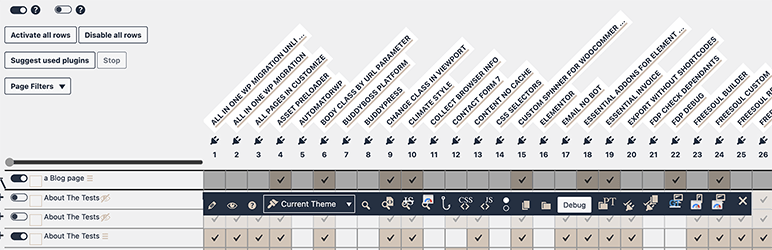
It adds an action button to collect information to debug Freesoul Deactivate Plugins.
Without Freesoul Deactivate Plugins you don’t need this plugin.
After activation, if in the Singles or Archives settings of Freesoul Deactivate Plugins you go with your mouse on a row, you will see the button “DEBUG”.
Clicking on “DEBUG”, you will see some information that you can give to the support of Freesoul Deactivate Plugins. It will be an help for the problem-solving.
Backend Speed Optimization
Advanced backend optimization to speed up your WordPress admin area.
Read Backend Speed Optimization Service for more information.
Встановлення
- Upload the entire
fdp-debugfolder to the/wp-content/plugins/directory or install it using the usual installation button in the Plugins administration page. - Activate the plugin through the ‘Plugins’ menu in WordPress.
- All done. Good job!
Часті питання
Why is it not integrated in Freesoul Deactivate Plugins?
Because if you don’t need to debug better to don’t have additional weight.
Відгуки
Для цього плагіна немає відгуків.
Учасники та розробники
“FDP Debug” — проект з відкритим вихідним кодом. В розвиток плагіну внесли свій вклад наступні учасники:
Учасники
Перекладіть “FDP Debug” на вашу мову.
Цікавитесь розробкою?
Перегляньте код, перегляньте сховище SVN або підпишіться на журнал розробки за допомогою RSS.
Журнал змін
0.0.6
- Fix: button color not visible
0.0.5
- Fix: URL not showing in the case of Custom URLs
0.0.4
- Added: reqquest keys and values if any
0.0.3
- Added: empty reqquest
0.0.2
- Added: additional information
0.0.1
- Initial release