

Опис
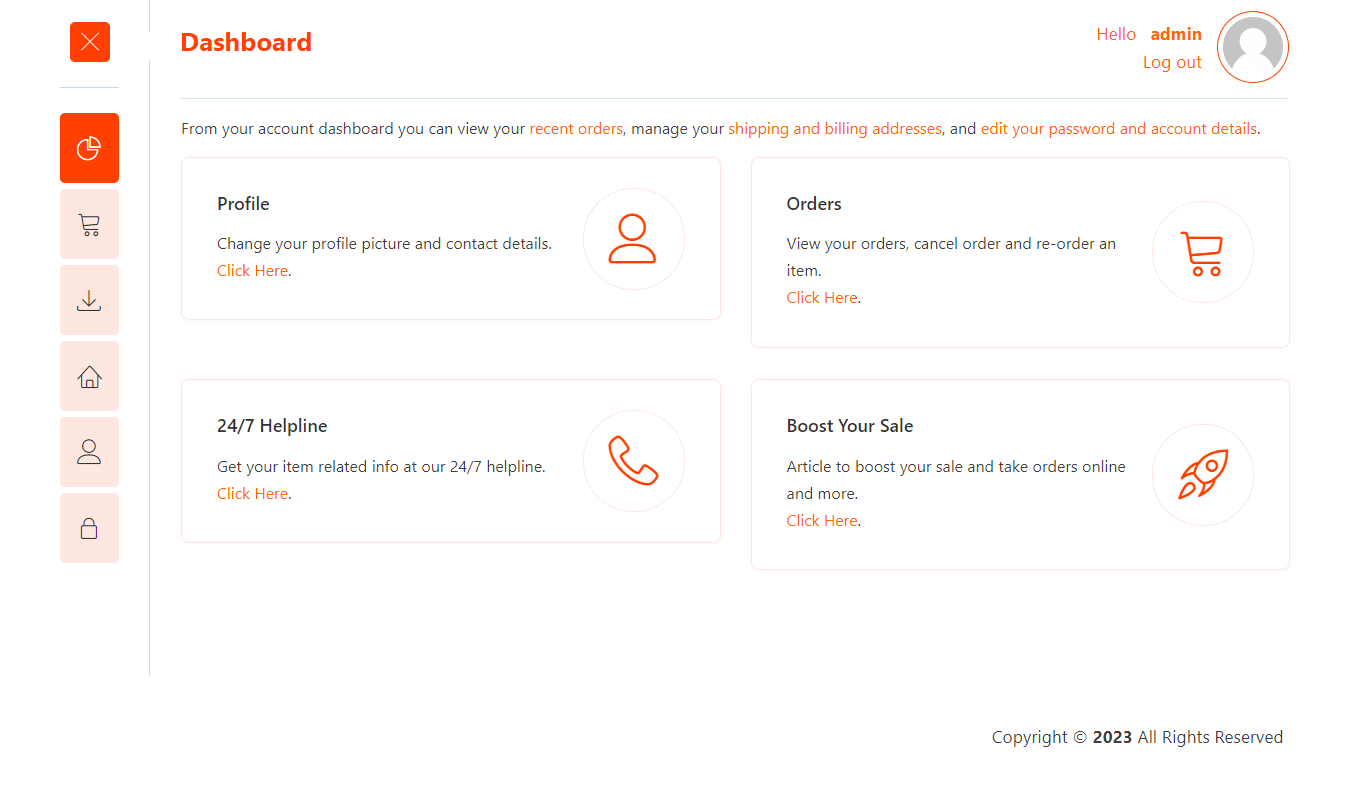
Experto Dashboard for WooCommerce allows you to transform the standard WooCommerce My Account page into a customized, branded dashboard experience for your customers.
This plugin provides tools to personalize the visual appearance of your customer dashboard and add custom content blocks to the dashboard home screen. You can modify colors, fonts, and styling to match your brand identity while maintaining a clean, user-friendly interface.
Key Features
- Visual Customization – Modify colors, fonts, and styling elements to align with your brand
- Custom Content Blocks – Add personalized content and information to the dashboard home screen
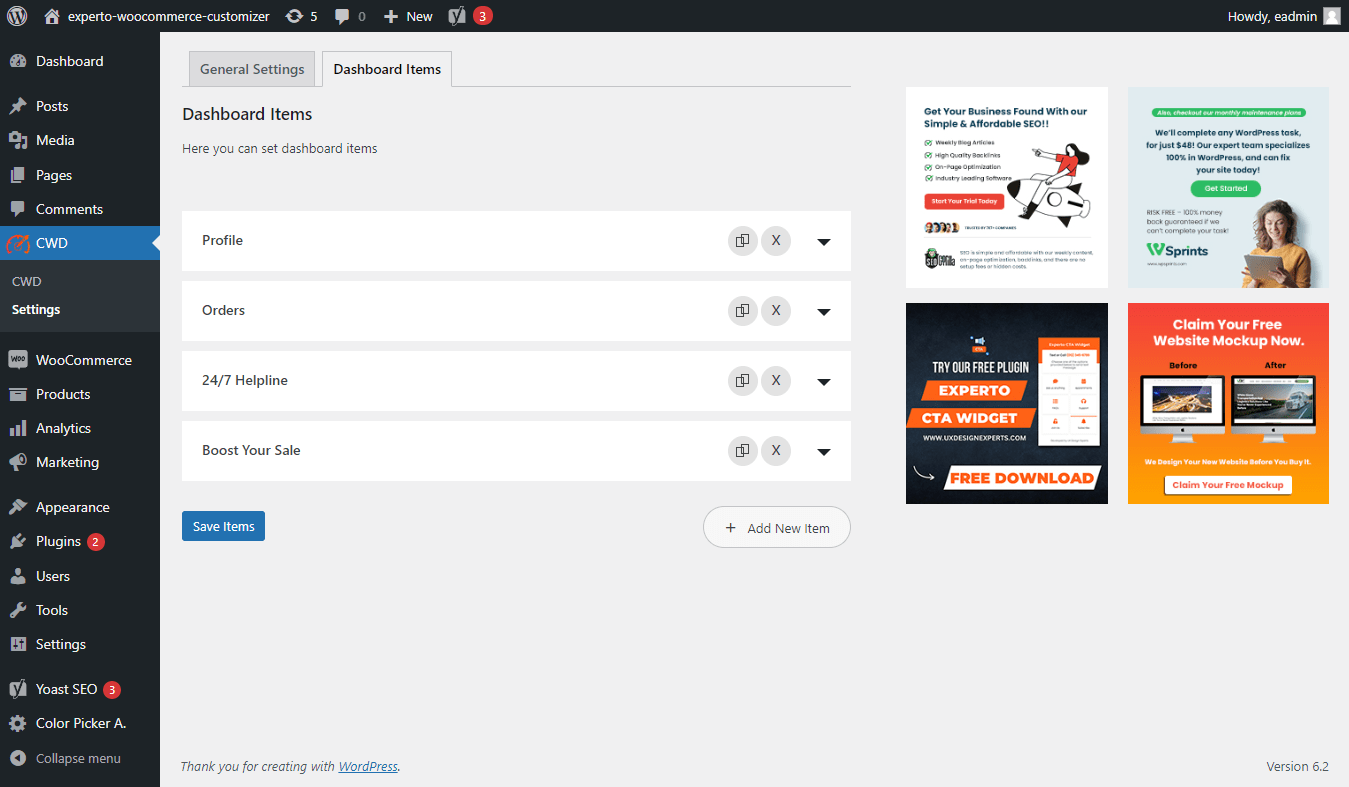
- Flexible Layout – Add or remove dashboard items to create the optimal customer experience
- Development Mode – Test changes in a safe environment visible only to administrators before publishing
- Easy Configuration – Simple setup and management through the WordPress admin panel
What You Can Customize
- Appearance – Personalize the look and feel of your dashboard to align with your brand identity and create a visually consistent interface.
- Custom Blocks – Integrate custom blocks on the dashboard’s home screen to showcase important information, such as order status, account details, or promotional content.
- User Experience – Organize and present relevant information in a user-friendly manner, allowing customers to navigate and access key features easily.
- Dashboard Items – Choose which dashboard elements to display on the main page to streamline the customer experience.
Requirements
This plugin requires WooCommerce to be installed and activated on your WordPress site.
Скріншоти


Встановлення
- Upload the plugin folder to the ‘/wp-content/plugins/’ directory, or install the plugin through the WordPress plugins screen directly.
- Activate the plugin through the ‘Plugins’ menu in WordPress.
- You will find ‘Experto Custom Dashboard’ or ‘CWD’ menu in your WordPress admin panel.
- Once you are on the admin panel, you can edit and change the text, fonts, colors, and URLs of dashboard elements, then click save.
- Choose development mode first so you can test and preview your changes. Development mode will only show to administrators who are logged in. Switch to live mode when ready to publish.
- Go to your ‘My Account’ page settings and set the template to CWD Template.
Часті питання
-
What does this plugin do?
-
This plugin transforms your WooCommerce My Account page into a customizable dashboard area for your customers.
-
What customization options are available?
-
You can change colors, font sizes, and you can add or remove dashboard main page items to match your brand and customer needs.
-
The ability to add and remove custom menu items is planned for a future release.
-
Do I need WooCommerce installed?
-
Yes, this plugin requires WooCommerce to be installed and activated.
-
Will this affect my existing WooCommerce setup?
-
The plugin adds a custom template for the My Account page. Your existing WooCommerce functionality will remain intact. You can easily switch back to the default template if needed.
Відгуки
Для цього плагіна немає відгуків.
Учасники та розробники
“Experto Dashboard for WooCommerce” — проект з відкритим вихідним кодом. В розвиток плагіну внесли свій вклад наступні учасники:
Учасники
Перекладіть “Experto Dashboard for WooCommerce” на вашу мову.
Цікавитесь розробкою?
Перегляньте код, перегляньте сховище SVN або підпишіться на журнал розробки за допомогою RSS.
Журнал змін
1.0.1
- Updated plugin name to “Experto Dashboard for WooCommerce” for WordPress.org compliance.
- Improved plugin description with clear, functional language.
- Removed promotional content and marketing claims.
- Updated compatibility: Tested with WordPress 6.8 and WooCommerce 9.6.1.
- Fixed grammar and typos throughout documentation.
- Enhanced README with better structured information and additional FAQ entries.
1.0.0
- Brand new icon set added.
- Adding and removing items functionality added to My Account dashboard page.
- Bug fixes and added dependency on WooCommerce plugin.
0.5.0
- Initial release.