

外掛說明
Sendmachine’s official plugin will enable you to:
Set up signup forms
You can set up a signup form in a few easy steps: connect using the provided API credentials, select a contact list where your visitors will subscribe and you’re basically good to go. The signup form is available as a widget (in your widget area) or as a shortlink by pasting [sm_subscribe_form] in a post or page.
Add subscribe checkboxes
Allow users to subscribe to your contact list only by checking a checkbox in certain website areas like comment form or register form.
Sync your wordpress users with a specific contact list
You want to send emails to all your users but don’t know how? Well, don’t worry, we can help you with that. After you’ve successfully selected a contact list, you can use the “Sync users” button, to subscribe all your users to that contact list.
Send emails through our services
No need for nasty, geeky configurations. Just set a from email, an optional from name and you are good to go. Also, make sure that “enable email sending” is set to on.
If you set a from email that doesn’t already exist in your sendmachine account as a sender address, a confirmation email will be generated and sent to that address.
Not quite sure if you’ve done everything right? You can test if everything is ok by sending a test email. If you got the mail, you can sit back and relax: you’ve done it, otherwise something went wrong.
Send transactional emails
No more “dog ate my email” excuses. Using our services you can now monitor an email’s activity (opens, clicks, geolocations, user agents). In order to enable this option, after you install our plugin, go to “email settings” tab and check that “Register” and/or “Comment” checkboxes. Basically, if you tick that checkboxes on each email sent, that coresponds with that action, we add a custom tracking header: X-Sendmachine-Campaign: campaign_name, where campaign_name is the name of the transactional campaign that will be created, or updated if already exists. Campaign’s name can be found/modified next to every action’s checkbox.
Send news feed
You can send a newsletter directly from the admin panel with the latest posts. You can choose to build your newsletter with the latest 5, 10, 15 or 20 posts, set newsletter’s width, color and content.
螢幕擷圖
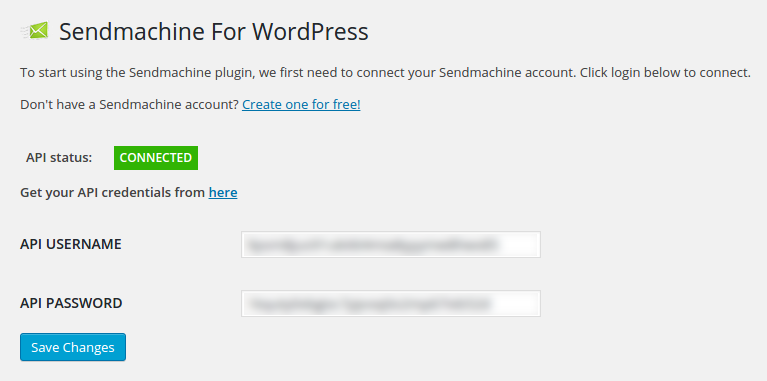
Connecting using API credentials 
Configuring contact lists 
Checkbox settings 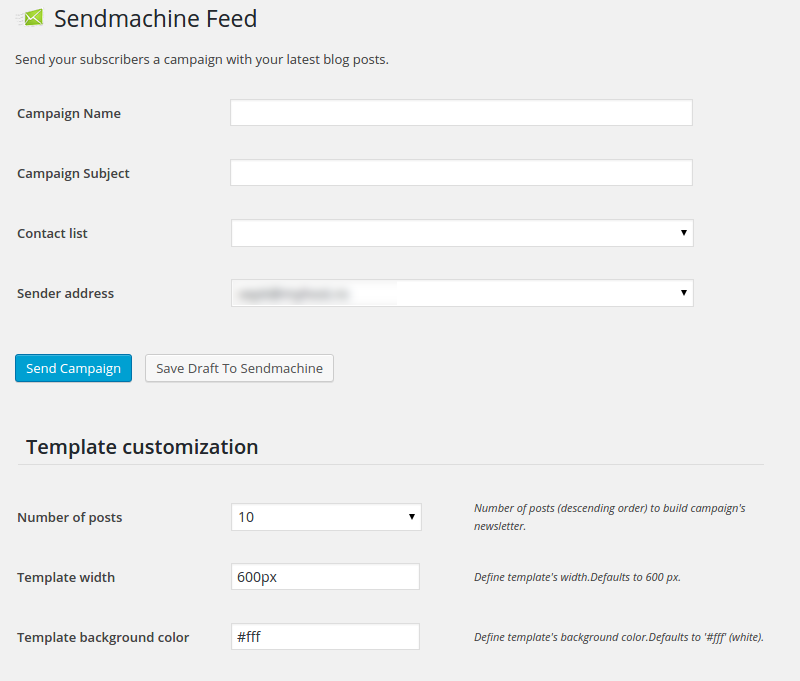
Feed/template customization 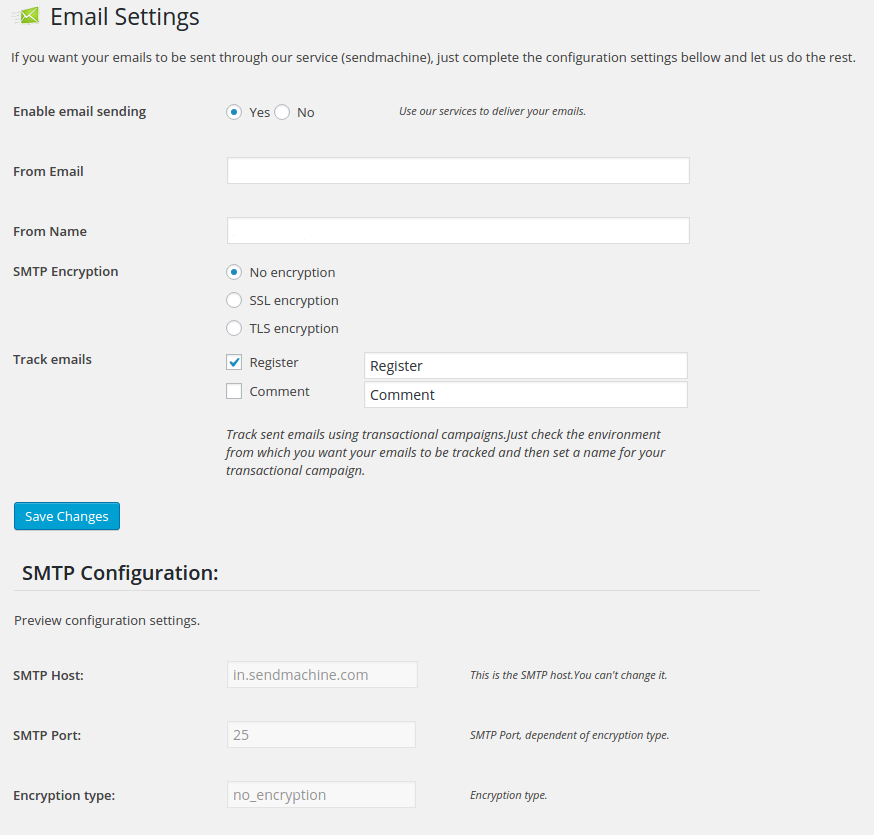
Email settings
安裝方式
- In your WordPress admin panel, go to Plugins > New Plugin, search for Sendmachine and click Install now
- Alternatively, download the plugin and upload the contents of
sendmachine-for-wordpress.zipto your plugins directory, which usually is/wp-content/plugins/ - Activate the plugin through the ‘Plugins’ menu in WordPress
- Set your Sendmachine API username and password in the plugin’s general settings tab.
NOTE! You must have cURL extension enabled.
常見問題集
-
What is Sendmachine?
-
Sendmachine is an email marketing service provider that offers all the tools you need to send your beautiful newsletters to destination.
-
Do I need a Sendmachine Account?
-
Yes, you do, but you can easily create one for free.
-
How to get started with this plugin?
-
Grab your API credentials from our site and head out to the plugin’s “general” tab to fill in the appropriate fields.
-
What does track emails mean?
-
Track emails means that a transactional campaign will be created when a checked action occurs and an email is sent.
-
Can’t see the subscription widget
-
Sendmachine subscription widget will be visible only after you’ve successfully connected to the API (using the API credentials) and have selected a contact list.
-
Signup form not hiding after successful signup
-
Hide form after a successful sign-up option works only if the visitor that subscribed has an account and is logged in to your site.
-
What does “Refresh cached contact lists” mean?
-
Refresh cached contact lists refers to the fact that, for optimisation purposes, the plugin does not perform a request to sendmachine each time you visit that page, it caches your list data. For this reason, if you create a new contact list, you need to acknowledge the plugin that you made some changes to your lists.
-
A form field is checked and I can’t uncheck it
-
If a contact list’s form field is checked and the checkbox is grayed out (you can’t uncheck it), it means that is required.
-
What are subscribe checkboxes?
-
Subscribe checkboxes are used to subscribe people to your contact list when they perform certain actions like register or comment.
-
I can’t sync users or add signup checkbox to register and comment form
-
If you encounter this problem, most likely you selected a contact list that has more required fields than these options can operate with. Basically when performing this operations, just the email address is sent for subscription and if a list has more required fields, like name or age, subscription will not be successful because we did not sent a value for the extra required fields.
-
I confirmed my from address, but the interface still notices me that I have to confirm my address
-
If you added a from address that does not exist in your sender list, a confirmation email will be sent to you. After you confirm your email address, you need to go back to the plugin’s “Email settings” tab and hit that I already confirmed my address button to acknowledge the plugin that you confirmed your address, this is not done automatically.
-
What are those keywords?
-
With that keywords you can build your newsletter without the need of an actual content. This way you can customize your newsletter how you want.
Those keywords will be replaced with the actual content when you preview the newsletter, or send it. -
In which languages is this plugin available?
-
This plugin is currently available in English and Romanian.

參與者及開發者

變更記錄
1.0.20
- Tested up to v6.8
1.0.19
- Tested up to v6.2
1.0.18
- Captcha 5.3 + php 5.3 compatibility
1.0.17
- Tested up to v4.9
1.0.16
- Added captcha support using “Really Simple CAPTCHA” plugin
1.0.15
- Tested up to WP v4.8
- Updated sendmachine API library
1.0.14
- Tested up to 4.7
1.0.13
- Subscribe required fields limitation
1.0.12
- Extra checks for invalid email address
- Added flat module icon
1.0.11
- Added customisable subscribe button label
1.0.10
- Tested plugin up to WP v4.6
- Added widget html classes
1.0.9
- Tested up to 4.5
1.0.8
- Removed list exception
1.0.7
- fixed curl constant not defined bug
1.0.6
- updated language file
1.0.5
- disabled error reporting
1.0.4
- added php 5.3 compatibility
1.0.3
- array_column bugfix
1.0.2
- Blurred credentials
- Removed display error: all
1.0.1
- Added description field to widget area.
1.0.0
- First stable release.