
外掛說明
Lazyzoun is the easy way to add any amazon product to your sidebar.
If you are writing Reviews about amazon items, it helps you monetize your blog.
Lazyzoun-Features:
* quickly add a product by using custom-fields
* adds automatically a customizable “call-to-action-button”, a product-image and the current product-price
* a local cache stores the image to a folder on your server (SEO-friendly)
* Google Analytics click tracking
* Uses the Amazon Product Advertising API
* Requires an AWS Public and Private Key
螢幕擷圖

Lazyzoun call-to-action – widget 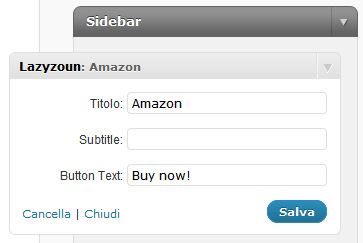
Customizable widget 
Quickly add a product-affiliate-link by using custom-fields
安裝方式
- Upload the
lazyzounfolder and all it’s contents to the/wp-content/plugins/directory - Create a
/products/folder in your/wp-content/uploads/directory and make sure that it`s writeable - Now you have the image-cache directory:
/wp-content/uploads/products/ - Activate the plugin through the Plugins menu in WordPress
- Access the Plugin settings by clicking the Lazyzoun menu option
- Enter the Product Advertising API – Public Key
- Enter the Product Advertising API – Private Key
- Insert the Lazyzoun Widget into your website
- Create a custom field “lazyzoun-id” and insert an amazon ASIN Code to the value field
- Optionally create a custom field “lazyzoun-name” and insert a Product-Name
使用者評論
這個外掛目前沒有任何使用者評論。
參與者及開發者

變更記錄
0.4.1 – 18/12/2011
- Added param. AssociateTag for making latest API version working
0.4 – 03/05/2011
- SEO Friendly image-names and changed cache-folder
- Fixed CSS Problem (IE)
- Fixed JS Problem (jQuery)
- Added a more flexible call-to-action – button
0.3 – 02/25/2011
- Support for Widgets
- Some Bugfixes