
外掛說明
Please Deactivate and Delete previous version before installing this version. This plugin allows you to add more than one message at the bottom of your WordPress post or page. You can have as many messages as you need as there is no limit to how many messages you have at the bottom of your post or page. Examples of messages are Google Authorship and Copyright notice, Googles Ads from AdSense, Facebook + Google+ and Twitter Like and Share buttons, and even other affiliate adverts like advertisements from Commission Junction, ClickBank and other affiliate programs and even Sign Up forms. The plugin is SEO sensitive by allowing or diasbling a message to be part of the webpage SEO. You can show post messages in Home, Category & Archives summary pages. Can process and display shortcodes.
With version 1.05 you can disable some pages or post from displaying messages.
As of version 1.19 shortcodes can now be displayed through the messages.
My thanks to Cynthia K. Wunsch, http://www.striketherightnote.com, for requesting me to allow the posts to be shown in Home, Category & Archives summary pages.
My thanks to Scott Million, http://www.apartmentforrentinsaigon.com, for requesting me for some pages and some post not to display messages.
You can visit our website, https://www.drpeterscode.com/add-messages-footers-ads-to-bottom-of-every-post-and-page.php, too.
1.01
-
Any messages that might affect your SEO can be saved elsewhere and not on your webpage.
-
All file names and sub-directory names were changed to lower case so that it will be more compatible with all servers. Due to the filename changes to lower case, if you have problems when you upgrade, then delete Version 1.00 first and then reinstall version 1.01. Do save, copy and paste into a text file, all your messages before deleting the plugin.
1.02
Add ability to display messages in Home, Category & Archives summary pages. Add a title for each message area so that when you return months later you have a Title to describe each meaasge and not forget what you did.
1.03
Fixed a bug that was not displaying messages correctly at the bottom of a page.
1.04
Changed some of the PHP code to be more compatible with WordPress PHP and no errors when debug is turned on.
1.05
Added feature to allow or to stop display messages at bottom of individual post or pages.
1.06
Undid some of upgradres in version 1.04 upgrades to minimise the spurious memory errors.
1.07
Some form data was not checked if isset(). Now it checks the data in the form fields is set.
1.08
Found out that when you upgrade any plugin, WordPress will delete the existing plugin before downloading the upgrade version. Since this plugin saves all settings in the plugin directory all settings were lost upon upgrading. With version 1.08 a separate directory is created …/wp-contents/plugins/dpabottomofpostpagedata/ and all settings are saved in the altrnative sub-directory. Thus even after upgrading the original seetings are still available.
Changed all variable names to begin with $spmybp_.
1.09
Fixed display of messages in multi-post index page and other bugs.
1.10
Fixed messages disappearing when posts were edited
1.11
Fixed messages disappearing when posts were edited
1.12
Fixed messages disappearing when posts were edited.
1.13
Corrected the link for two images that were not displayed.
1.14
Add two positions for messages. The original Bottom of Content and add display of messages in the WP footer as End of Document position.
1.15
Allowed position of messages in footer to be moved a little by adjusting its ranking.
1.16
As per WordPress request added additional security checks of form data. Inserted .htaccess files. As per WordPress request moved data files from /wp-content/plugins/dpabottomofpostpage/ to /wp-content/uploads/dpabottomofpostpage/ and ensured that plugin directory names are not hard coded. Now Bottom of Content messages can be prioritsed and the default priority is 200.
1.17
Found some undefined variables and set them. Added the ability to delete messages. Changed the way the messages are stored.
1.18
Simplified the .htaccess file in plugin and upload directory. Made option to allow or disallow javascript.
1.19
Allowed shortcodes to be processed and displayed in the messages.
1.20
Added Facebook, Google and Twitter Like buttons below messages.
1.21
Fixed to work with latest upgrades to WordPress 5.2.2.
1.22
added tiny backlink
1.23
added links to affiliate program on Amazon. ok for WordPress version 5.5.1
1.24
added one more link. ok for WordPress version 5.5.1
螢幕擷圖

Shows an example settings when you are the dpaBottomofPostPage plugin. This section is to setup how many messages you need in your Posts and in your Pages and whether they are to be displayed. screenshot-1.png 
Shows what dpaBottomofPostPage screen will look like when first install dpaBottomofPostPage as no messages have been created. screenshot-2.png 
Shows example code entered into the different Post Message Areas. Notice the AFFECTS SEO & DOES NOT AFFECT SEO radio buttons. With version 1.02 you now have the ability to display, by checking the checkboxes, individual messages in HOME and/or CATEGORY and/or ARCHIVES pages. screenshot-3.png 
Shows example code entered into the different Page Message Areas. screenshot-4.png 
Shows example of what your Bottom of Post can look like. screenshot-5.png 
Shows example of how to allow post to display message or stop displaying message. screenshot-6.png 
Shows example of how to allow page to display message or stop displaying message. screenshot-7.png 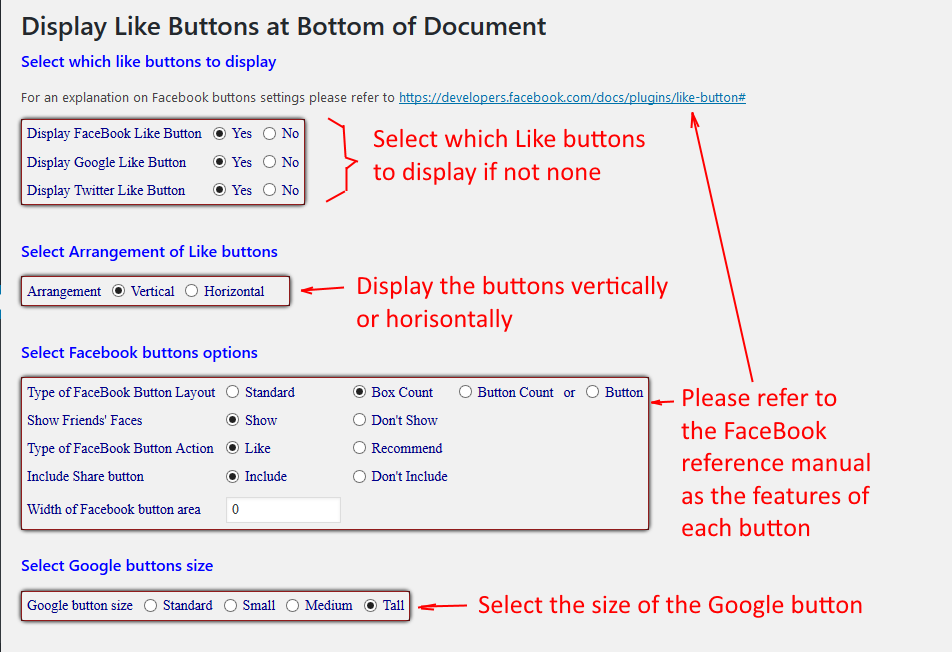
Shows how to set up to display or not to display the Like buttons. screenshot-8.png
安裝方式
- Upload ‘dpabottomofpostpage.zip’ to the ‘/wp-content/plugins/’ directory and unzip it.
- Activate the plugin through the ‘Plugins’ menu in WordPress.
- Go to ‘Settings > dpabottomofpostpagemenu’ and edit and save settings.
常見問題集
-
What does this plugin do?
-
This plugin can add one or more messages or advertisements to the bottom of every post and every page. You can have different content for your posts and pages. With version 1.01 you can set the message to be saved outside the webpage so that it does not affect your SEO tuning of the webpage.
-
How can I edit the message?
-
In your WordPress Control Panel, go to menu option Settings > dpaBottomofPostPageMenu and you will see several options and settings. The first is the number of messages you want displayed at the bottom of every post and every page. They can be a different number of messages for posts and for pages. Set this figure to at least 1 and click Submit button if you want something displayed.
Then click on radio buttons to display messages in Posts and or Pages and save by clicking on Set Display button.
You will see one or more text areas appear in the POST section and in the PAGE section depending on the figures you entered. Select whether the message you add in here “AFFECTS SEO” or “DOES NOT AFFECT SEO”. If it AFFECTS SEO then specify the dimensions of the message in pixels. Do remember that Facebook, Google, Twitter, … like buttons should be part of your page so they should be marked as “DOES NOT AFFECT SEO”.
Fill the message text areas with your HTML code then click on Save Post Messages button or Save Page Message button to save.
After this go back and select the “Display or Dont Display” options and then click on the “Set Display” button to save the settings. If you had selected “Dont Display” for either posts or pages then those will not be displayed.
You are done. View your webpages and you will see those messages at the bottom of every post or page.
-
Where can I see the change?
-
When you view the posts or pages.
使用者評論
這個外掛目前沒有任何使用者評論。
