
外掛說明
What is this plugin about?
You are using a theme in WordPress and it looks marvelous good. Well, almost! If you could just change the main color to match your liking, your companys style, .. whatever!
It’s actually easy in WordPress, because you have direct access to your themes’ style files. Just use Appearance -> Editor inside the Dashboard and there you go. That’s great until the other day you update your theme because a new, improved and of course much better version has been released. Then all your custom changes are gone and you have to start from scratch again.
A much better way is to save additional CSS rules in the blog’s database and include them inside a < style/> element. Of course there must also be a way to enter those rules via the Dahsboard. And this is exactly what this plugin is all about!
This simple plugin will add a <style>..</style> element to <head />, thus allowing the administrator to customize the “look” of the theme used without actually changing one of the theme’s files. This allows you to simply update the theme without loosing your valueable changes.
Support
If you require any help, if something is not working, if you have an
idea for improvement, critics, please do not hesitate to contact me by sending an
email to wh [at] haefelinger [dot] it or visit the plugin’s home
page at http://workbench.haefelinger.it/project/custom-style
螢幕擷圖

Shows the additional menu item ‘Custom-Style’ showing up in ‘Appearance’ in your Dashbard after having installed this plugin. 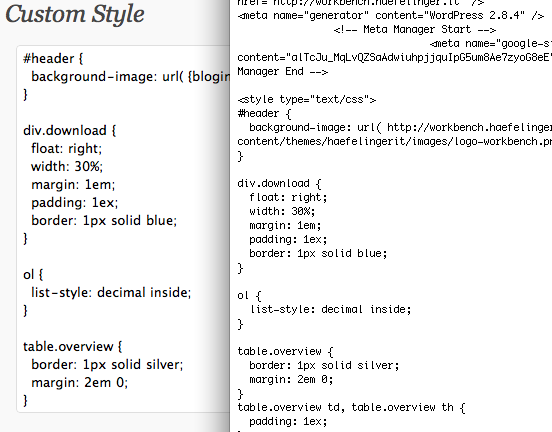
Shows the text input field with some example content and to the right you can see what the plugin generates.
安裝方式
Basic Installation
- Upload
custom-styleinto/wp-content/plugins/directory - Activate the plugin through the ‘Plugins’ menu in WordPress
- The plugin is now installed and ready for usage (see Usage section).
Usage
Once installed and activated, sub menu item ‘Custom Style’ is added to
menu ‘Appearance’ in your Dashboard. Select that menu item, add some
CSS rules into the text field and save it. Then reload your WordPress
Blog. If you then look at your blog’s HTML source code, you should see
a <style>..</style> element in the head element with your content.
Advanced Usage
Depending on your CSS rules, you may need to refer to files in your
theme. A typical example is the usage of a background image as shown
below:
    #header {
      background-image: url( <my theme url>/images/my-bg-image.jpg );
    }
Using a hardwired URL here is possible but a rather ugly
solution. Especially if you prefer to install themes having version
numbers in their folder name.
To support a location independant CSS addition, ‘custom-style’
supports the syntax
{bloginfo:word}
where ‘word’ is an arbitrary word (or absent). Such a ‘custom
expression’ is evaluated as
bloginfo('word')
See https://codex.wordpress.org/Template_Tags/bloginfo for further
information about ‘bloginfo’.
This eventually allows you to solve the problem above like
 #header {
   background-image: url({bloginfo:template_url}/images/my-bg-image.jpg );
 }
cause bloginfo("template_url") evaluates to your blog’s theme URL.
常見問題集
- No <style>..</style> in my <head /> element?
-
The plugin depends on the usage of
<?php wp_head(); ?>. So your
header.php file should look something like<head> .. <?php wp_head(); ?> .. </head> - There is a <style>.. in my < element – no visible effect though!?
-
Make sure that your CSS styles are not overridden by
<style />
elements later in your HTML code. It’s therefore advised to add<?phpnear
wp_head(); ?></head>, preferable<head> .. <?php wp_head(); ?></head>Make also sure that your CSS rules are really picked up! It might very
well be the case that your CSS rules are overriden by another CSS
rules which is more selective! Try to use the “!important” rule when
in doubt.
使用者評論
這個外掛目前沒有任何使用者評論。
參與者及開發者

變更記錄
1.0.2
- No functional changes – just wrestling with this readme file. XML tags get eaten up by
markdown, especially when using such a tag in a section’s title.
1.0.1
-
No functional changes – spelling errors and ‘eaten-up-tags’ problem in readme.txt corrected. No changes in source code or functionality.
-
Bit of motivation why I created this plugin in the first placed got added to readme.txt as well.
1.0
- Initial version.