
外掛說明
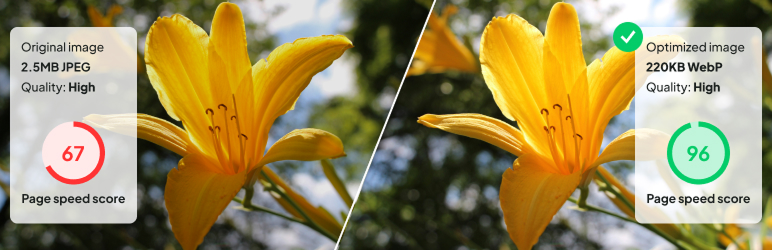
Large images slowing down your WordPress site?
Unoptimized images are one of the biggest reasons WordPress websites become slow.
Large image files increase page size, delay page loading, and negatively impact Core Web Vitals and SEO rankings. Manually optimizing images can be time consuming and easy to forget.
CodePros Image Optimizer solves this automatically.
The plugin converts images to modern WebP format during upload, significantly reducing file size while maintaining visual quality.
Your site loads faster, visitors get a smoother experience, and search engines reward your website with better rankings.
Key Features (Free)
- Automatic WebP Conversion – Convert uploaded images to WebP format automatically
- Auto Optimize on Upload – Images are optimized immediately when uploaded
- Quality Control – Adjustable image quality from 0 to 100
- Frontend WebP Serving – Serve WebP images automatically to supported browsers
- Image Filtering – Filter images by type, date, and conversion status
Pro Features
Upgrade to the Pro version to unlock advanced optimization tools.
- Bulk Optimize Existing Images – Convert previously uploaded images to WebP
- Scheduled Optimization – Run conversions during low traffic hours
- S3 Compatible Storage Support – Sync images to S3 compatible storage and serve via CDN
- CDN Ready Delivery – Serve optimized images globally via CDN
Learn more about the Pro version:
https://wp-plugins.codepros.ai/codepros-image-optimizer.html
These features are designed for websites with large media libraries and high traffic environments.
How It Works
The plugin uses the Imagick PHP extension to convert images to WebP format. It processes images in batches to avoid server overload and provides real-time progress updates. WebP images are created alongside your original images, ensuring compatibility with all browsers.
Requirements
- WordPress 6.6 or higher
- PHP 7.4 or higher
- Imagick PHP extension
Installation
- Upload the plugin files to the
/wp-content/plugins/codepros-image-optimizerdirectory, or install the plugin through the WordPress plugins screen directly - Activate the plugin through the ‘Plugins’ screen in WordPress
- Navigate to Settings > WebP Conversion to configure the plugin
- Enable WebP optimization and configure your preferred settings
Frequently Asked Questions
Does this plugin delete my original images?
No, the plugin creates WebP versions alongside your original images. Your original images remain untouched.
What image formats are supported?
The plugin supports JPEG, PNG, and other common image formats that can be converted to WebP.
Will this work with all hosting providers?
The plugin requires the Imagick PHP extension. Most modern hosting providers support this, but you should check with your hosting provider if you encounter issues.
Screenshots
- General Settings – Configure Image Optimization options and quality settings
- Bulk Optimization – Process all images in your media library with progress tracking
- Scheduled Conversion – Set up scheduled bulk conversion tasks
Development
= Code Structure =
The plugin follows WordPress coding standards and uses:
* PSR-4 autoloading
* Namespace-based organization
* Trait-based code reuse
* Singleton pattern for controllers
Hooks and Filters
The plugin provides various hooks and filters for developers to extend functionality. Refer to the code documentation for available hooks.
Contributing
Contributions are welcome! Please ensure all code follows WordPress coding standards and includes proper documentation.
Credits
Developed by Code Pros (https://www.codepros.ai)
螢幕擷圖


使用者評論
這個外掛目前沒有任何使用者評論。
參與者及開發者

變更記錄
1.0.1
- Maintenance release
- Readme updates
1.0.0
- Initial release
- Automatic WebP conversion on image upload
- Frontend WebP serving
- Quality control settings (0-100)
- Image filtering