
Description
Rosary Roses (Róże Różańcowe) is a WordPress plugin designed to help manage rosary prayer groups. It allows you to:
- Create and manage multiple rosary prayer groups (roses)
- Assign participants to each rose
- Track monthly rosary mysteries for each participant
- Display prayer calendars on your website
- Send email notifications to participants (optional)
- Fully internationalized (English and Polish included)
Features
- Easy Rose Management: Create roses with custom names, years, and starting months
- Participant Tracking: Add participants with contact information
- Monthly Calendars: Display beautiful prayer calendars on any page with shortcode
- Filtering: Filter roses by name or year
- Responsive Design: Works perfectly on mobile, tablet, and desktop
- Email Notifications: Optional email reminders with customizable templates
- Multilingual: Fully translated to English and Polish
Usage
After activation:
- Go to “Rosary Roses” in the admin menu
- Click “Add New Rose” to create your first prayer group
- Fill in the rose details (number, name, year, starting month, starting mystery)
- Add participants to the rose
- Use the shortcode
[rosary_roses_calendar]on any page to display the calendar
Shortcode
[rosary_roses_calendar]
Display the rosary roses calendar with filtering options.
Support
For support, please visit https://rosaryrose.wordpress.com/ or contact [email protected].
Privacy
This plugin stores participant information (names, emails, phone numbers) in your WordPress database. It does not send any data to external servers except when email notifications are enabled (uses WordPress wp_mail function).
Screenshots

Main admin panel – list of all rosary roses 
Rose details view with participant management 
Frontend calendar display 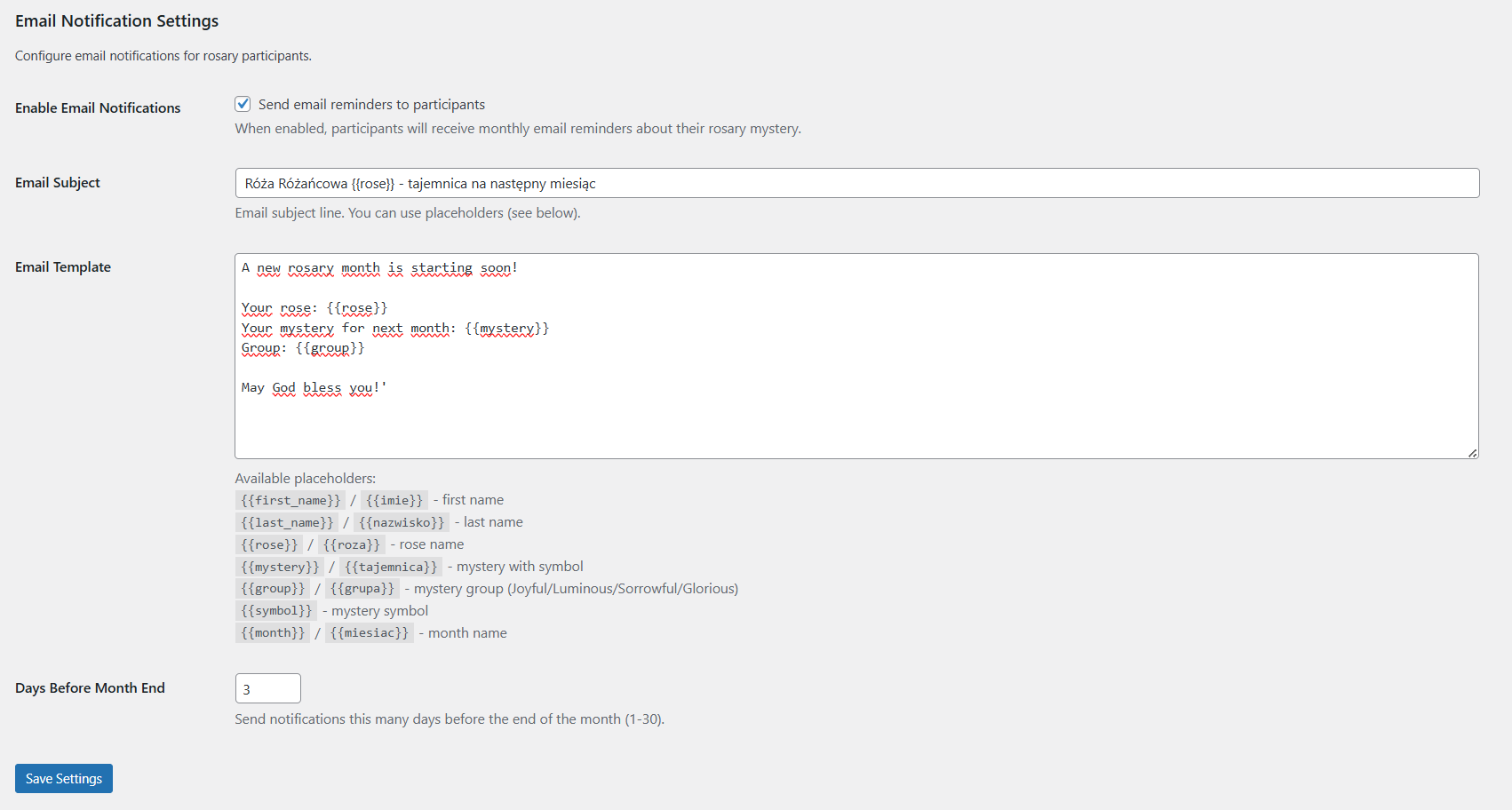
Settings page with email configuration
Installation
- Upload the
rosaryrosefolder to the/wp-content/plugins/directory - Activate the plugin through the ‘Plugins’ menu in WordPress
- Go to “Rosary Roses” to create your first prayer group
- Use the shortcode
[roze_rozancowe]on any page or post
FAQ
-
How do I display the rosary calendar on my website?
-
Use the shortcode
[roze_rozancowe]on any page or post where you want the calendar to appear. -
Can I customize the number of months displayed?
-
Yes! Go to “Rosary Roses” > “Settings” and adjust the “Number of Visible Months” setting.
-
How do email notifications work?
-
Enable email notifications in Settings, customize the email template, and participants will receive monthly reminders about their assigned rosary mystery.
-
What languages are supported?
-
The plugin is fully translated to English and Polish. The interface automatically adapts to your WordPress language setting.
-
Can I have multiple roses?
-
Yes! You can create and manage unlimited prayer groups (roses).
Reviews
There are no reviews for this plugin.
Contributors & Developers
“Rosary Roses” is open source software. The following people have contributed to this plugin.
Contributors
Translate “Rosary Roses” into your language.
Interested in development?
Browse the code, check out the SVN repository, or subscribe to the development log by RSS.
Changelog
1.0.26
- New Feature: Configurable email subject line with template variables
- New Feature: Configurable notification days (1-30 days before month end)
- New Feature: Added
{{month}}/{{miesiac}}template variable for month name - Enhancement: All template variables now available in both English and Polish:
{{first_name}}/{{imie}}– first name{{last_name}}/{{nazwisko}}– last name{{rose}}/{{roza}}– rose name{{mystery}}/{{tajemnica}}– mystery with symbol{{group}}/{{grupa}}– mystery group{{symbol}}– mystery symbol{{month}}/{{miesiac}}– month name
- Variables work in both email subject and body
- Default email subject: “Róża Różańcowa {{roza}} – tajemnica na następny miesiąc”
1.0.25
- BREAKING CHANGE: Removed old shortcode
[roze_rozancowe]– use[rosary_roses_calendar]instead - WordPress.org Compliance: Removed plugin asset files (icon-128×128.png, icon-256×256.png) from plugin package – these will be uploaded via SVN separately
- WordPress.org Compliance: Fixed JavaScript object naming to use proper prefix
- Changed
rrAjaxtorosaryRosesAjaxfor admin panel scripts - Changed
rrFrontendtorosaryRosesFrontendfor frontend scripts - All JavaScript objects now use the full
rosaryRosesprefix to avoid conflicts with other plugins
1.0.24
- Fix: Added Domain Path header back to enable automatic translation loading
- WordPress needs Domain Path header to locate translation files for auto-loading
- Translations now work correctly without load_plugin_textdomain() function
1.0.23
- Fix: Removed load_plugin_textdomain() call (WordPress 4.6+ auto-loads translations for plugins hosted on WordPress.org)
- Translations are now loaded automatically by WordPress
1.0.22
- UI Enhancement: Added hover effects to calendar table rows and columns for better visibility
- Row hover: Highlights entire participant row with subtle blue background
- Column hover: Highlights entire month column when hovering over any cell
- Smooth transitions (0.2s) for professional look and feel
- Current month highlighting preserved during hover (yellow background maintained)
- Fix: Removed optional “Domain Path” header (WordPress uses standard /languages location automatically)
1.0.21
- Bug Fix: Fixed current month highlighting to check both month AND year (prevents highlighting wrong month in future-year roses)
- Security: Used esc_sql() for old table names in migration INSERT queries
- WordPress Coding Standards: Added phpcs:disable comments for all interpolated table names in SQL queries
- Code Quality: Properly suppressed WordPress.DB.PreparedSQL.InterpolatedNotPrepared warnings (table names cannot use placeholders)
- Testing: Updated E2E tests to use dynamic current year (future-proof tests)
- Shortened plugin description to meet 150-character limit for WordPress.org
- All database queries now comply with WordPress Coding Standards and security best practices
- E2E test results: 17/17 tests passing (100% success rate)
1.0.20
- BREAKING CHANGE: Changed all prefixes from
rr_torosary_roses_to meet WordPress 4-character minimum requirement - Database Migration: Renamed tables from Polish to English with proper prefix (roze_rozancowe rosary_roses_roses, roze_uczestnicy rosary_roses_participants)
- Automatic Migration: Plugin automatically migrates data from old tables and options on activation
- Backward Compatibility: Old shortcode
[roze_rozancowe]still works alongside new[rosary_roses_calendar] - Fixed email notification mystery calculation for multi-year roses (e.g., 2026 rose when current year is 2025)
- Fixed email notifications to use custom template from settings instead of hardcoded content
- Added template variable replacement system: {{imie}}, {{nazwisko}}, {{roza}}, {{tajemnica}}, {{grupa}}, {{symbol}}
- Added check for email enabled option before sending notifications
- Updated plugin description to be more descriptive and informative
- All AJAX actions, settings, and database operations now use
rosary_roses_prefix - Updated all script and style handles to use
rosary_roses_prefix
1.0.19
- Added interactive tooltip for mystery icons on mobile devices (click to show/hide mystery name)
- Added hover tooltip for mystery icons on desktop devices
- Improved mobile user experience with clickable tooltips instead of title-only hints
- Added E2E test for tooltip functionality (test 7a)
- Updated all script versions to 1.0.19
1.0.18
- Fixed calendar month display for roses starting in future years (e.g., 2026 plan when current year is 2025)
- Added participant editing functionality with edit button in admin panel
- Added autofocus on first name field when opening participant modal
- Moved table deletion from plugin deactivation to uninstall.php (WordPress best practices)
- Fixed syntax in uninstall.php for proper table name concatenation
- Updated all script versions to 1.0.18
1.0.17
- Removed debug console logging from admin.js for cleaner code
- Updated all script versions to 1.0.17
1.0.15
- Fixed WordPress Coding Standards violation: Global variables in uninstall.php now properly prefixed with rr_
- Updated all script versions to 1.0.15
1.0.14
- Reorganized file structure following WordPress Plugin Standards
- Moved admin files to admin/ folder (admin/css/, admin/js/)
- Moved public files to public/ folder (public/css/, public/js/, public/images/)
- Added assets/ folder for WordPress.org plugin icons
- Added uninstall.php for proper plugin cleanup
- Updated all asset paths and script versions to 1.0.14
1.0.13
- Changed to plugins_url() for more reliable CSS/JS file loading
- Fixed script enqueuing to work across all WordPress environments
- Updated all script versions to 1.0.13
1.0.12
- Fixed ZIP packaging structure to ensure CSS/JS files load correctly
- WordPress plugin ZIP must contain parent folder matching plugin slug
- Updated all script versions to 1.0.12 for cache busting
1.0.11
- Fixed admin scripts not loading on some environments
- Added fallback hook check for ‘roze-rozancowe’ slug pattern
- Updated script versions to force cache refresh
- Enhanced debug info with plugin URL and version
1.0.10
- Added diagnostic alert for translation debugging
- Shows locale, language, text domain, and hook information on admin page load
- Helps identify translation loading issues on different environments
1.0.9
- Fixed admin scripts loading on different WordPress environments
- Changed hook check from exact match to flexible pattern matching
- Added locale variants for better translation compatibility (pl, pl_PL, en, en_US)
1.0.8
- Fixed class name to follow WordPress naming standards (Rosary_Roses)
- Ensures compatibility with WordPress Coding Standards
1.0.7
- Fixed text domain mismatch – changed from ‘rosaryrose’ to ‘rosary-roses’ to match plugin slug
- Renamed translation files to match new text domain (rosary-roses-*.po/mo)
- Ensures WordPress.org Plugin Check compliance
1.0.6
- Renamed distribution package to rosary-roses.zip for consistency with folder name
- No functional changes
1.0.5
- Changed Plugin Name to “Rosary Roses” (with space for better readability)
- Renamed plugin folder and main file to match WordPress slug (rosary-roses)
- Ensures proper plugin detection and installation
- Added Plugin Name translation (Polish and English)
1.0.4
- Removed unnecessary load_plugin_textdomain() (WordPress 4.6+ auto-loads translations)
- Removed unnecessary migrate_existing_participants() function
- Added plugin Description translation (Polish and English)
- Updated translation files (.mo) with Description entry
- Code cleanup and optimization
1.0.3
- Fixed “Add New Rose” button not working in admin panel
- Corrected admin menu slug to match hook registration (rosary-roses)
- Fixed JavaScript loading on admin pages
1.0.2
- Regenerated translation files (.mo) for proper internationalization
- Fixed translation loading issues
- Updated package naming for WordPress.org compatibility
1.0.1
- Fixed text domain to match plugin slug (rosaryrose)
- Replaced deprecated date() and time() functions with current_time()
- Updated WordPress compatibility to 6.9
- Improved timezone handling for notifications
- Code quality improvements for WordPress.org standards
1.0.0
- Initial release
- Rose management with full CRUD operations
- Participant tracking with contact details
- Monthly mystery calendar display
- Frontend filtering by name and year
- Current month highlighting
- Configurable visible months (3-12)
- Email notification system with template editor
- Full internationalization (English and Polish)
- Responsive admin interface
- WordPress coding standards compliant