

Açıklama
Helps to create events and show the events location on google map. Use the given shortcode to show the location map with the location info in a list: [‘event-map-sc’] or <?php echo do_shortcode('[event-map-sc]');?>
Features:
Events : You can create as many events as you want. Events will be a post type.
Map : Each of the events location will be shown in a single google map.
Map Icon : You can show your own custom map icon/pin for each of the events in a map.
Event Date : You can set event start date, event end date as well as time for each of the events.
Location Info : You just need to put latitude and longitude for each of the events location to show them in a map. You can also add additional details about the location.
Shortcode : Use the given shortcode to show the location map with their info in a list: ‘event-map-sc’. This will show all the events in a single map with their info such as start date, start time, end date, end time and location info in a list.
Event link : You can navigate to each of the events easily by clicking the event name from the list.
**Note: Al the timings will be shown according to the server’s time.
Ekran Görüntüleri
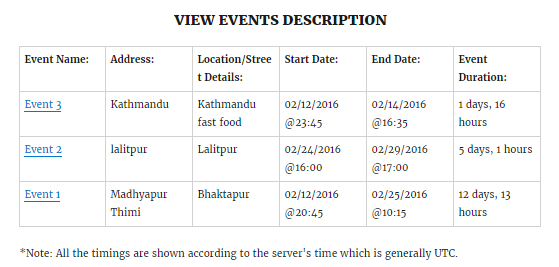
Events List. 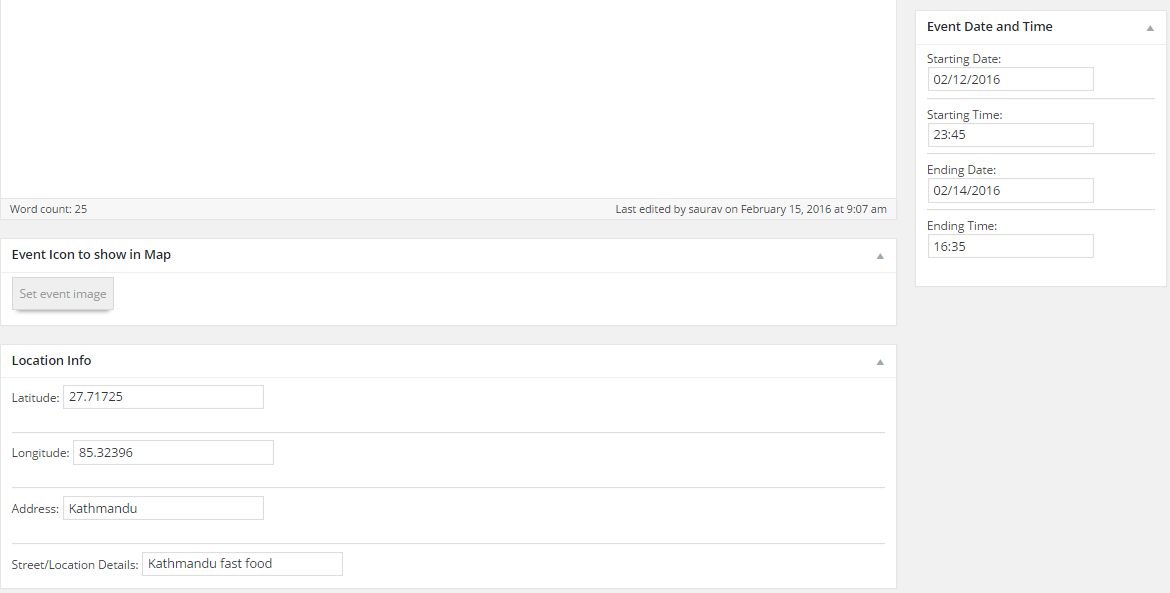
Backend Fields.
Yükleme
Using The WordPress Dashboard
- Navigate to the ‘Add New’ in the plugins dashboard
- Search for
wp-event-map - Click
Install Now - Activate the plugin on the Plugin dashboard
Uploading in WordPress Dashboard
- Navigate to the ‘Add New’ in the plugins dashboard
- Navigate to the ‘Upload’ area
- Select
wp-event-map.zipfrom your computer - Click ‘Install Now’
- Activate the plugin in the Plugin dashboard
Using FTP
- Download
wp-event-map.zip - Extract the
wp-event-mapdirectory to your computer - Upload the
wp-event-mapdirectory to the/wp-content/plugins/directory - Activate the plugin in the Plugin dashboard
SSS
- There is something cool you could add…
-
Nice, make a post on the Support Forum and let us know. We are always looking for ways to improve our plugins.
İncelemeler
Bu eklenti için herhangi bir değerlendirme bulunmuyor.
Katkıda Bulunanlar ve Geliştiriciler
“WP Event Map” açık kaynaklı yazılımdır. Aşağıdaki kişiler bu eklentiye katkıda bulunmuşlardır.
Katkıda bulunanlar
“WP Event Map” eklentisini dilinize çevirin.
Geliştirmeyle ilgilenir misiniz?
Kodu görüntüleyin, SVN deposuna göz atın ya da RSS ile geliştirme günlüğüne abone olun.
Değişiklik Kaydı
1.0.0
- İlk sürüm