

Açıklama
VERSION 2.0 – COMPLETELY REBUILT! CloudSync Master has been rebuilt from the ground up with a new setup wizard, 10 cloud providers, powerful integrations, and cross-provider migration.
Your slow-loading images are costing you visitors and sales. Studies show that 53% of mobile users abandon sites that take longer than 3 seconds to load. Every second of delay reduces conversions by 7%.
CloudSync Master offloads your WordPress media to cloud storage and serves it via global CDN – delivering lightning-fast page loads that keep visitors engaged and improve your Google rankings.
The best part? Unlike competitors charging $99+/year, CloudSync Master gives you 10 cloud providers, one-click migration, and zero egress fees – completely FREE.
What’s New in 2.0
- Setup Wizard – Step-by-step guidance for each cloud provider
- 10 Cloud Providers – Amazon S3, Cloudflare R2, Google Cloud, DigitalOcean, Backblaze, Wasabi, Vultr, Linode, MinIO, Custom S3
- 20+ Plugin Integrations – Image optimizers, cache plugins, page builders, e-commerce, multilingual (PRO)
- Import from Cloud – Download files from cloud to server and register in Media Library
- Cross-Provider Migration – Stream files directly between cloud providers
- Improved Admin UI – Cleaner, faster, more intuitive interface
Why Site Owners Choose CloudSync Master
- 10 Cloud Providers – More options than any competitor (WP Offload Media: 3, WP-Stateless: 1)
- Zero Egress Fees – Save up to 90% on bandwidth with Cloudflare R2 or Wasabi
- Switch Instantly – One-click migration from WP Offload Media, Media Cloud, WP-Stateless
- Tiny Footprint – Just <1.5MB vs competitors’ 23-87MB (no bloated SDKs)
- Works in Minutes – Simple setup, no coding required
Cloudflare R2 – Stop Paying for Bandwidth
AWS S3 charges you every time someone views your images. A site with 100,000 monthly visitors can pay $50-200/month in egress fees alone.
Cloudflare R2 charges $0 for downloads. Zero. Just $0.015/GB for storage.
- Unlimited traffic – No bandwidth bills, ever
- Same S3 API – Easy migration from AWS
- Global CDN included – Cloudflare’s edge network built-in
- Free tier – 10GB storage + 10M requests/month free
CloudSync Master makes R2 setup dead simple – easier than any competitor.
10 Cloud Providers, One Plugin
Connect to any major cloud storage service:
- Cloudflare R2 – Zero egress fees, global CDN
- Amazon S3 – Industry standard, massive ecosystem
- Google Cloud Storage – Enterprise reliability
- DigitalOcean Spaces – Simple and affordable
- Backblaze B2 – Best for large archives
- Wasabi – Hot storage, no egress fees
- Vultr Object Storage – High performance
- Linode Object Storage – Reliable S3-compatible
- MinIO – Self-hosted option
- Any S3-Compatible – Custom endpoints supported
One-Click Migration From Other Plugins
Already using another cloud storage plugin? CloudSync Master can import your settings with one click from:
- WP Offload Media (by Delicious Brains)
- Media Cloud (ILAB)
- WP-Stateless (by UDX)
No manual reconfiguration needed – just install, import, and go.
FREE Features That Competitors Charge For
CloudSync Master vs WP Offload Media vs Media Cloud:
- Cloud Providers – CloudSync Master: 10, WP Offload Media: 3, Media Cloud: 5
- Plugin Size – CloudSync Master: <1.5 MB, WP Offload Media: 23 MB, Media Cloud: 87 MB
- Setup Wizard – CloudSync Master: FREE, Others: No
- Migrate From Other Plugins – CloudSync Master: FREE, WP Offload Media: No, Media Cloud: Partial
- Cross-Provider Migration – CloudSync Master: FREE, Others: No
- Import from Cloud to Server – CloudSync Master: FREE, Others: No
- Upload Queue Visibility – CloudSync Master: FREE, Others: No
- Parallel Async Uploads – CloudSync Master PRO: Up to 20 concurrent, Others: No
How It Works
- Connect – Add your cloud storage credentials
- Configure – Choose bucket, path, and CDN settings
- Offload – New uploads automatically go to cloud storage
- Save Space – Optionally delete local copies after upload
Your media is served from cloud/CDN URLs automatically. No manual work required.
Transform Your Site Performance
Offloading media delivers measurable business results:
- Faster Pages – Media served from CDN edge locations worldwide, loading in milliseconds
- Higher Google Rankings – Page speed is a confirmed SEO ranking factor since 2018
- More Conversions – Faster sites convert better (Amazon found 1 second = 7% more sales)
- Lower Hosting Bills – Free up expensive disk space, reduce bandwidth usage
- Unlimited Scale – Handle viral traffic without server crashes
Safer Than Local Storage
Your media is more secure in the cloud than on your web server:
- Automatic Redundancy – Cloud providers replicate your files across multiple data centers
- Disaster Recovery – Server crash? Hacked? Your media is safe in the cloud
- Easy Server Migration – Move hosts without transferring gigabytes of media files
- No Backup Hassles – Cloud storage is already backed up by the provider
- Enterprise Security – AWS, Google, and Cloudflare protect your files with world-class security
Lightweight & Modern – Works Everywhere
CloudSync Master uses native REST APIs instead of bundled SDKs. At just <1.5MB (vs competitors’ 23-87MB), it runs anywhere:
- Serverless Ready – Works on Vercel, AWS Lambda, and edge hosting
- Shared Hosting Friendly – Won’t hit resource limits
- Faster Loading – Less code to parse on every request
- Fewer Conflicts – No SDK version conflicts with other plugins
- Wide PHP Support – Works on PHP 7.4 through 8.3+ for maximum compatibility
- Modern Codebase – Promise-based async operations
Competitors bundle massive SDKs that bloat your WordPress install and can cause conflicts. CloudSync Master stays lean and works everywhere.
Powerful Integrations
CloudSync Master integrates with your favorite plugins:
Competitor Migration (FREE)
* WP Offload Media – One-click settings import
* Media Cloud – One-click settings import
* WP-Stateless – One-click settings import
Image Optimizers (PRO)
* ShortPixel – Optimize before cloud upload
* Imagify – Optimize before cloud upload
* EWWW Image Optimizer – Optimize before cloud upload
* Smush – Optimize before cloud upload
* TinyPNG – Optimize before cloud upload
* WebP/AVIF auto-serving to supported browsers
Cache Plugins (PRO)
* LiteSpeed Cache – Auto-clear on media offload
* WP Rocket – Auto-clear on media offload
* W3 Total Cache – Auto-clear on media offload
* WP Fastest Cache – Auto-clear on media offload
* WP Optimize – Auto-clear on media offload
* Autoptimize – Auto-clear on media offload
Page Builders (PRO)
* ACF (Advanced Custom Fields) – URL rewriting in custom fields
* Elementor – Cloud URLs in page builder content
E-commerce (PRO)
* WooCommerce – Signed URLs for secure digital downloads
* Easy Digital Downloads – Signed URLs for EDD products
Multilingual (PRO)
* WPML – Safe deletion across translations
PRO Features
Need more power? Upgrade to PRO for:
- Media Library Scanner – Bulk upload existing media to cloud
- Upload Queue – Real-time visibility, pause, resume, retry controls
- Parallel Async Uploads – Up to 20 concurrent uploads, offload terabytes of media fast
- Objects Browser – Search and manage your cloud-stored files
- Google OAuth – One-click Google Cloud connection
- WooCommerce Signed URLs – Secure time-limited download links
- Easy Digital Downloads – Signed URLs for EDD products
- Page Builder Support – Activate cloud URLs in ACF, Elementor, and other page content
- Extended Coverage – Rewrite URLs across all supported page types and plugins
- Image Optimization – ShortPixel, Imagify, EWWW, Smush, TinyPNG integration
- WebP/AVIF Serving – Automatic modern format delivery
- Cache Integration – LiteSpeed, WP Rocket, W3TC, and more
- Priority Support – Direct email support
Get Started in 5 Minutes
- Install CloudSync Master from WordPress.org
- Connect your cloud provider (Cloudflare R2, S3, Google Cloud, etc.)
- Enable automatic offloading
- Done – Your new uploads are now served from global CDN
Already using another plugin? CloudSync Master detects and imports your settings automatically. No manual work needed.
Start saving money and loading faster with CloudSync Master today.
Ekran Görüntüleri

Speed Improvement – 68% faster page loads (2.8s to 0.9s) with CDN edge delivery 
Size Comparison – CloudSync Master is 43x smaller than competitors (2MB vs 87MB) 
WooCommerce Benefits – Perfect for e-commerce: lightning fast, global CDN, zero egress fees 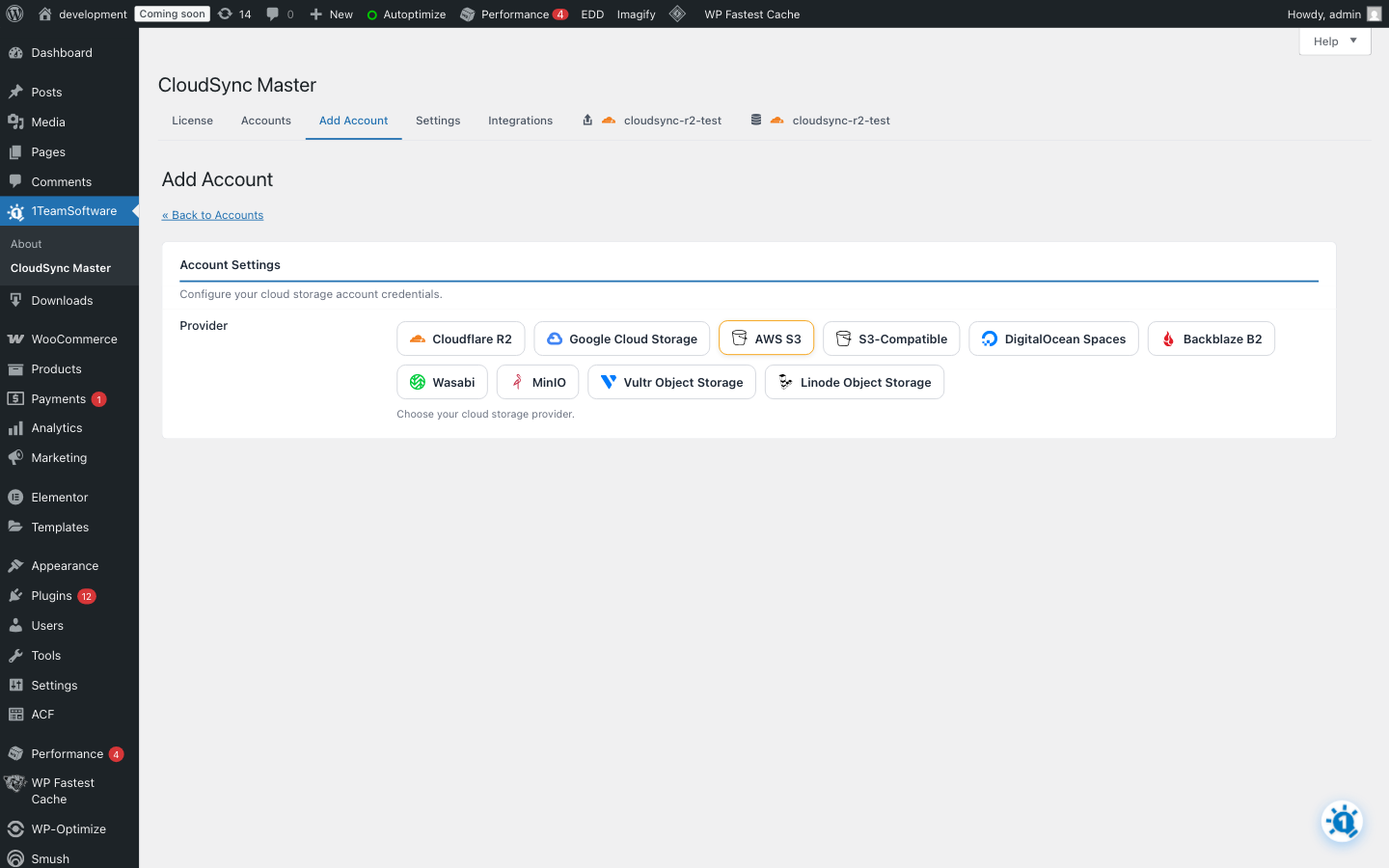
Provider Selection – Choose from 10 cloud providers including Cloudflare R2, AWS S3, Google Cloud 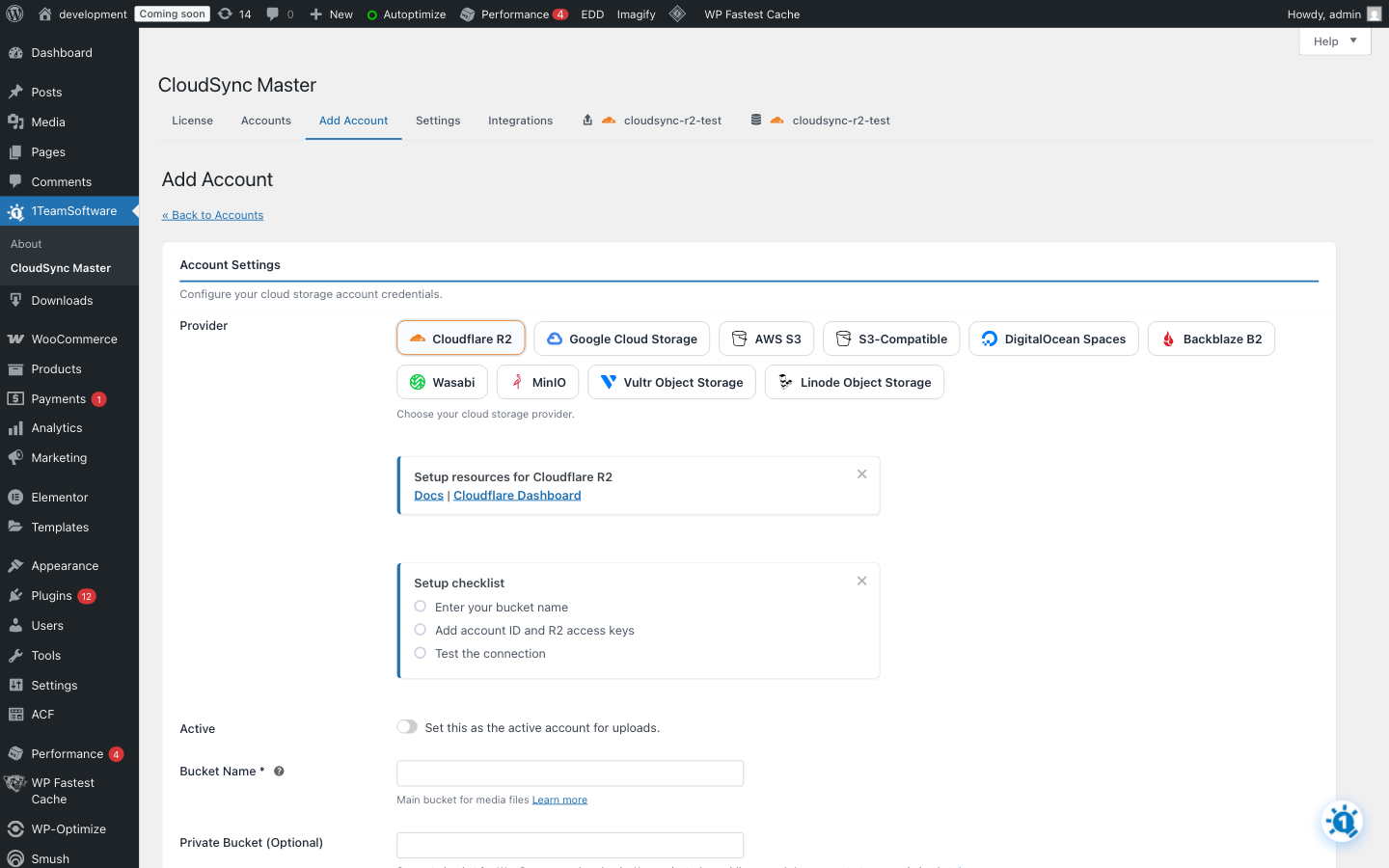
Cloudflare R2 Setup – Simple setup with Account ID and access keys, setup checklist included 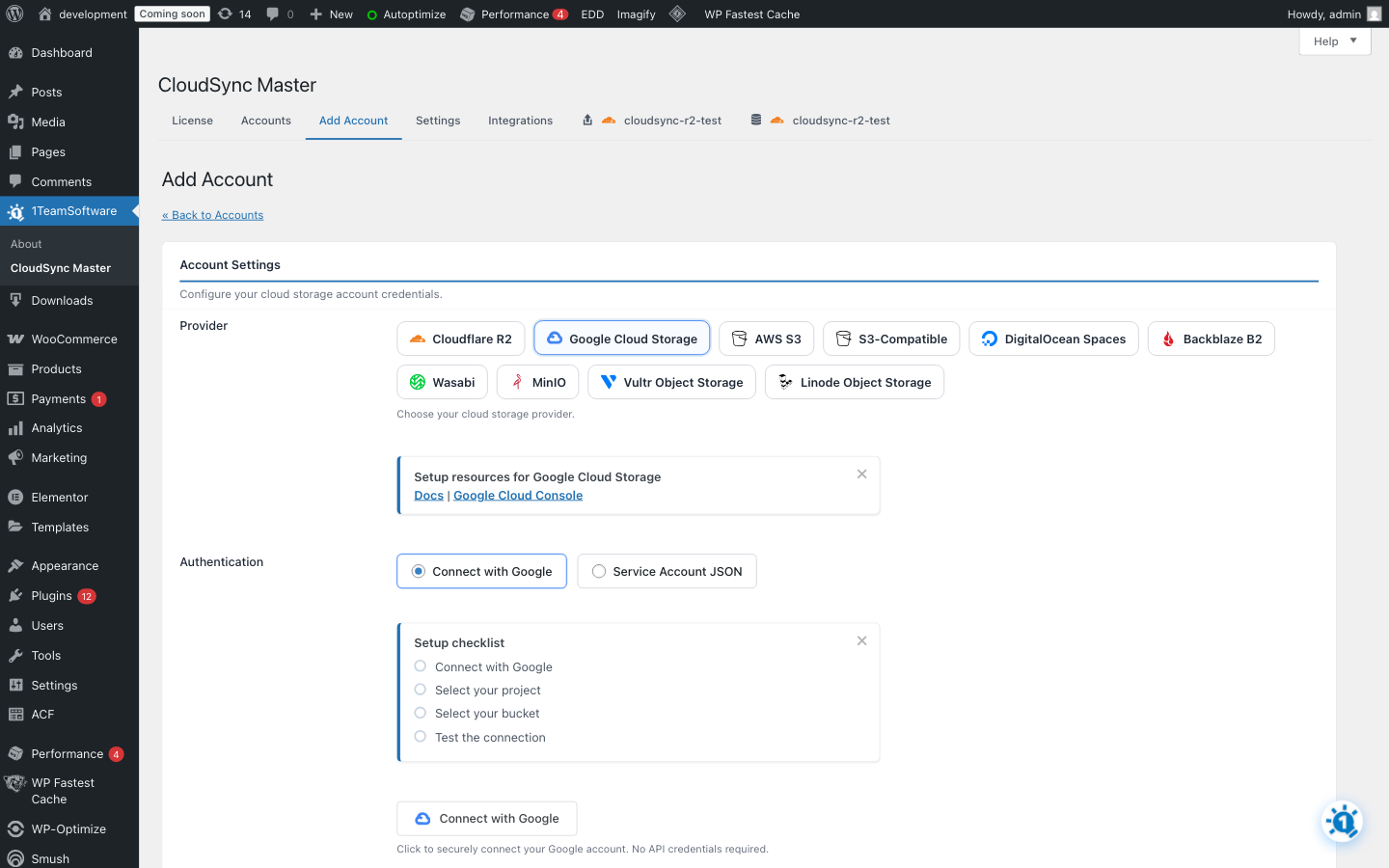
Google Cloud Setup – One-click OAuth or Service Account JSON authentication options 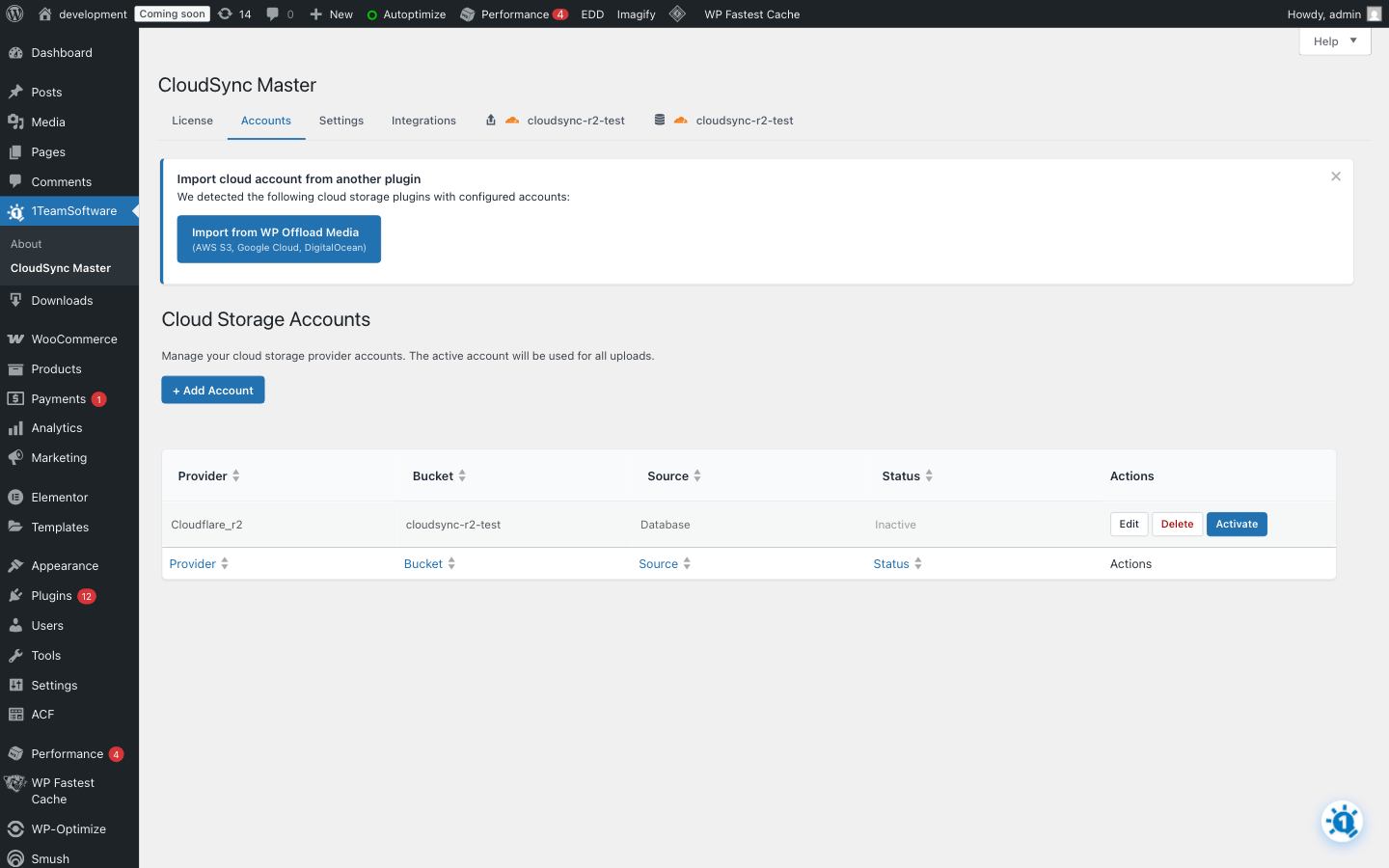
Cloud Accounts – View connected cloud storage accounts with easy migration notice 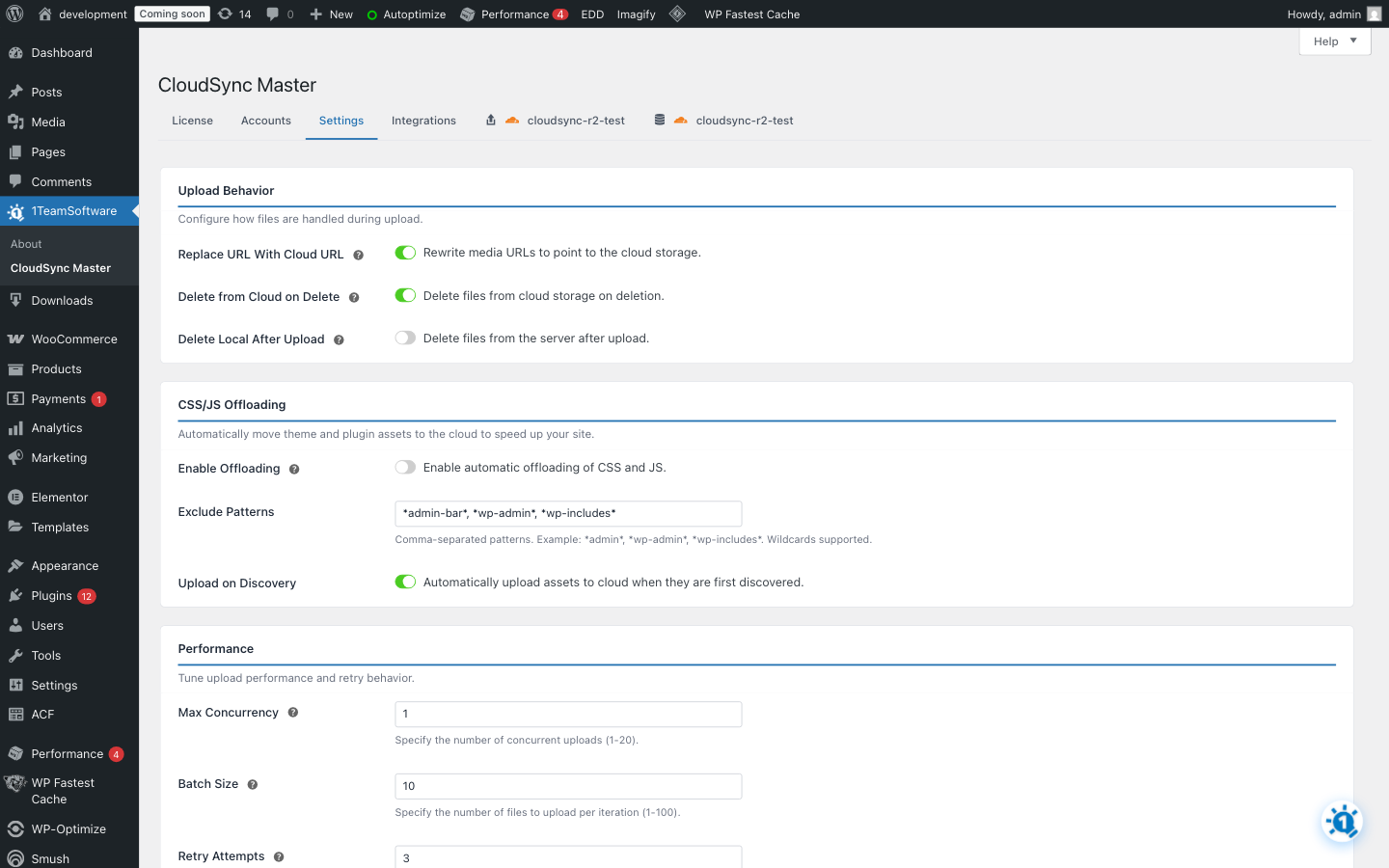
Settings – Configure upload behavior, CSS/JS offloading, performance, and debugging 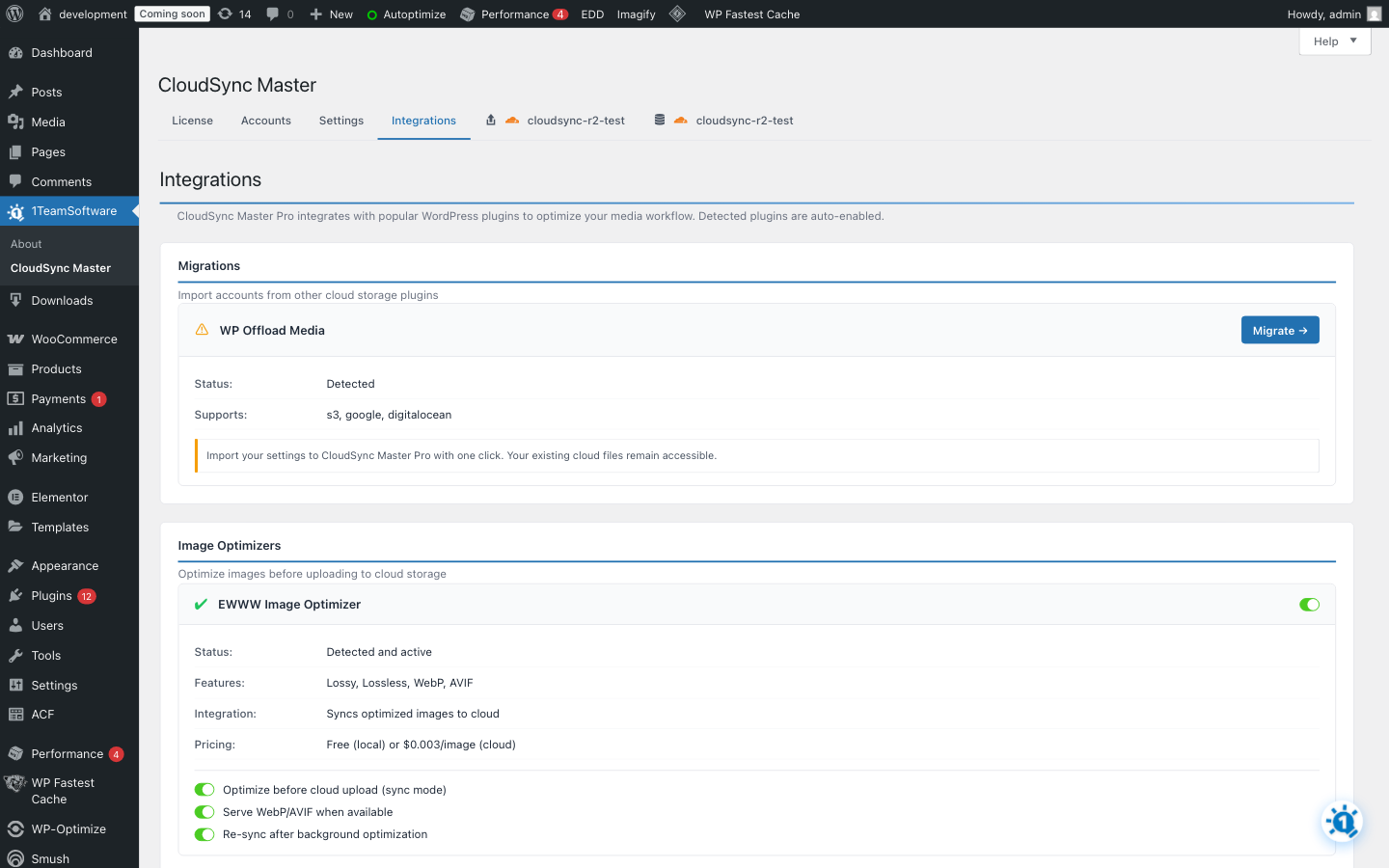
Integrations – One-click migration from WP Offload Media, image optimizers, and more 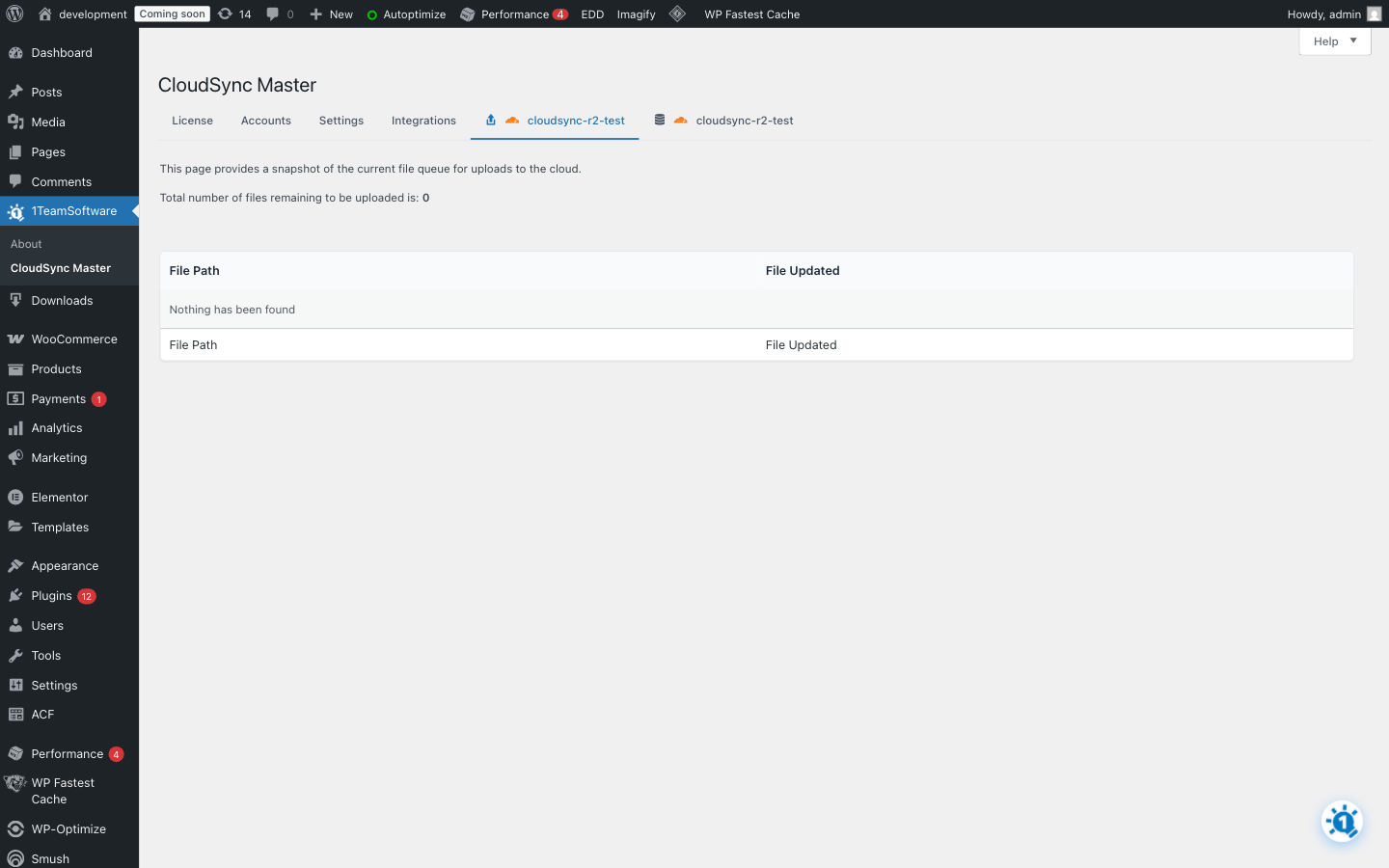
Upload Queue – Real-time visibility into media offloading progress (PRO) 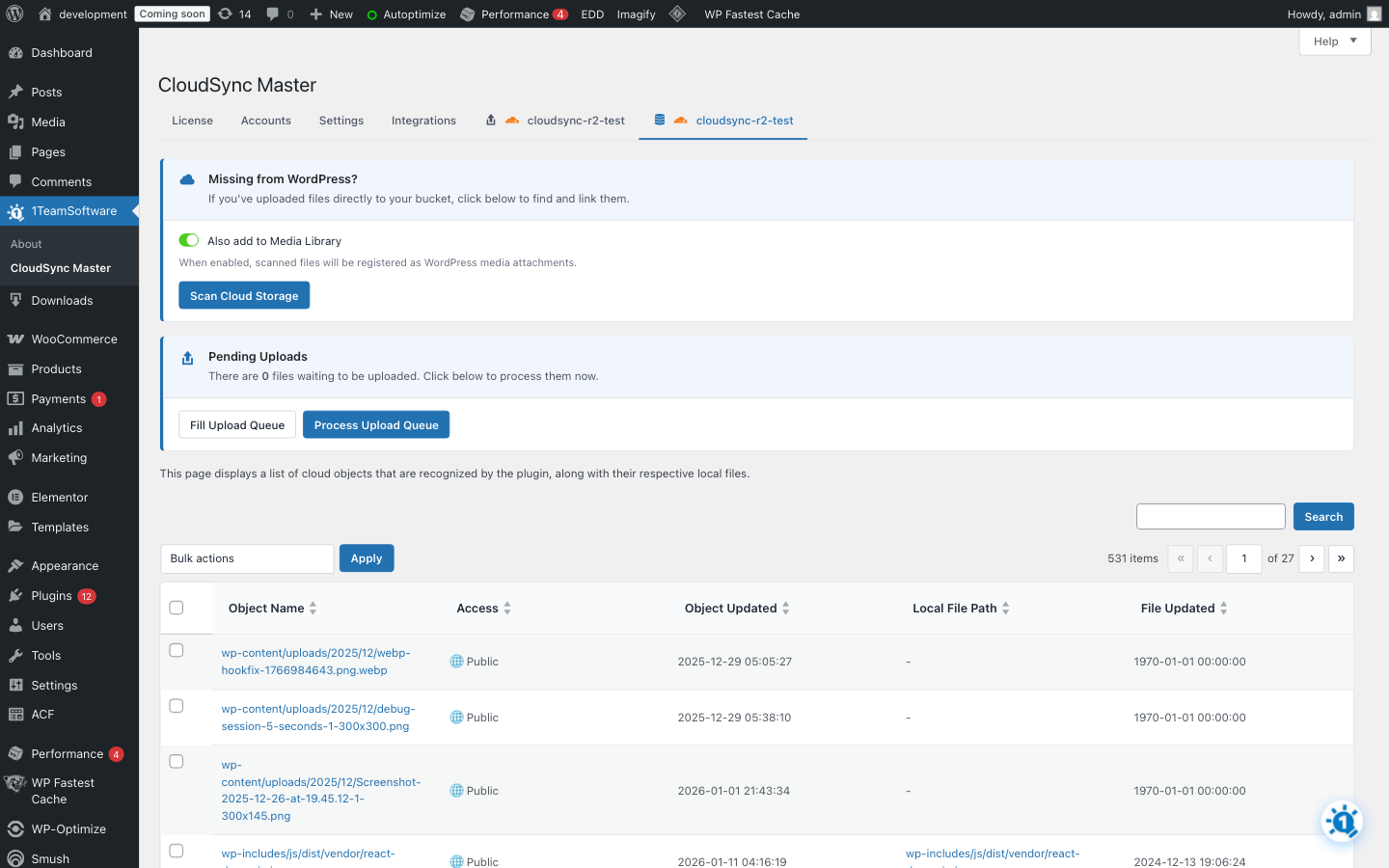
Objects Browser – Search and manage cloud-stored files with bulk actions (PRO) 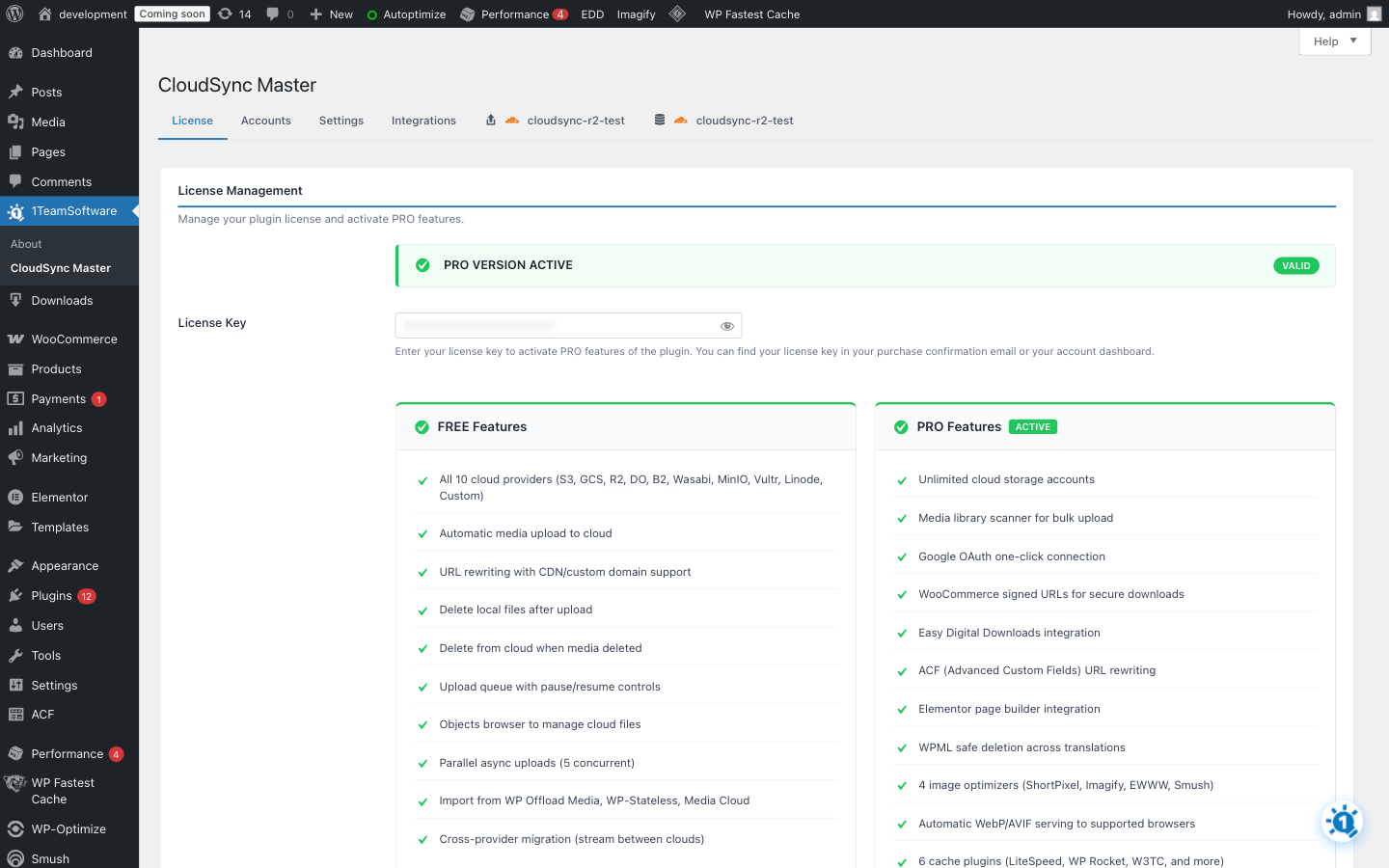
License Dashboard – Compare FREE vs PRO features and manage your license
Yükleme
Automatic Installation
- Go to Plugins > Add New in WordPress admin
- Search for “CloudSync Master”
- Click Install Now then Activate
- Go to CloudSync Master to configure
Manual Installation
- Download the plugin ZIP file
- Go to Plugins > Add New > Upload Plugin
- Choose the ZIP file and click Install Now
- Activate and configure under CloudSync Master
Quick Setup
- Navigate to CloudSync Master in admin
- Click Add Account
- Select your cloud provider
- Enter credentials (API keys, tokens, etc.)
- Select or create a bucket
- Enable automatic offloading
- Done! New uploads now go to cloud storage
SSS
-
Which cloud provider should I choose?
-
For zero bandwidth costs: Cloudflare R2 or Wasabi – both have no egress fees
For enterprise reliability: Amazon S3 or Google Cloud Storage
For simplicity: DigitalOcean Spaces – straightforward pricing
For large archives: Backblaze B2 – very affordable storage
For self-hosted: MinIO – run your own S3-compatible storage
-
Perfect for WooCommerce Stores
-
Product images are the #1 bandwidth consumer on e-commerce sites. CloudSync Master offloads all your product images to cloud storage automatically.
Benefits for WooCommerce:
– Faster product pages = higher conversion rates
– Handle Black Friday traffic without crashes
– Reduce hosting costs as your catalog growsPRO Feature: Secure signed URLs for digital downloads prevent customers from sharing download links.
-
Can I migrate from WP Offload Media?
-
Yes! CloudSync Master can automatically detect and import your settings from WP Offload Media, Media Cloud, and WP-Stateless. Look for the migration notice in your admin.
-
What about my existing media files?
-
The FREE version offloads new uploads automatically. Your existing files stay on the server.
PRO Feature: The Media Library Scanner bulk uploads your existing media to cloud storage.
-
Will this slow down my site?
-
No – it speeds it up! Media is served from CDN edge locations closer to your visitors. Uploads happen in the background without affecting page loads.
-
What happens if I deactivate the plugin?
-
Your files remain in cloud storage. URLs will revert to local paths (if files still exist locally) or you can keep using cloud URLs.
-
Does this help with server migration?
-
Yes! When your media is in cloud storage, migrating to a new host is much easier – just move your database and code. No need to transfer gigabytes of media files. Your cloud URLs keep working immediately.
-
Is cloud storage safer than my server?
-
Much safer. Cloud providers like AWS, Google Cloud, and Cloudflare automatically replicate your files across multiple data centers. If your server gets hacked or crashes, your media is safe. Cloud storage is enterprise-grade backup built-in.
-
Can I use a CDN with this?
-
Yes! Configure a custom CDN domain in your account settings. Works with CloudFront, Cloudflare CDN, BunnyCDN, and others.
-
Does this work with multisite?
-
Yes. CloudSync Master is fully compatible with WordPress multisite networks.
-
Is Cloudflare R2 really free?
-
R2 has zero egress fees – you only pay for storage ($0.015/GB/month). The free tier includes 10GB storage and 10 million reads per month.
-
How is this different from WP Offload Media?
-
CloudSync Master offers:
– 10 providers vs 3
– <1.5MB size vs 23MB
– Parallel async uploads (competitors use sequential)
– PRO: Upload queue visibility (competitors show nothing)
– Free migration from other plugins (WP Offload Media, Media Cloud, WP-Stateless)
– Same core features, no SDK bloat -
What file types are supported?
-
All WordPress media types: images (JPG, PNG, GIF, WebP, SVG), videos (MP4, WebM), documents (PDF), and any other uploads.
İncelemeler
Bu eklenti için herhangi bir değerlendirme bulunmuyor.
Katkıda Bulunanlar ve Geliştiriciler
“CloudSync Master – Offload Media to S3, Cloudflare R2 & Google Cloud” açık kaynaklı yazılımdır. Aşağıdaki kişiler bu eklentiye katkıda bulunmuşlardır.
Katkıda bulunanlar
“CloudSync Master – Offload Media to S3, Cloudflare R2 & Google Cloud” eklentisini dilinize çevirin.
Geliştirmeyle ilgilenir misiniz?
Kodu görüntüleyin, SVN deposuna göz atın ya da RSS ile geliştirme günlüğüne abone olun.
Değişiklik Kaydı
2.0.0
- Added support for 10 cloud providers: Amazon S3, Cloudflare R2, Google Cloud, DigitalOcean Spaces, Backblaze B2, Wasabi, Vultr, Linode, MinIO, Custom S3
- Added one-click migration from WP Offload Media, Media Cloud, and WP-Stateless
- Added setup wizard with provider-specific guidance
- Added integrations tab with support for image optimizers, cache plugins, page builders
- Added ability to import files from cloud to server and register in media library
- Added cross-provider migration (stream files between cloud providers)
- Improved admin UI and settings experience
- Updated for WordPress 6.9 compatibility
1.0.7
- Updated WordPress 6.9 compatibility
- PHP 7.4-8.3+ support
- Performance improvements
1.0.6
- Updated compatibility
1.0.5
- Improved cache key generation
1.0.4
- Updated libraries
1.0.3
- Reduced redundant caching
1.0.2
- Updated compatibility
1.0.1
- Updated compatibility
1.0.0
- Initial release