

Açıklama
Visual Block Inspector adds automatic visual inspection overlays to all blocks in the WordPress editor:
- Color-coded outlines around every block (40% opacity by default, 100% on hover)
- Smart labels showing block names on hover (e.g., core/paragraph, core/group)
- Automatic numbering for columns and grid items
- Hierarchy visualization – parent labels appear outside (centered), child labels inside (top-right)
No configuration needed – just activate and hover over blocks!
Color Coding System
- Green outlines = Layout/container blocks (core/group, core/columns, core/grid, etc.)
- Unique colors = Content blocks automatically assigned from 20-color Material Design palette
- Purple outline = Post/page title
Smart Labels
Standard blocks (no children):
* Label inside at top-right corner
* Colored background matching outline
* Shows block type name
Parent containers (with children):
* Label outside, centered above block
* Text only, no background
* Shows container structure
Special numbering:
* Columns: Hover over core/columns to see numbers (1, 2, 3…) on each column
* Grids: Shows both item number (left) and block name (right) simultaneously
Why You Need This Plugin
Ever felt lost editing a complex page? Not sure which block is which? Wondering if that’s a column or a group?
Visual Block Inspector solves this instantly.
Perfect for:
* WordPress developers building complex layouts
* Designers who need to understand block structure
* Content creators working with nested blocks
* Site builders managing columns and grids
* Beginners learning how the Block Editor works
* Anyone who’s ever been confused editing a page
Technical Features
- Pure vanilla JavaScript (no frameworks, no build process)
- CSS-only visual effects (hover, transitions)
- MutationObserver for automatic block detection
- ~12KB total (CSS + JS)
- Works in both standard and iframe editors
- Zero external dependencies
Privacy & Security
This plugin:
* Does NOT track users
* Does NOT make external calls
* Does NOT collect any data
* Works entirely in your browser
* Never sends anything to external servers
100% privacy-friendly and secure.
Ekran Görüntüleri
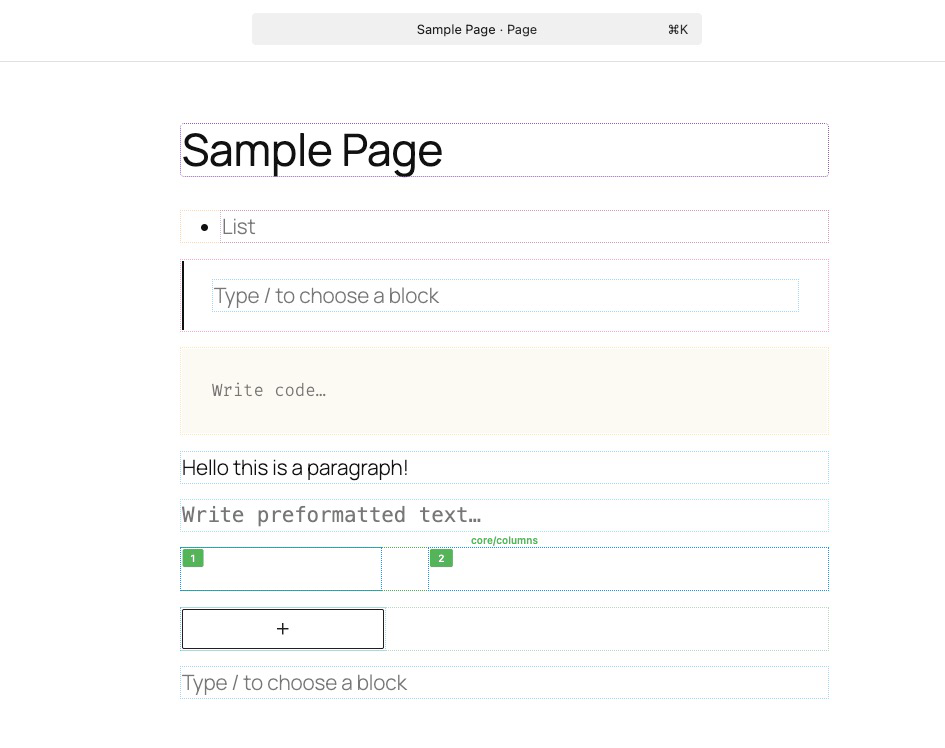
Color-coded outlines on blocks with hover labels
Yükleme
- Upload the
visual-block-inspectorfolder to/wp-content/plugins/ - Activate from WordPress Admin Plugins
- Open any post/page in Block Editor
- Hover over blocks to see outlines and labels
That’s it! No settings to configure.
SSS
-
Will this change how my website looks to visitors?
-
No! The plugin only works in the WordPress editor. Your actual website looks exactly the same to visitors.
-
Do I need to configure anything?
-
Nope! Just activate the plugin and start editing. Everything works automatically.
-
Does it slow down the editor?
-
Not at all. The plugin is super lightweight (only 12KB) and uses modern browser features for smooth performance.
-
Can I change the colors?
-
Yes! If you know CSS, you can customize the colors by editing the CSS variables in
assets/css/editor.css. -
Does it work with page builders like Elementor?
-
No. This plugin is specifically designed for the native WordPress Block Editor (Gutenberg). It won’t work with third-party page builders.
-
What if I use the Classic Editor?
-
This plugin only works with the Block Editor (Gutenberg). If you’re still using the Classic Editor, this plugin won’t do anything.
-
Does it work on mobile/tablet?
-
The plugin works in the WordPress editor on any device. However, the hover effects work best with a mouse. On touch devices, you may need to tap blocks to see labels.
-
Can I use it on client sites?
-
Absolutely! The plugin is free and GPL-licensed. Use it on as many sites as you want, including client projects.
-
What browsers are supported?
-
Modern browsers with CSS
color-mix()support:
* Chrome 111+
* Firefox 113+
* Safari 16.4+Older browsers will show solid colors instead of semi-transparent outlines.
İncelemeler

Katkıda Bulunanlar ve Geliştiriciler
“Visual Block Inspector” açık kaynaklı yazılımdır. Aşağıdaki kişiler bu eklentiye katkıda bulunmuşlardır.
Katkıda bulunanlar
“Visual Block Inspector” eklentisini dilinize çevirin.
Geliştirmeyle ilgilenir misiniz?
Kodu görüntüleyin, SVN deposuna göz atın ya da RSS ile geliştirme günlüğüne abone olun.
Değişiklik Kaydı
1.0.0
- Initial release
- Color-coded outlines for all blocks
- Smart label positioning (inside vs outside)
- Column and grid numbering system
- 20-color auto-assignment palette
- Post/page title highlighting
- CSS variables for easy customization
- Iframe editor support
- Pure vanilla JavaScript (no frameworks)
- Zero external dependencies