
Açıklama
The widget shows the prayer/fasting time on your website using the local WordPress timezone and the provided salah.csv file (see installation description).
Front-end language support for:
– English
– German
– Bosnian
Ekran Görüntüleri

Widget Theme Blue (Front-end) 
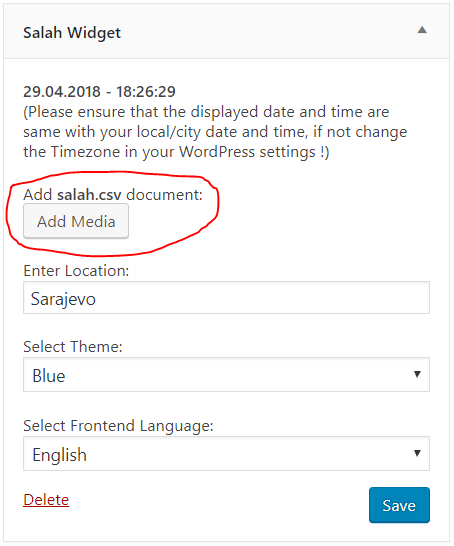
Widget Settings (Back-end) 
Widget Theme Green (Front-end) 
Widget Theme Red (Front-end) 
Widget Theme Grey (Front-end) 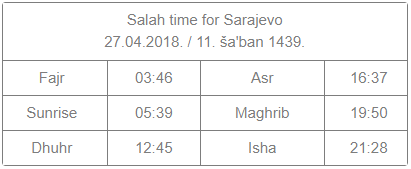
Widget Theme Classic (Front-end)
Yükleme
- Install and activate the plugin through the “Plugins” menu in WordPress
- Add the Salah Widget in the “Appearance -> Widgets” menu in WordPress
- Check if the displayed time matches your local (city) time, if not update your timezone in “Settings -> General” menu in WordPress
- Download the example salah.csv file
- Edit the downloaded salah.csv file and adapt it to your needs. Remember that your website will load faster if you have lesser days in the csv file (ideally 365 or less rows)
- Save the edited salah.csv file as a comma delimited csv file
- Upload the edited salah.csv file via the Salah Widget settings menu. Remember that the file must be called salah.csv and no other file should contain this name in your WordPress Media Library
- Enter the name of your city in the Salah Widget settings
- Choose a Theme
- Select the front-end language
- Save your Salah Widget settings
SSS
- Installation Instructions
-
- Install and activate the plugin through the “Plugins” menu in WordPress
- Add the Salah Widget in the “Appearance -> Widgets” menu in WordPress
- Check if the displayed time matches your local (city) time, if not update your timezone in “Settings -> General” menu in WordPress
- Download the example salah.csv file
- Edit the downloaded salah.csv file and adapt it to your needs. Remember that your website will load faster if you have lesser days in the csv file (ideally 365 or less rows)
- Save the edited salah.csv file as a comma delimited csv file
- Upload the edited salah.csv file via the Salah Widget settings menu. Remember that the file must be called salah.csv and no other file should contain this name in your WordPress Media Library
- Enter the name of your city in the Salah Widget settings
- Choose a Theme
- Select the front-end language
- Save your Salah Widget settings
İncelemeler
Bu eklenti için herhangi bir değerlendirme bulunmuyor.
Katkıda Bulunanlar ve Geliştiriciler
“Salah Widget” açık kaynaklı yazılımdır. Aşağıdaki kişiler bu eklentiye katkıda bulunmuşlardır.
Katkıda bulunanlar


“Salah Widget” 3 dile çevrildi. Katkıda bulundukları için çevirmenlere teşekkürler.
“Salah Widget” eklentisini dilinize çevirin.
Geliştirmeyle ilgilenir misiniz?
Kodu görüntüleyin, SVN deposuna göz atın ya da RSS ile geliştirme günlüğüne abone olun.
Değişiklik Kaydı
1.0
- Initial version.
1.1
- Stable version.
- Added front-end language selection for: english, german, bosnian