

Açıklama
Do you use the “Remember Me” feature when logging in to your WordPress site? I know I do.
Do you find it annoying when WordPress stops remembering you after a few days? I know I do.
Longer Login is a simple WordPress plugin that remedies this. By default, WordPress automatically
forgets users after 14 days. This plugin adds an option in your website’s General Settings that
can change this expiration date. There are numerous options ranging from 1 day to 1 year.
Change the setting, and the next time you, or any user on your site logs in with “Remember Me” checked,
WordPress will keep them logged in for that specified time.
How Does It Work?
To remember users, websites store a small piece of information in your web browser’s memory.
This token of information is called an HTTP cookie. These
cookies have an expiration date specified by the website.
By default, WordPress websites have their persistent login cookies expire after 14 days. This plugin
changes the length of time the cookie will survive. Instead of 14 days after login, you can make the
cookie live for as long as 1 year after login.
Ekran Görüntüleri
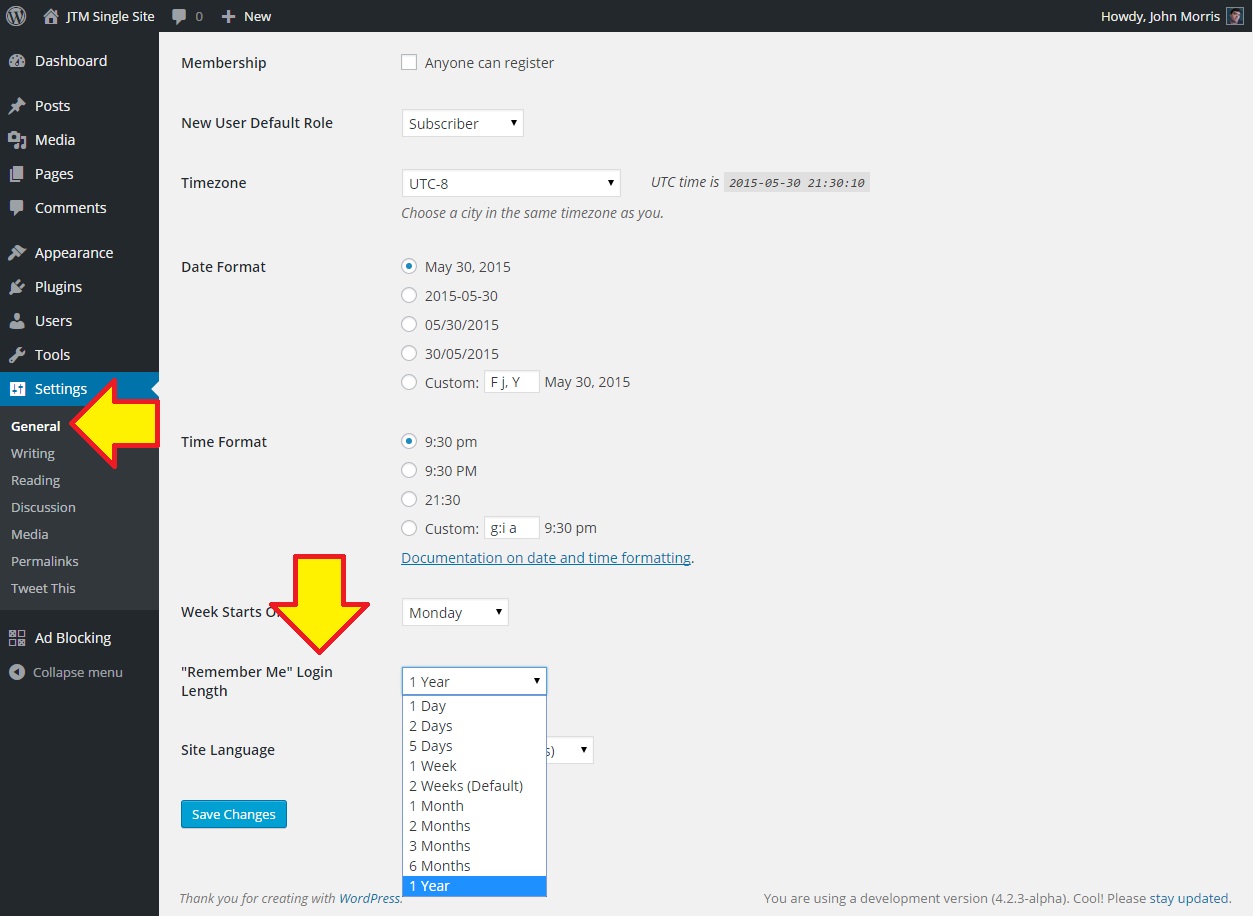
Settings Page
Yükleme
Using WordPress.org’s Plugin Repository (recommended)
- Search for “Longer Login” in your WordPress “Add New” plugin section of your dashboard.
- Install and activate the “Longer Login” plugin by John Morris.
Manually
- Download the latest version of Longer Login and upload the
longer-login.zipfile
in the Add New plugin section of your dashboard. - Activate the plugin through the “Plugins” menu in your WordPress admin section.
From Source
- Visit the plugin’s GitHub repository.
- Select the branch you want to download (choosing a version branch is highly recommended (e.g. v1.0.0)).
- Click the download ZIP button on the lower right side of the page.
- Upload the contents of the longer-login-plugin-branch name directory to a directory
named ‘longer-login’ in your WordPress site’s ‘./wp-content/plugins/’ directory. - Visit your WordPress site’s Plugins menu in the admin section, and activate the newly listed
Longer Login plugin.
SSS
- Installation Instructions
-
Using WordPress.org’s Plugin Repository (recommended)
- Search for “Longer Login” in your WordPress “Add New” plugin section of your dashboard.
- Install and activate the “Longer Login” plugin by John Morris.
Manually
- Download the latest version of Longer Login and upload the
longer-login.zipfile
in the Add New plugin section of your dashboard. - Activate the plugin through the “Plugins” menu in your WordPress admin section.
From Source
- Visit the plugin’s GitHub repository.
- Select the branch you want to download (choosing a version branch is highly recommended (e.g. v1.0.0)).
- Click the download ZIP button on the lower right side of the page.
- Upload the contents of the longer-login-plugin-branch name directory to a directory
named ‘longer-login’ in your WordPress site’s ‘./wp-content/plugins/’ directory. - Visit your WordPress site’s Plugins menu in the admin section, and activate the newly listed
Longer Login plugin.
İncelemeler
Bu eklenti için herhangi bir değerlendirme bulunmuyor.
Katkıda Bulunanlar ve Geliştiriciler
“Longer Login ("Remember Me" Extension)” açık kaynaklı yazılımdır. Aşağıdaki kişiler bu eklentiye katkıda bulunmuşlardır.
Katkıda bulunanlar
“Longer Login ("Remember Me" Extension)” eklentisini dilinize çevirin.
Geliştirmeyle ilgilenir misiniz?
Kodu görüntüleyin, SVN deposuna göz atın ya da RSS ile geliştirme günlüğüne abone olun.
Değişiklik Kaydı
1.0.0
- Initial version. No changes to report.