Tag: wordpress AI

Use our own developed excerpt_more function to avoid potential plugin conflicts, wordpress tooltips pro plus 27.0.8, wordpress tooltips pro 19.2.6, wordpress tooltips free 9.3.5 released

Hi Dear  WordPress Tooltip plugin users,  hope this message find you are doing well and having wonderful days with your family 🙂  One of our wordpress tooltips plugin users reported encountering a PHP warning record in the background log. We took the user’s concern seriously and thoroughly investigated the log. However, we faced challenges in replicating the reported error. After conducting extensive tests, we delved into the 200 option combinations within the WordPress tooltips background. Within this exploration, we identified two particular combinations that had the potential to cause conflicts. Through meticulous testing and diligent tracking, we successfully identified the root cause and developed a solution. To address this potential conflict, we created our own “exceprt more” function. This solution underwent further testing and refinement until we were confident in its effectiveness. Our dedicated efforts finally resolved the problem of potential conflicts. We take great pride in developing and implementing our own “exceprt more” function to solve this issue. Through an arduous process of testing and thorough investigation, we were able to determine the cause of the problem and implement an appropriate solution. 🙂

Also in wordpress tooltips free plugin, we fixed a problem of woocommerce product directory and we using our function to generate excerpt for woocommerce product too 🙂

We deeply appreciate the valuable feedback provided by this user. To express our heartfelt gratitude, we would like to offer this user a complimentary license for the Smart Content Links with Tooltip plugin. This is our way of saying thank you for their invaluable contribution and for helping us improve our services. Smart content links are a powerful tool for enhancing your website’s content and improving the user experience. By embedding links to related content within your wordpress blog posts, you can provide valuable context, information, and resources to your readers without disrupting their flow or distracting them from your main message. These smart links are designed to provide readers with quick access to related resources and information, making it easier for them to learn more about the topic at hand. Smart content links using AI NLP(Natural Language Processing) to help you build best internal links — it is important to improve your SEO quickly, you can enter a keyword in back-end, Smart content links will ranking posts based on the best match with keywords using AI calculations 🙂

We are adding more and more AI functions to all of our wordpress plugins, for example, wordpress tooltips pro plus using openAI ChatGPT to generate high quality unique content for wordpress blogger 🙂

if you have any more feature request or question, please don’t hesitate to contact us, we always give gifts to users as a THANKS

Thanks, have a blessed day with your family

Best Regards,

WordPress tooltips plugin support

Tagged with: , , , ,

Recent Works on WordPress Tooltips Until 2023-07-20

Hi, Dear  wordpress tooltip plugin users,  hope this message find you are doing well and having happy days  with your family. In recent days, we developed 7 versions of wordpress tooltips plugin, 2 version of AI smart content link with tooltips plugin , 4 wordpress FAQ with tooltips plugin:

1: we developed 7 versions of wordpress tooltips plugin

A few wordpress tooltip plugin users using directory module in wordpress tooltip to build their recipe collection directory, news aggregator list, business lists, and they hope we can offer an option to limit the the total number of posts that displayed in wordpress post directory, we realize it in 22.5.8,wordpress tooltips pro 17.0.6,wordpress tooltips free 8.7.9

Another wordpress tooltip user told us his developer said load multiple jquery-migrate packages is not good, we developed wordpress tooltips pro plus plugin 22.6.8 and pro 17.1.6 to prevent the simultaneous loading of multiple jquery-migrate packages

And then we released WordPress Tooltips Pro Plus 22.8.8  to solved a conflicts with another wordpress plugin

A few days before, our wordpress tooltip developer fixed an AJAX Statics Error in WordPress Tooltips Pro Plus 22.9.8 and WordPress Tooltip Pro 17.2.6

2: we developer 2 version of AI smart content link plugin for wordpress tooltip users

AI Smart content links plugin is a powerful tool for enhancing your website’s content and improving the user experience. By embedding links to related content within your wordpress blog posts, you can provide valuable context, information, and resources to your readers without disrupting their flow or distracting them from your main message. These smart links are designed to provide readers with quick access to related resources and information, making it easier for them to learn more about the topic at hand.

In AI smart content link 3.0, our wordpress tooltip plugin developer added  AI NLP(Natural Language Processing) to help wordpress adnub to  build best internal links — it is important to improve your SEO quickly, you can enter a keyword in back-end, Smart content links will ranking posts based on the best match with keywords using AI calculations

Then in Smart Content Link with Tooltips Pro Plugin 3.1, we start to support  customize font size of AI Smart Content Link, we make a screenshot, it looks like this:


3: We collected feedback of wordpress AI FAQ with tooltips pro plugin, and we realize these suggestions in last week, we released 4 versions of wordpress AI FAQ with tooltips pro plugin:
In WordPress FAQ with Tooltip Pro Plugin 4.1.6  we support custom FAQ answer background color and FAQ answer font color, FAQ editor can build a better FAQ for users
Then in WordPress FAQ with Tooltips Plugin 4.2.6, wordpress faq admin can custom F.A.Q active item border color
In WordPress FAQ with Tooltips 4.3.6, wordpress admin can Custom FAQ Title Font Size
In WordPress FAQ with Tooltips Pro 4.4.6, wordpress faq editor can Customize WordPress FAQ Content Font Size
Thanks for the great feedback and suggestions, we give a few wordpress Pro Plugins as a gift to each users who report bug or give us suggestions 🙂
Best Regards,
WordPress tooltip Support team
Tagged with: , , ,

How to Customize Font Size of AI Smart Content Link? Supported by Smart Content Link with Tooltips Pro Plugin 3.1

Hi, Dear users of wordpress tooltip plugin,  hope this message find you are doing well and having happy days with your family   We got a suggestion from an amazing smart content link with tooltip plugin, in which he said he is using our smart content link plugin in his e-commerce site, he using our “Ranking posts based on the best match with keywords using AI calculations” module to find the best matched posts for keyword which users searching, he found our AI algorithms can rank the product listings based on their relevance to the keyword, so it is a great help to link the keywords to the most suitable products and articles, he said when he purchase this plugin, he did not found this great function from our product description. (yes, we just busy to develop all kinds of plugin, we forget to write document for many new functions, we will do it asap we can).

Also he is using our smart content link bar at the top of the site, in which he added the link of shop, support, forum, document…etc, but a problem is, his wordperss theme have a small font size, so these smart content links have a small font size too, he said he hope a lager font size in smart content link bar, he using it as a navigation bar for his woocommerce users.

This is the first time we heard the requirement of increase the font size of smart content link, our wordpress tooltip developer customized a new version wordpress smart content link 3.1 to realize the function for users, changes:

1: new option to customize the font size of smart content links
2: new module to customize smart content links bar style
3: removed ajax js link in the code because we do not need it now

How to Customize Font Size of AI Smart Content Link?

1: Login wordpress tooltip plugin site and download AI smart content link which version >= 3.1.0

2: Login dashboard of your wordpress site  and upload new version of AI smart content link plugin

3: Click smart content link menu then you will open smart content link style settings panel, it like this:

Smart Content Links style settings panel 3.0.1

4: As you can see, in the “Information Bar Settings” panel, there are a new option “font size”, just enter 16px..etc, you can customize the font size in smart content link information bar 🙂

Document of AI Smart Content Link Plugin

How to only add smart content links for specific wordpress post types?

How to Enable / Disable Smart Content Link Bar Throughout the Whole WordPress Site?

How to use scl shortcode to display Smart Content Links in anywhere of your wordpress site?

How to modify content from 3rd plugin via scl_content API in Smart Content Links with Tooltip plugin? (for developer)

Tagged with: , ,

How to limit the total number of posts in post directory using the shortcode, how to display only the posts with a specified post category ID, how to display only the posts with a specified post category name, these new features are supported in wordpress tooltips plus 22.5.8,wordpress tooltips pro 17.0.6,wordpress tooltips free 8.7.9

Hi, Dear  wordpress tooltip plugin users,  hope this message find you are doing well and having happy weekend with your family Several months ago, wordpress tooltip plugin started supporting post directory, since then, we got a few feedback from wordpress post directory users, basically, users have been responding by saying — they said they using post directory function to build:

1: News Aggregator: Create a directory to display latest news articles from various sources.

2: Event Calendar: List upcoming events with details, dates

3: Recipe Collection: Create a directory of recipes

4: Business Listings: Display a directory of local businesses, their contact information, and services offered.

5: Real Estate Listings: List properties for sale or rent with price, location, and property type.

6: Travel Guide: Create a directory of travel destinations, attractions, and recommendations.

…etc

And some users have provided valuable feedback:

1: One possible parameter for the “postdirectory” shortcode could be “limit”, which can be used to restrict the number of post displyes in the post directory. By setting a specific limit, it ensure that not all posts are listed, preventing excessive load time on the page.

In this version we support it by this way:

please use shortcode: “postdirectory limit=30” — this will list 30 posts in post directory.

2: As a blog directory, they need  — showcase popular blogs, categorized by niche or topic.

Actually we have realized function of categorized by category ID or categorized by category Name, we have a detailed document at How to only list posts of specified category in post directory?

Our issue is that we have listed these reference documents, but we haven’t included the explanations of these features in our plugin’s control panel. As a result, many users are unaware of these functionalities because they don’t check our change log  or wordpress tooltip document, starting from this version, we will directly write the usage instructions and features of the plugin in the wordpress tooltip plugin control panel, we will also start listing the plugin’s document directly beneath the relevant settings options.

Now the new directory settings panel looks like this — this is screenshot from the pro plugin version, but the interface of post directory panel are exactly the same:

Directory Settings panel in wordpress tooltips pro plus 22.5.8

Thanks for the great suggestion and feedback, our wordpress tooltip plugin is driven by wordpress tooltip users, you make the plugin better and better, if you have any more feature request, please don’t hesitate to contact us, we are very happy to realize it for you 🙂

We greatly appreciates this user’s suggestion, and we will reward him with a premium plugin of smart content link, Smart content links are a powerful tool for enhancing your website’s content and improving the user experience. By embedding links to related content within your wordpress blog posts, you can provide valuable context, information, and resources to your readers without disrupting their flow or distracting them from your main message. These smart links are designed to provide readers with quick access to related resources and information, making it easier for them to learn more about the topic at hand.

Smart content links using AI NLP(Natural Language Processing) to help you build best internal links — it is important to improve your SEO quickly, you can enter a keyword in back-end, Smart content links will ranking posts based on the best match with keywords using AI calculations. We have developed a few wordpress AI plugins for wordpress tooltip users, we are develop more wordpress AI plugins for you 🙂

Conclusion:

1: Enhanced advanced “postdirectory” shortcode, added new shortcode parameters, include:
“postdirectory limit=30”, this will list 30 posts in post directory
“postdirectory catid=’38′”, this will only list posts in the post categort that id = 38
“postdirectory catname=’lession’”, this will only list posts in the post categort that name = lesson
…etc
2: added index.php in each sub folder to prevent direct access to directory contents and enhance site security
3: follow wordpress security standard to enhance site secutity

Thanks, have a blessed day with your family 🙂

Best Regards,

Wordpres tooltip support

Tagged with: , , , , ,

New settings panel for woocommerce product directory, job board directory, member directory, post directory, page directory, supported by wordpress tooltips pro plus 19.2.8

Hi, Dear users of wordpress tooltip, hope this message find you are doing well and having happy weekend with your family 🙂  As you known,in recent days, we are working had to add more and more directory functionality for wordpress tooltip plugin, in the current time, in wordpress tooltips pro plus version,  we have finished  wordpress job board directory,  , woocommerce product directory, member directory, wordpress page directory, wordpress post directory,   but there are lack of a management settings panel for all wordpress directories, our developer released wordpress tooltips pro 18.9.8 to add setting panels for each kind of wordpress directory 🙂

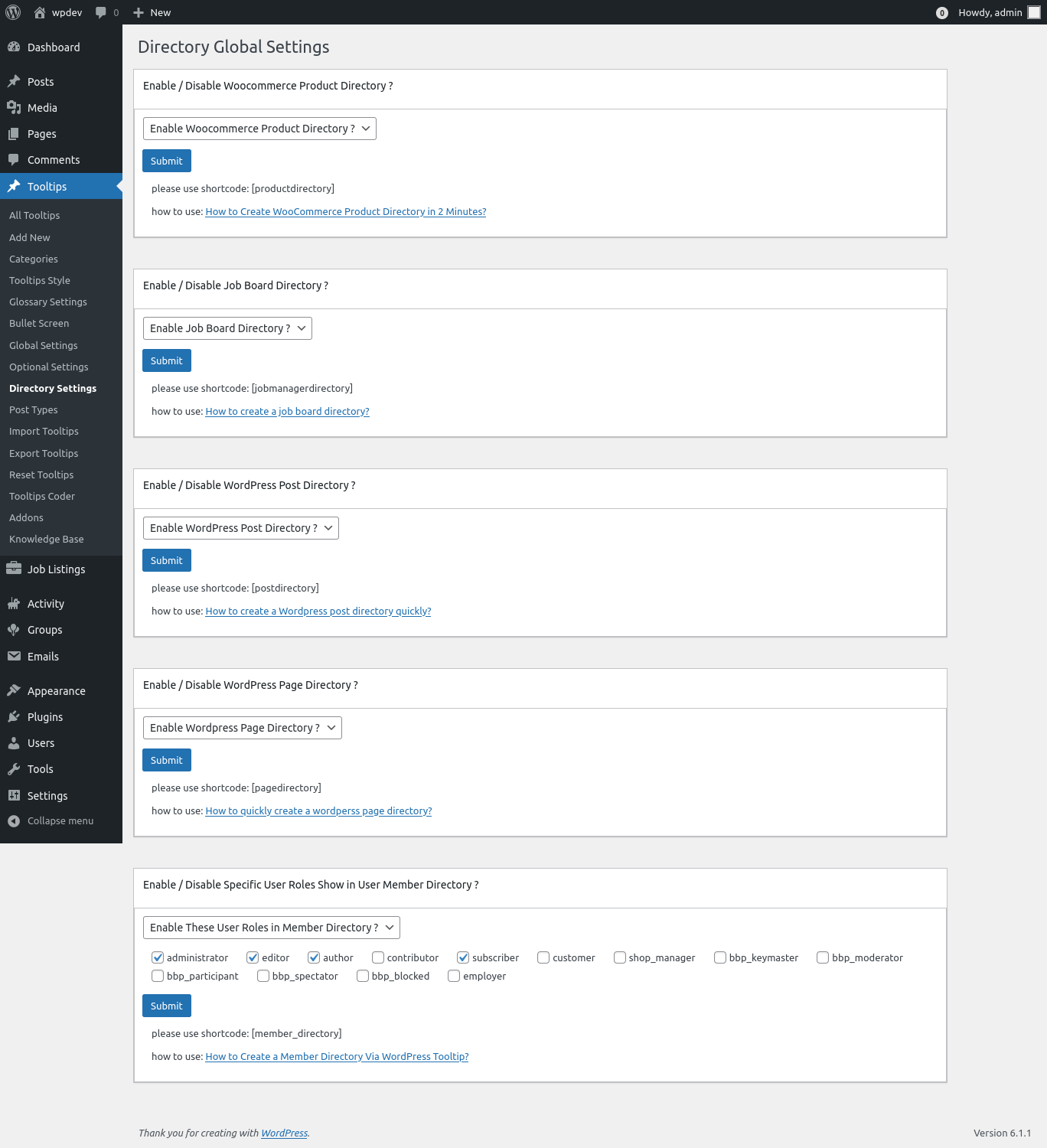
In wordpress tooltips pro 18.9.8, we changed the UI of wordpress directory settings panel too, a few users told us they do not know how to use our wordpress directory, we always replied with detailed document URL in our wordpress tooltip document , in the new version,  we added shortcode of each directory and we added details about “how to use” link for each directory,  so users can use wordpress directory easier 🙂

In our old UI, member directory section is a little large, it is a little messed up,  we are adding more and more wordpress directory functions in the settings panel, we’d like offer a simple and clean UI for wordpress tooltip users, so we re-developed the UI of wordpress directory settings panel to make it simple and pretty 🙂

The new UI of wordperss directory settings panel looks like this:

directory settings panel in wordpress tooltips pro plus 19.2.8

directory settings panel in wordpress tooltips pro plus 19.2.8

Also we fixed a bug in wordpress directory menu 🙂

In the current time, our wordpress tooltip developer is working hard to add an  artificial intelligence (AI) system for wordpress tooltip plugin, maybe you know, in our wordpress tooltips plus version, we had integrated a few APIs to generate wordpress tooltip via 3rd big sites, for example, users can just enter a wordpress tooltip title in wordpress tooltip editor and select the option to generate content from wikipedia , and just click public, then wordpress tooltips plug version will generate tooltip content from wikipedia automatically, you can check demo at wikipedia tooltip demo, now we are start to support generate wordpress tooltip content from AI automatically, based on a few heavy tooltip  user’s strong suggestion, they said they want to generate more and more tooltip with best content automatically.  This AIGC tooltip content basic module will be added to all wordpress tooltip users, include wordpress tooltip free, wordpress tooltip pro, and wordpress tooltip pro +, because this can help many heavy blogger generate content automatically, and it is good for SEO, then we will add more and more functions for pro and pro + user, we have got many suggestion on this area, we will realize all these functions asap we can 🙂

Thanks, have a happy day with your family 🙂

Best Regards,

WordPress tooltip support

Tagged with: , , , , ,

WordPress tooltips free plugin 8.3.3 Released, support wordpress post directory

Hi, Dear WordPress Tooltip plugin users, hope this message find you are doing well and having happy weekend with your family 🙂 Our wordpress tooltip developer just finished a new version of wordpress tooltips plugin — wordpress tooltip 8.3.3. 🙂

In recent months, we start to realize all feature request about wordpress tooltip directory, in recent days, in wordpress tooltips pro plus version,  we have finished  wordpress job board directory,  , woocommerce product directory, member directory, wordpress page directory, wordpress post directory,   today we move the wordpress post directory function to wordpress tooltips free plugin, based on a free user’s request. 🙂

Also we have changed the UI of wordpress directory settings panel, we added shortcode of each directory and we added detailed how to use link for each directory too, and  because the old UI is a little large, so if we add more wordpress directory functions in the settings panel, the UI might messed up, so we re-developed the UI of wordpress directory settings panel to make it simple and pretty 🙂

In the current time, our wordpress tooltip developer is working hard to add an  artificial intelligence (AI) system for wordpress tooltip plugin, maybe you know, in our wordpress tooltips plus version, we had integrated a few APIs to generate wordpress tooltip via 3rd big sites, for example, users can just enter a wordpress tooltip title in wordpress tooltip editor and select the option to generate content from wikipedia , and just click public, then wordpress tooltips plug version will generate tooltip content from wikipedia automatically, you can check demo at wikipedia tooltip demo, now we are start to support generate wordpress tooltip content from AI automatically, based on a few heavy tooltip  user’s strong suggestion, they said they want to generate more and more tooltip with best content automatically.  This AIGC tooltip content basic module will be added to all wordpress tooltip users, include wordpress tooltip free, wordpress tooltip pro, and wordpress tooltip pro +, because this can help many heavy blogger generate content automatically, and it is good for SEO, then we will add more and more functions for pro and pro + user, we have got many suggestion on this area, we will realize all these functions asap we can 🙂

Thanks, have a happy day with your family 🙂

Best Regards,

WordPress tooltip plugin support

Tagged with: , , , , , , ,
Top