
ImageGenerator
Create images from text or references, compare AI models, and refine results in a private library with image editing tools.
Visit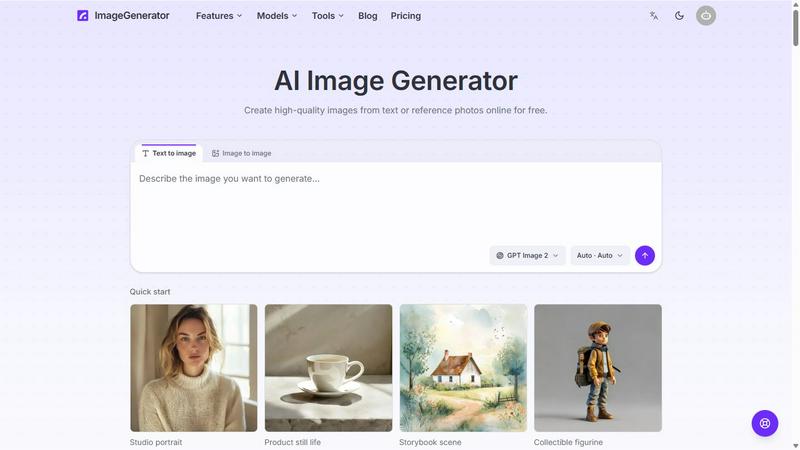
About ImageGenerator
ImageGenerator brings text-to-image and image-to-image generation together with a set of focused editing tools. Users can start with a prompt or a reference image, choose among multiple models, and iterate one image at a time. Results remain in a private library with the prompt and model used, where they can be downloaded at full resolution or reused as references.
Useful for layout and campaign drafts
The model selection is a practical part of the workflow: the product identifies options for rapid drafts, detailed scenes, prompt-faithful layouts, and production visuals. Aspect ratio controls include square, landscape, portrait, and other common formats. The site also offers background removal, 2× or 4× upscaling, image expansion, and style transfer. Since models consume different credit amounts, compare the displayed cost and expected output for the chosen model and resolution before generating at volume.
Features of ImageGenerator
- Generate images from text or reference images.
- Choose from multiple image models and aspect ratios.
- Save prompts, models, and results in a private library.
- Remove backgrounds, upscale, expand, or restyle images.
Use Cases of ImageGenerator
- Explore campaign concepts from a written brief or reference photo.
- Draft posters, product imagery, and layouts with legible text.
- Prepare alternate aspect ratios or extend an image beyond its frame.
- Keep a sequence of generated concepts for later refinement.
Frequently Asked Questions
Can I create from an existing image?
Yes. Upload a reference and use it to guide changes to style, setting, lighting, composition, or subject.
How do I control the format?
Choose an aspect ratio before generating, including 1:1, 16:9, 9:16, 4:3, or 3:4.
Are all model generations the same credit cost?
No. Credit use depends on the model and resolution, and the cost is shown before generation.
Explore more in this category:
Similar to ImageGenerator

MakePiecesOfUs
MakePiecesOfUs turns a pet's real photo into a private room with free memory tools and optional daily stories, themed settings and travel postcards.

Face Swap Video
Turn your photos into face-swap clips with trending dance, runway and music video templates, with format options that vary by template.

EveryGen AI
EveryGen AI combines image and video generation with editing pages and browser utilities for visual content work.

Toolbox for Mac
Toolbox for Mac includes 102 local tools for video, audio, images, PDFs and Mac utilities, all accessible from one keyboard-searchable app.

ImageAgent
ImageAgent lets creators turn a reference image or plain-language idea into visuals, then request new versions and download selected results.

Dola AI
Dola AI brings image, video, and 3D creation together with editing and office tools in a credit-based online workspace.

filmcraft
Filmcraft combines browser-based video editing with color and audio controls and a separate, credit-based suite of AI media tools.

ArtCraft
ArtCraft combines image, video, and 3D creative tools in a web studio, with reference organization and AI features that use credits.