
Berth for Mac
Berth for Mac maps storage to the apps and projects behind it, helping developers and creative Mac users judge what can be rebuilt or restored.
Visit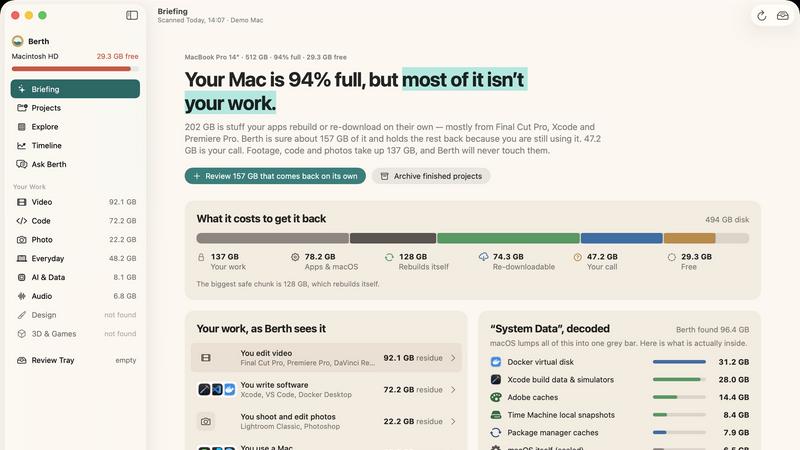
About Berth for Mac
Mac storage tools often show which folders are large but leave their purpose unclear. Berth for Mac connects files to the apps that produced them, so a developer can distinguish Xcode build output or Docker data from personal files, while a video editor can trace renders to a project. Each finding includes an explanation and, when relevant, the time to rebuild it or the size to download it again.
Berth supports browsing by meaning as well as by folder and offers project grouping for related work. Its verdicts are designed to inform a decision: generated data may be rebuildable, some content can be fetched again, ambiguous items stay for your judgment, and personal work is kept. Cleanup therefore requires review. Selected items go to the Trash rather than being permanently deleted, and undo is available. The app scans locally and does not require an account. Full Disk Access improves visibility into hidden app data, which is a practical setup consideration for a thorough scan.
Features of Berth for Mac
- Connects app leftovers to their likely source apps and projects.
- Gives four verdict types, including rebuildable, redownloadable and keep.
- Offers plain-language explanations and a folder-path view.
- Uses a review tray, dry run and Trash with undo for cleanup.
Use Cases of Berth for Mac
- Check whether sleeping projects contain removable build output.
- Locate caches and renders associated with creative projects.
- Assess local model storage and other downloadable assets.
- Inspect System Data when macOS storage categories are too broad.
Frequently Asked Questions
Can I use Berth without Full Disk Access?
Yes. It can scan your home folder and indicate what it could not see, but hidden app data may be missed.
Will it select my own files for cleanup?
Berth says personal files and items marked for your judgment are never selected automatically. You choose what enters the review tray.
Where do removed files go?
Confirmed items are moved to the macOS Trash, and Berth provides an undo option.
Pricing of Berth for Mac
Free tier for disk explanations and scanning. Pro costs $14.99 one time and covers two Macs.
Explore more in this category:
Similar to Berth for Mac

Kivloo
Kivloo organizes workplace and food safety checks by site, with phone based checklists, offline saving and searchable records for managers.

SmartCV
SmartCV helps job seekers create resumes from templates or existing files, then refine, check, export, and track applications.

BE THE ONE
BE THE ONE pairs daily intention setting with reflection, movement, breathwork, meditation, affirmations and creative practices in a routine app.

CyberScore
CyberScore finds publicly visible email, website and server security issues for small businesses, with a grade and plain-language remediation notes.

AI Sandbox Hunt
Explore agent sandboxes, cloud dev boxes and related tools with sourced price comparisons and a published scoring method.


Leadmatically
Leadmatically watches five social platforms for likely buyers and organizes scored prospects, outreach drafts and replies in one workflow.

GigUp
GigUp tracks Upwork searches around the clock, matches jobs to a public profile, and sends alerts so freelancers can review and apply themselves.