
AI Formatter
Transform your raw text into professional documents effortlessly with AI Formatter's expert templates and intuitive.
VisitPublished on:
October 14, 2025
Pricing:
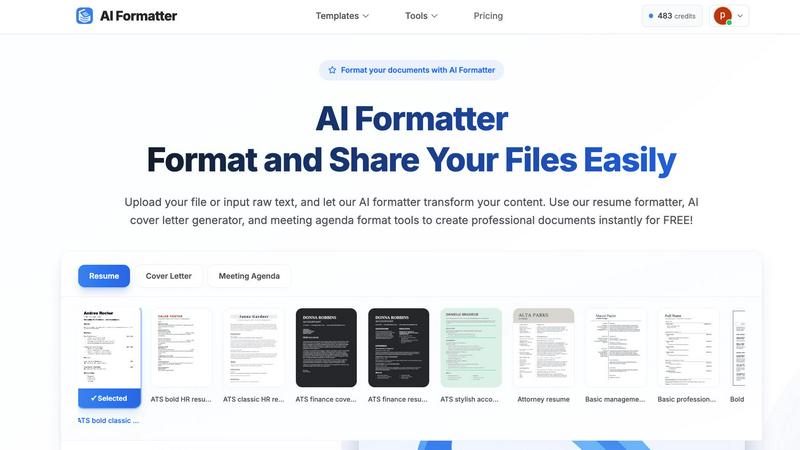
About AI Formatter
AI Formatter is the cutting-edge solution for professionals seeking to streamline their document formatting process. Developed by Sun Sky LLC, this cloud-based platform eliminates the time-consuming and often frustrating task of manual formatting, allowing users to focus on what truly matters: growth and quality presentation. Tailored for a diverse audience, including job seekers, businesses, and academics, AI Formatter enables users to upload raw text or existing files in various formats like Word, PDF, and TXT, and receive a polished, ATS-optimized document in seconds. With a remarkable 95%+ success rate on Applicant Tracking Systems, it addresses a crucial barrier in career advancement. The platform offers over 100 professional templates and a powerful real-time editor, ensuring that whether you are crafting a resume, a cover letter, or a meeting agenda, your content not only meets but exceeds professional standards. AI Formatter empowers users to invest their time in strategy, creativity, and personal growth instead of administrative overhead.
Features of AI Formatter
Template Library
AI Formatter boasts an extensive library of over 162 professional templates, specifically designed for ATS optimization. This feature ensures that your resumes and cover letters are formatted to meet the stringent criteria of automated screening systems, helping you stand out in a competitive job market.
Real-Time Editing
The platform provides a powerful real-time editor that allows users to customize their documents after formatting. This flexibility enables users to make necessary adjustments, enhance content, and ensure that every document meets their individual style and requirements.
Multi-Format Support
With support for various file formats, including PDF, DOC, DOCX, and TXT, AI Formatter allows users to easily upload existing documents or input raw text. This versatility ensures that no matter the source of your content, it can be transformed into a polished final product.
Rapid Formatting
AI Formatter significantly reduces the time spent on document preparation by providing instant formatting. Users can expect to receive a fully formatted document within seconds, saving over two hours of manual work per document, which translates to increased efficiency and productivity.
Use Cases of AI Formatter
Job Seekers
Job seekers can leverage AI Formatter to create compelling, ATS-optimized resumes and cover letters. By utilizing the platform, they can present their qualifications effectively and increase their chances of landing interviews in a competitive job market.
Businesses
Organizations can standardize their communications with AI Formatter by creating professional documents, such as reports, proposals, and internal memos. This helps maintain consistency in branding and messaging across all corporate documents.
Academics
Researchers and academics can benefit from AI Formatter by transforming their raw research notes and drafts into polished documents, including research papers and presentations. This ensures their work is presented professionally, enhancing its impact and reception.
Event Planners
Event planners can utilize the meeting agenda format tools to create structured agendas from raw notes. AI Formatter facilitates the quick turnaround of meeting materials, enabling planners to focus on orchestrating successful events while maintaining professionalism in documentation.
Frequently Asked Questions
How does AI Formatter ensure ATS compatibility?
AI Formatter uses templates specifically designed to meet the criteria of Applicant Tracking Systems. By following best practices in formatting, the tool ensures that your documents are easily readable by automated systems used by employers.
What file formats are supported by AI Formatter?
AI Formatter supports several file formats, including PDF, DOC, DOCX, and TXT. This flexibility allows users to upload existing documents or input raw text for formatting.
Can I customize my documents after formatting?
Yes, AI Formatter includes a powerful real-time editor that enables users to review, edit, and customize their documents post-formatting. You can make adjustments to ensure the final product meets your desired standards.
Is AI Formatter free to use?
Yes, AI Formatter offers its core features for free, allowing users to format their documents, create resumes, and generate cover letters without any cost.
Top Alternatives to AI Formatter


documentorium
Evolve from quoting to closing with guided forms that create professional contractor documents and PDFs in seconds.

Konstruction Group Inc.
Konstruction Group evolves custom builds from structural framing and steel to finished drywall and insulation.

SureThing.io
SureThing.io evolves into your trusted partner, autonomously managing tasks while learning your unique business voice over time.

Fond
Fond is your AI cooking companion that evolves with you, managing recipes and teaching technique to build your culinary confidence.

Clinic Comply
ClinicComply evolves your Australian healthcare practice from scattered spreadsheets to a single, always-ready accreditation platform.

Magic Resume
Magic Resume optimizes your resume in just 2 minutes, ensuring it stands out and passes ATS filters to land you interviews fast.

Outbid
OutBid empowers freelancers with instant job alerts and AI-generated proposals on Telegram, enabling faster applications and higher job wins.