

Dokie AI
Dokie AI empowers users to effortlessly create stunning professional presentations in minutes using advanced AI technology.
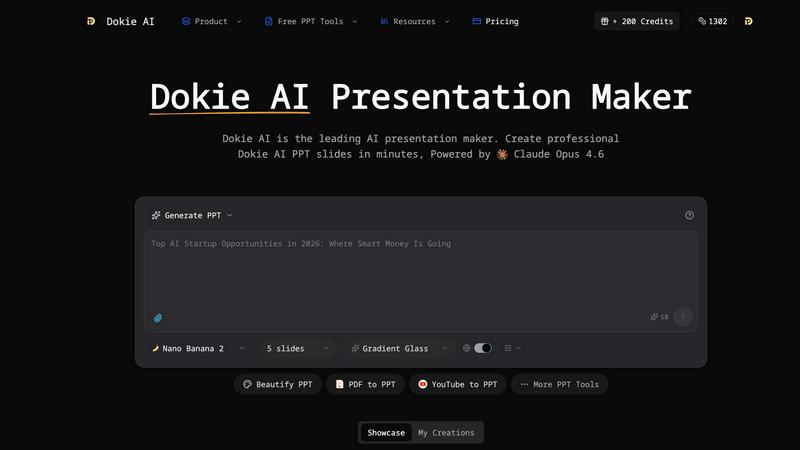
About Dokie AI
Dokie AI is a groundbreaking AI-powered presentation maker designed for business professionals, educators, marketers, and startup founders. It simplifies the process of creating professional-grade presentations without the need for advanced design skills. Utilizing the advanced capabilities of Claude Opus 4.6, Dokie AI automates various aspects of presentation design, including content structure, layout selection, typography, and visual design. This innovative tool offers multiple modes to cater to different user needs: Generate mode allows users to create presentations from scratch based on text prompts; Beautify mode enhances existing presentations; Speech mode adds detailed speaker notes; and document-to-PPT conversions facilitate seamless transitions from various formats. By streamlining the presentation creation process, Dokie AI empowers users to focus on content and delivery, ensuring their presentations are not only visually appealing but also impactful.
Features of Dokie AI
AI Generate PPT
This feature allows users to produce a complete slide deck based solely on a plain text description of their topic. Dokie AI intelligently analyzes the input and generates slides with professional layouts, relevant charts, and engaging content, saving users valuable time and effort in the presentation creation process.
AI Beautify PPT
With this functionality, users can upload existing presentations, and Dokie AI will enhance their design. The AI beautifies the slides by fixing layouts, applying professional styling, and ensuring that the presentation's content remains intact, transforming ordinary slides into stunning visual displays.
Speech Notes Generation
Dokie AI automatically generates detailed speaker notes for each slide, equipping users with comprehensive talking points to aid in their delivery. This feature enhances the overall presentation experience, allowing presenters to engage their audience effectively and confidently.
Document-to-PPT Conversion
This versatile feature enables users to convert various document formats, including PDFs and Word documents, into PowerPoint presentations seamlessly. By transforming existing content into slides, Dokie AI simplifies the workflow for users who need to quickly create presentations from pre-existing materials.
Use Cases of Dokie AI
Business Presentations
Dokie AI is ideal for business professionals who need to create impactful presentations for meetings, pitches, or reports. The tool's ability to generate polished slides rapidly allows users to focus on delivering their message rather than getting bogged down in design details.
Educational Lectures
Educators can leverage Dokie AI to prepare engaging lectures and presentations for their classes. The AI-generated slide decks can help convey complex information clearly and visually, enhancing the learning experience for students.
Marketing Campaigns
Marketers can utilize Dokie AI to create presentations that showcase campaign strategies, results, and market analysis. The tool's features enable them to produce visually appealing slides that captivate and inform stakeholders.
Startup Pitches
Startup founders can use Dokie AI to develop compelling pitch decks that highlight their business ideas and value propositions. The AI's capabilities help ensure that the presentations are professional and persuasive, increasing the chances of securing investment.
Frequently Asked Questions
What types of presentations can I create with Dokie AI?
Dokie AI allows users to create various types of presentations, including business reports, educational lectures, marketing strategies, and startup pitch decks, catering to a wide range of professional needs.
How does Dokie AI enhance existing presentations?
Using the AI Beautify feature, Dokie AI enhances existing presentations by fixing layouts, applying professional design elements, and ensuring that the original content remains intact while improving overall aesthetics.
Can I generate speaker notes for my presentations?
Yes, Dokie AI automatically generates detailed speaker notes for each slide, providing users with essential talking points that help enhance their presentation delivery and maintain audience engagement.
Is Dokie AI suitable for non-designers?
Absolutely! Dokie AI is specifically designed for users without advanced design skills. Its intuitive AI technology automates the design process, allowing anyone to create professional-grade presentations effortlessly.
Top Alternatives to Dokie AI

Ninjasell
NinjaSell automates Etsy print-on-demand selling by creating optimized listings, generating mockups, and fulfilling orders with white-label shipping.

Supermachine
Supermachine empowers creators with over 60 AI models to generate stunning, commercial-ready images and videos effortlessly.

Proofapp
Proofapp lets teams and clients leave visual feedback directly on any webpage to streamline reviews.

Genstory
Transform your ideas into captivating novels, comics, and videos effortlessly with Genstory's powerful AI storytelling.

vaethat
Vaethat is the specialized AI that upscales and enhances architectural renders with precision and ease.

Postproxy
Postproxy simplifies social media publishing by unifying multiple networks into one seamless API solution.

Gleem.AI Studio
Gleem.AI Studio is your all-in-one creative workspace for generating and editing stunning AI images with simple prompts.

Nano Banana Pro
Nano Banana Pro is a professional AI image generator that creates stunning, consistent 4K visuals for any creative.