

Deskripsyon
This plugin adds a universal top menu among WordPress sister websites.
Administrators may manage menus from one central location (a master site) and use the client plugin (pending) on remaining sites to display the menus.
Or simply add the master menu to all sites that needs the top menu.
Create as many menus as you like. If you are using the client plugin to display the menus
on sisters sites you first need to add that site to the list of menus first on the master site.
After creating your menus choose from ten (10) color themes under settings and you’re all set to go.
Please feel free to request more themes and features (email @ kevonadonis.com )
Mga Screenshot
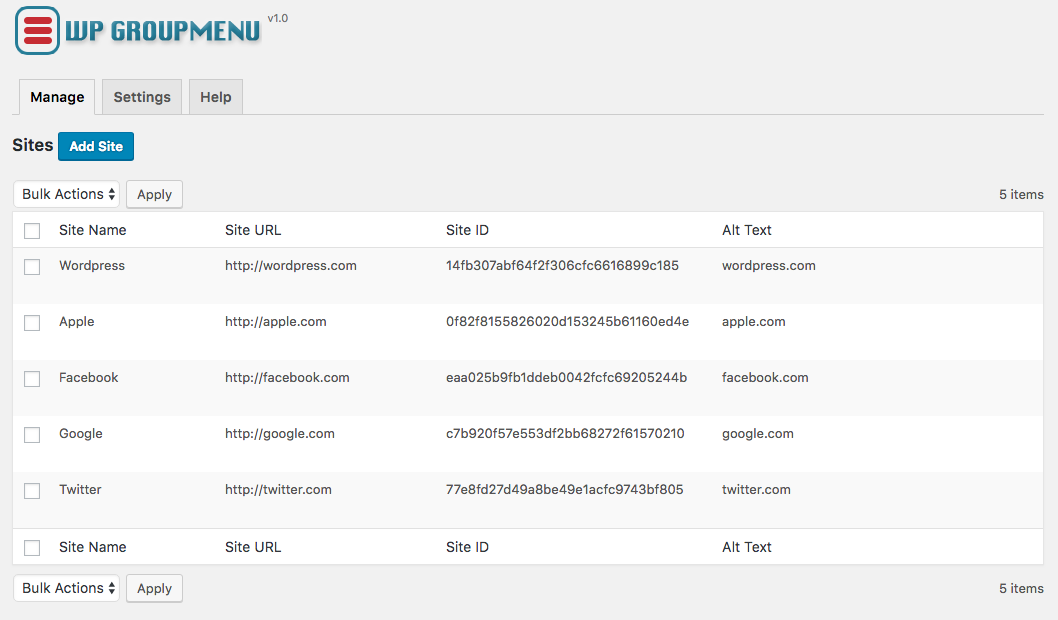

Pag-install
- Upload
wpgroupmenuto the/wp-content/plugins/directory - Activate the plugin through the ‘Plugins’ menu in WordPress
- Go to setting, create your menus and customize your the look.
FAQ
- Installation Instructions
-
- Upload
wpgroupmenuto the/wp-content/plugins/directory - Activate the plugin through the ‘Plugins’ menu in WordPress
- Go to setting, create your menus and customize your the look.
- Upload
Mga Review
Wala pang reviews para sa plugin na ito.
Mga Contributor at Developer
Ang “WP Group Menu” ay open source software. Ang mga sumusunod na tao ay nag-ambag sa plugin na ito.
Mga Contributor
Isalin ang “WP Group Menu” sa iyong wika.
Interesado sa development?
Tingnan ang code, i-check ang SVN repository, o mag-subscribe sa development log sa pamamagitan ng RSS.
Changelog
1.0
- Add ability to set custom colors and allignment
- Compatibility testing with WP 4.9.6
0.2
- Add eight (8) color themes
- Minor bug fixes
0.1
Initial Release