
Deskripsyon
This plugin will automatically generate a page-specific widget area that replaces the content of the page when selecting the ‘Widgetized Page’ template. Requires the Genesis Framework.
You can add support for Genesis structural wraps when using the ‘Widgetized Page’ template along with the full-width Genesis page layout option. The following example shows how you can implement this on your theme:
// Add structural wrap to page widget area section
add_theme_support( 'genesis-structural-wraps', array( 'header', 'footer-widgets', 'footer', 'site-inner', 'page-widget-area' ) );
Mga Screenshot
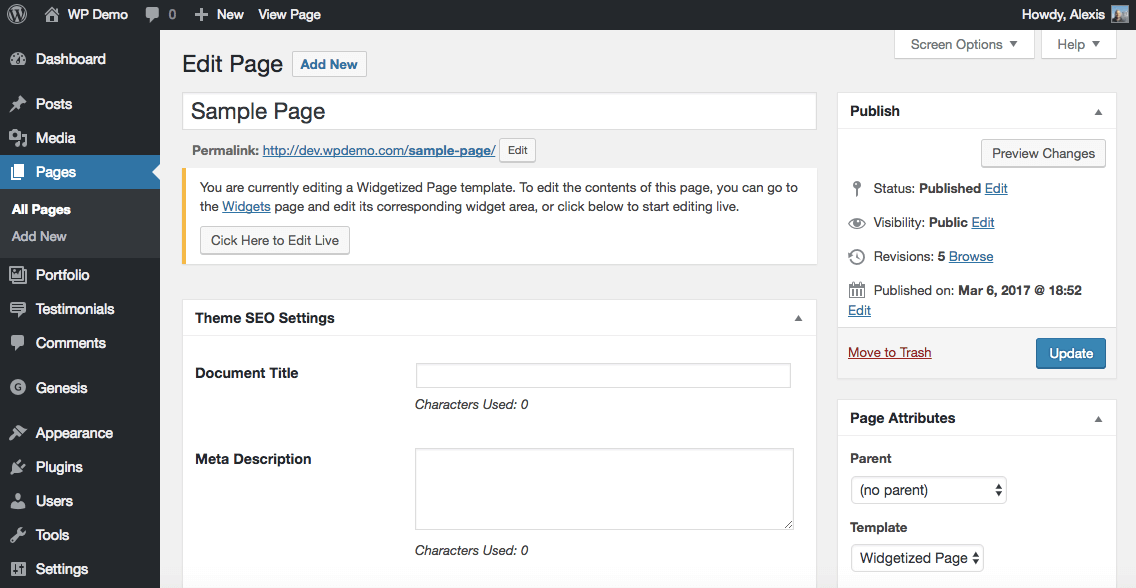
Page editor screen
Pag-install
Using The WordPress Dashboard
- Navigate to the ‘Add New’ Plugin Dashboard
- Click on ‘Upload Plugin’ and select
widgetized-page-template.zipfrom your computer - Click on ‘Install Now’
- Activate the plugin on the WordPress Plugins Dashboard
Using FTP
- Extract
widgetized-page-template.zipto your computer - Upload the
widgetized-page-templatedirectory to yourwp-content/pluginsdirectory - Activate the plugin on the WordPress Plugins Dashboard
Mga Review


Mga Contributor at Developer
Ang “Widgetized Page Template” ay open source software. Ang mga sumusunod na tao ay nag-ambag sa plugin na ito.
Mga Contributor
Ang “Widgetized Page Template” ay naisalin na sa 3 (na) mga locale. Salamat sa mga tagasalin para sa kanilang mga kontribusyon.
Isalin ang “Widgetized Page Template” sa iyong wika.
Interesado sa development?
Tingnan ang code, i-check ang SVN repository, o mag-subscribe sa development log sa pamamagitan ng RSS.
Changelog
1.1.0
- The page widget area output is now automatically saved to
post_contentin the database for improved indexing and site search. - Code and syntax fixes to ensure compatibility with latest WordPress version.
- Added Spanish translations.
1.0.5
- Fixed bug where page template was breaking search results and prevented them from displaying correctly.
1.0.4
- Added a live edit button to the page editor screen that automatically redirects to the page widget area section in the Customizer.
1.0.3
- Removed previous version’s compatibility issue fix (no longer needed with Genesis v2.5.2).
1.0.2
- Fixed compatibility issue with Genesis v2.5.1.
1.0.1
- Added support for WordPress v4.7 and above.
1.0.0
- Initial release.