

Deskripsyon
Ultimate Login Customizer is a free WordPress plugin that helps you customize your WordPress login page (wp-login.php) easily. Transform the default WordPress login screen into a professionally branded login page with enhanced security features.
Looking to customize your WordPress login page? With Ultimate Login Customizer, you can easily modify the wp-login.php page design without coding. Whether you want to add your company logo, change colors, customize the login form, or enhance security with CAPTCHA – our plugin provides all the essential tools for WordPress login page customization.
Why Choose Ultimate Login Customizer?
- Free WordPress Login Customizer
- No Coding Required: User-friendly interface for wp-login.php customization
- Enhanced Security: Multiple CAPTCHA options to protect your WordPress login
- Professional Branding: Transform the default WordPress login screen
- Mobile-Friendly: Responsive design works on all devices
- Fast & Lightweight: Optimized code for quick loading
- Regular Updates: Continuous improvements and security updates
- Easy Setup: Start customizing in minutes
Perfect for:
- Web developers customizing client WordPress login pages
- Agencies needing branded WordPress login screens
- Website owners wanting to improve their wp-login security
- Anyone looking to customize the default WordPress login design
- Businesses requiring professional login page branding
- Developers managing multiple WordPress sites
- Agencies providing white-label WordPress solutions
WordPress Login Page Customization
Easily customize every aspect of your WordPress login page:
* Custom Login Logo: Replace the WordPress logo with your brand
* Login Background: Add custom images or colors
* Form Styling: Customize the login form appearance
* Color Schemes: Match your brand colors
* Button Design: Style the login button
* Form Position: Adjust the login form layout
* Responsive Design: Perfect display on all devices
* Custom CSS: Add your own styling if needed
Security Features
Protect your WordPress login page with multiple security options:
* Google reCAPTCHA v2: Industry-standard protection
* Canvas CAPTCHA: Lightweight built-in option
* Server-Side Verification: Secure form processing
* Session Management: Enhanced security handling
* AJAX Security: Protected form submission
* Mobile Security: Safe login on all devices
Easy Integration
Ultimate Login Customizer works seamlessly with:
* Default WordPress login page
* WooCommerce login pages
* Membership plugins
* Custom login pages
* WordPress Multisite
* Popular security plugins
* Cache plugins
* WordPress themes
Developer Friendly
- Clean, well-documented code
- Performance optimized
- Regular security updates
- WordPress coding standards
- Compatible with latest WordPress versions
Mga Screenshot

Customized login page with background effects 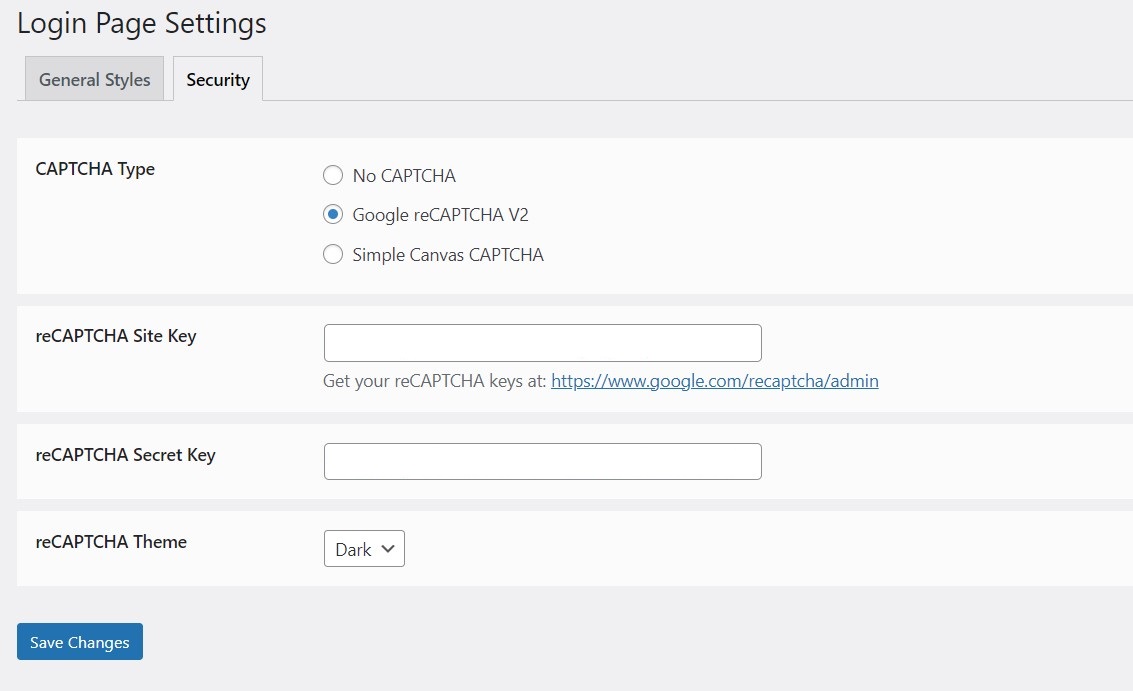
Security settings with CAPTCHA options 
Design customization interface 
Mobile view of customized login
Pag-install
- Upload the
ultimate-login-customizerfolder to the/wp-content/plugins/directory - Activate the plugin through the ‘Plugins’ menu in WordPress
- Go to ‘Login Settings’ in your WordPress admin panel
- Start customizing your WordPress login page
Quick Start Guide
- Choose your CAPTCHA security option
- Upload your custom logo
- Set your background style
- Customize form colors and transparency
- Save and preview your changes
FAQ
-
Is this a free WordPress login customizer?
-
Yes, Ultimate Login Customizer is completely free and includes all essential features for customizing your WordPress login page. There are no premium versions or hidden costs.
-
Can I customize the default WordPress login page?
-
Yes, you can fully customize the wp-login.php page including logo, background, colors, and form styles. The plugin provides an intuitive interface for all customizations.
-
Does this plugin modify the wp-login.php file?
-
No, the plugin safely customizes your login page without modifying any WordPress core files. All changes are applied dynamically and can be reversed at any time.
-
Which CAPTCHA option should I choose?
-
- reCAPTCHA v2: Best for high-security needs and familiar to users
- Canvas CAPTCHA: Lightweight option without external dependencies
-
Will this work with my theme?
-
Yes, Ultimate Login Customizer is compatible with all WordPress themes as it only modifies the login page (wp-login.php).
-
Is the customized login page mobile-friendly?
-
Yes, all login page customizations are fully responsive and work well on all devices, including smartphones and tablets.
-
How do I revert to the default login page?
-
Simply deactivate the plugin to return to the default WordPress login page. No settings or files are modified permanently.
Mga Review
Wala pang reviews para sa plugin na ito.
Mga Contributor at Developer
Ang “Ultimate Login Customizer – WordPress Login Page Design & Security” ay open source software. Ang mga sumusunod na tao ay nag-ambag sa plugin na ito.
Mga Contributor
Isalin ang “Ultimate Login Customizer – WordPress Login Page Design & Security” sa iyong wika.
Interesado sa development?
Tingnan ang code, i-check ang SVN repository, o mag-subscribe sa development log sa pamamagitan ng RSS.
Changelog
1.1.1
- Fixed Canvas CAPTCHA display issues
- Improved CAPTCHA refresh functionality
- Enhanced mobile responsiveness
- Updated security measures
- Optimized code structure
1.1.0
- Added Canvas CAPTCHA option
- Enhanced security settings interface
- Added background blur effect
- Improved mobile responsiveness
- Fixed various CSS issues
- Added CAPTCHA type selection
- Optimized code structure
- reCAPTCHA integration
1.0.0
- Initial release with basic customization options