
Deskripsyon
This plugin adds voting functionality for posts. visitors can vote for the post and against.
The Plugin HomePage on right is wrong , i’ sorry to that, and you can see how it works click Starbox Voting HomePage
If you like this plugin , and translate it to other language , please let me know
Change Log
1.1: Add plugins init setting , set display image as default image.
1.2: Repaire ajax Request ,no response .
1.3 Add so Style to choose In Setting > Starbox
1.4 You can set style by yourself In Setting > Starbox
1.5 Change error: no effect when change style in backend
Add ghosing effect when mouse hover the stars
Change Style Setting Page style.
1.6 Add Language Package
1.7 Rename every function . to avoid with other plugins
1.8 Compatible with Windows And Linux
2.0.2 Fix database create table only have ‘wp_’ prefix .
2.0.3 Clear code.
2.0.4 Fix Ie8 Bug:add this right after :
Requirements
-
A working WordPress install
-
WordPress theme must contain a call to the
get_header()function -
WordPress theme must contain the WordPress loop
Most WordPress installs have these, so you need not worry about these.
In addition, one must have JavaScript enabled in their browsers in order to vote.
Customizing
If the plugin cannot write to the database, you can try manually executing the below SQL queries (you can use phpMyAdmin to do this):
    CREATE TABLE `wp_starboxvoting` (
                                  id int(11) NOT NULL auto_increment,
                                  object_id int(11) NOT NULL,
                                  ip varchar(64) character set latin1 NOT NULL,
                                  vote int(11) NOT NULL,
                              PRIMARY KEY  (`id`)
                            ) ENGINE=MyISAM DEFAULT CHARSET=utf8 AUTO_INCREMENT=1 ;
Mga Screenshot

Front Page Display Style
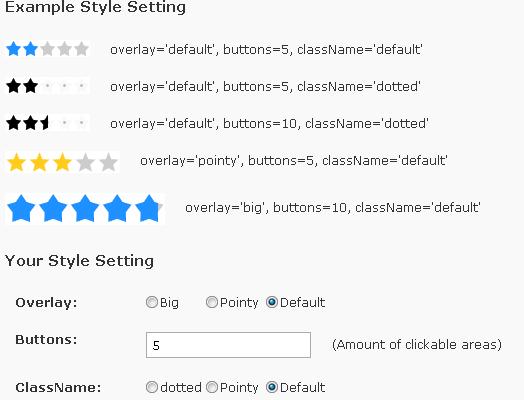
Starbox Voting Style
Pag-install
- Upload the folder
starboxto the/wp-content/plugins/directory - Activate the plugin through the ‘Plugins’ menu in WordPress
- You will need to insert the code (
<?php if(function_exists('starbox_voting')){starbox_voting(get_the_ID());} ?>) into the WordPress loop. - You can also insert the code (
<?php if(function_exists('starbox_voting')){starbox_voting(get_the_ID());} ?>) into the Post (single.php) or Pages (page.php). - You can customize the plugin options via the WordPress Dashboard (
Options > Starboxin WordPress versions prior to 2.3,Settings > Starboxin WordPress versions after 2.5) - If You want starbox work in ie8 , please add this right after:
<meta http-equiv=”X-UA-Compatible” content=”IE=EmulateIE7″ />
Mga Review
Wala pang reviews para sa plugin na ito.
Mga Contributor at Developer
Ang “Starbox Voting” ay open source software. Ang mga sumusunod na tao ay nag-ambag sa plugin na ito.
Mga Contributor
Isalin ang “Starbox Voting” sa iyong wika.
Interesado sa development?
Tingnan ang code, i-check ang SVN repository, o mag-subscribe sa development log sa pamamagitan ng RSS.