

Deskripsyon
Adds a menu to the admin bar to quickly identify different environments for a site (e.g. production and development) and easily switch to the same URL on other environments. Multi-site compatible for both sub-domain and sub-directory installations.
Configuration
The plugin has a convenient settings page but can also be configured programatically via a filter hook.
Setting environments via the WordPress admin interface
Navigate to “Settings > Set the Stage” in the WordPress admin to review and edit the configuration.
Setting environments via a WordPress filter hook
Hook to drgnff_wp_stage_switcher__environments and return an array with environments. Here’s an example filter function:
add_filter( 'drgnff_wp_stage_switcher__environments', function ($envs) {
    return [
        [
            'url' => 'https://example.com', // home url
            'title' => 'LIVE', // display name
            'color' => '#ffffff', // hex color (optional)
            'background_color' => '#ff0000', // hex color (optional)
        ],
        [
            'url' => 'https://example.com',
            'title' => 'DEVELOPMENT',
            'color' => '#ffffff',
            'background_color' => '#228b22',
        ],
    ];
});
Controlling visibility of the switcher
By default the switcher menu is displayed to all logged in users. By hooking to drgnff_wp_stage_switcher__should_display_switcher and returning a boolean you can control whether the switcher should be displayed.
Overriding the default environment
The default environment is used for the current site if it’s not in the list of environments. By hooking to drgnff_wp_stage_switcher__default_environment you can control the title and colors for the default environment.
A few notes on configuration
- Filters have a precedence over manual configuration made in the settings page. If filters are used then relevant sections on the settings page are rendered as read-only.
- For multi-site installations use the URLs of the main site.
- The plugin initiates its logic on the
plugins_loadedhook with priority11. Thus filter hooks that affect the plugin must be added before that.
Mga Screenshot

The admin bar menu in action 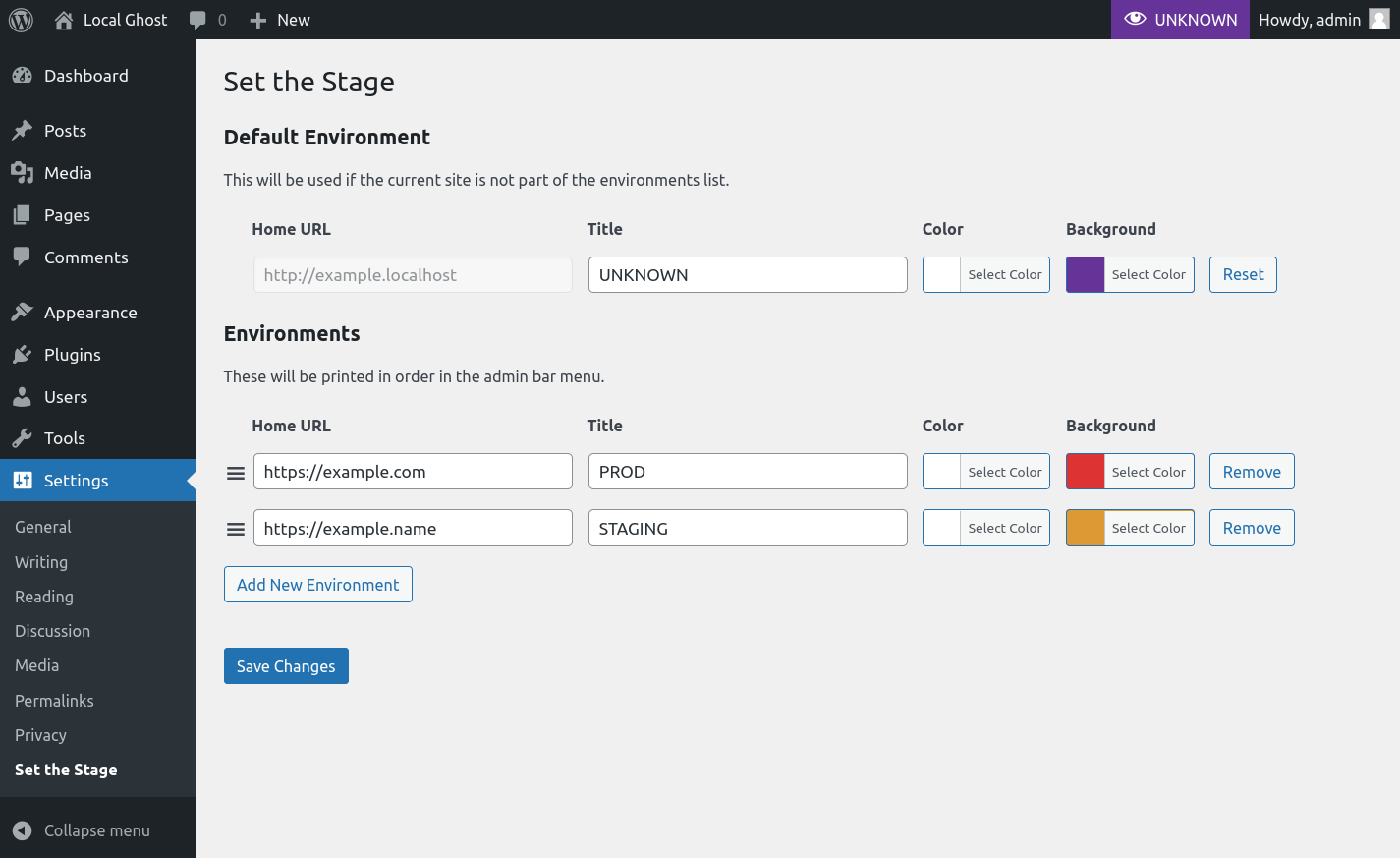
The settings page 
Adding the current environment to the list
Pag-install
- Activate from the plugins menu.
- Navigate to the plugin settings page or use a filter to set up your environments.

Mga Contributor at Developer
Ang “Set the Stage” ay open source software. Ang mga sumusunod na tao ay nag-ambag sa plugin na ito.
Mga Contributor
Isalin ang “Set the Stage” sa iyong wika.
Interesado sa development?
Tingnan ang code, i-check ang SVN repository, o mag-subscribe sa development log sa pamamagitan ng RSS.
Changelog
1.0.1
Fixed
– Fix default environment reset button
1.0.0
- Initial release.