

Deskripsyon
You can add your site to the background music through YouTube. Components can enable or disable the part, and you can easily control. The music you want to add to your site YouTube ID is required. In the number of songs on YouTube plugin you can see where it says.
Producer
It is prepared by Program indir
Mga Screenshot
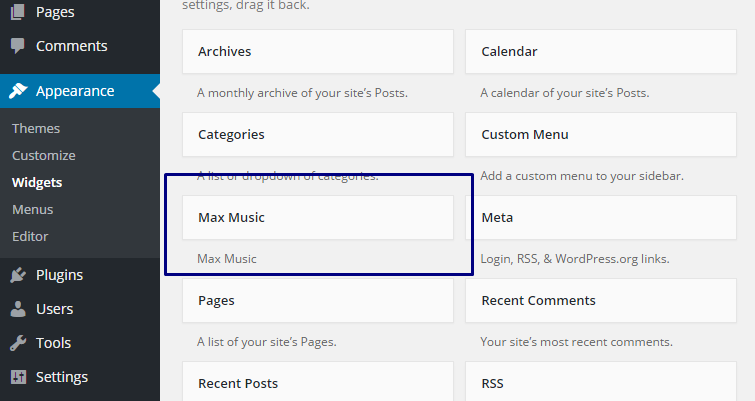
Widgets 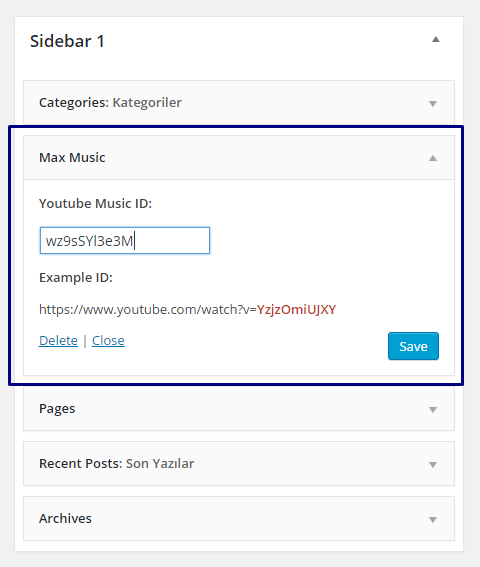
Max Music Widget
Pag-install
This section describes how to install the plugin and get it working.
e.g.
- Upload
maxmusicto the/wp-content/plugins/directory - Activate the plugin through the ‘Plugins’ menu in WordPress
- Admin Panel -> Appearance -> Widgets -> Max Music
- Add max plugin, and fill in the blanks
FAQ
- How to activate add-ons?
-
Admin Panel -> Appearance -> Widgets -> Max Music
- What Youtube music ID?
-
Sample music: https://www.youtube.com/watch?v=wz9sSYl3e3M
Sample ID: wz9sSYl3e3M
Mga Review


Mga Contributor at Developer
Ang “Max Music” ay open source software. Ang mga sumusunod na tao ay nag-ambag sa plugin na ito.
Mga Contributor
Isalin ang “Max Music” sa iyong wika.
Interesado sa development?
Tingnan ang code, i-check ang SVN repository, o mag-subscribe sa development log sa pamamagitan ng RSS.
Changelog
1.0
- Attachments prepared.