

Deskripsyon
Hide title or Hide page and post title plugin provides functionality to user to hide the page and post title.
Major features of this plugin include
- Hide the title of particular page.
- Hide the title of particular post.
- Hide the title of particular custom post(CPT).
Like the plugin?
Please Vote, Your votes really make a difference! Thanks.
Mga Screenshot

Pag-install
The plugin is simple to install:
- Download hide-page-and-post-title.zip
- Unzip
- Upload the ‘hide-page-and-post-title’ folder to your /wp-content/plugins directory
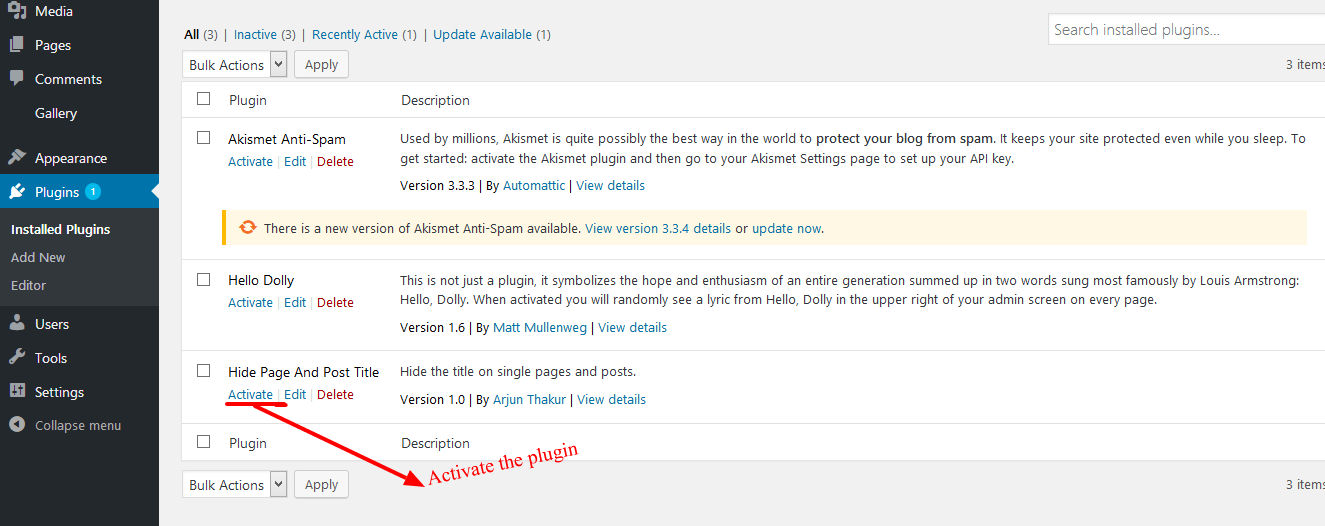
- Go to the plugin menu page and activate the plugin
FAQ
-
How to hide the title of page or a post?
-
- Activate the plugin through the ‘Plugins’ menu in WordPress.
- Then Create New Post/Page Or you can use old one.
- Now go to edit screen for pages or posts and click on the Hide the title options.
- After you click on “Hide the title” just publish or update the page or post.
- Activate the plugin through the ‘Plugins’ menu in WordPress.
-
What is the benefit of using this plugin?
-
User can easily hide the title of posts, pages or the custom posts.
Mga Review

Disyembre 15, 2023
Thanks!!

Agosto 31, 2023
Nice! Simple and does just what it says, no muss, no fuss. Thank you!!

Agosto 18, 2023
Comme d’autres l’ont dit, cela ne fonctionne pas sur toutes les pages ou articles, alors que j’ai un vieux plugin “disable title” non mis à jour depuis plus de 9 ans qui fonctionne bien et a plus d’option. Ma version Wordpress est 4.9.23 avec le thème Fanzone.

Hulyo 8, 2023
It works sometimes. Then when I make a page edit, the title displays again. I have to click off, save. Then click on and save again. Every time I make an edit to a page. Doesn’t work.

Hunyo 16, 2023
There is no visible funktion. I set the flag, but Title is still on the page…

Mayo 29, 2023
El titulo sigue visible, no funciona
Mga Contributor at Developer
Ang “Hide Page And Post Title” ay open source software. Ang mga sumusunod na tao ay nag-ambag sa plugin na ito.
Mga Contributor
Isalin ang “Hide Page And Post Title” sa iyong wika.
Interesado sa development?
Tingnan ang code, i-check ang SVN repository, o mag-subscribe sa development log sa pamamagitan ng RSS.