

Deskripsyon
Brute Force Protector is your site’s first line of defense against automated login attacks. Malicious bots constantly try to guess your password using brute force attacks, credential stuffing, and dictionary attacks — this plugin puts a complete stop to it.
It works by tracking failed login attempts from each IP address. If an IP exceeds the configured number of failures in a short period, it gets temporarily blocked, preventing the attacker from making further attempts. This simple but effective method secures your login page, protects your wp-admin area, and strengthens your overall WordPress security without adding complexity.
Who needs this plugin?
If you are looking for a way to secure WordPress login, limit login attempts, block bots from wp-login.php, stop brute force password attacks, prevent unauthorized access to your WordPress dashboard, or simply improve your WordPress site security — this plugin is built for you. It is the ideal WordPress security plugin for beginners and professionals alike.
How it helps:
By acting as a login-level firewall, Brute Force Protector reduces the risk of hacked WordPress sites, compromised admin accounts, and malware injections that often start with a brute force attack. It is a lightweight, zero-configuration WordPress protection tool that starts working the moment it is activated.
Features
- Limit Login Attempts: Set a maximum number of failed login attempts before an IP is blocked.
- Configurable Lockout Duration: Define how long a blocked IP should be denied access.
- Simple Settings Page: Easily configure the plugin from the WordPress admin dashboard under “Settings” > “Brute Force Protector”.
- Lightweight and Efficient: Designed to be fast and have a minimal impact on your site’s performance.
- Clears on Successful Login: The failed attempt counter is reset when a user successfully logs in.
Mga Screenshot
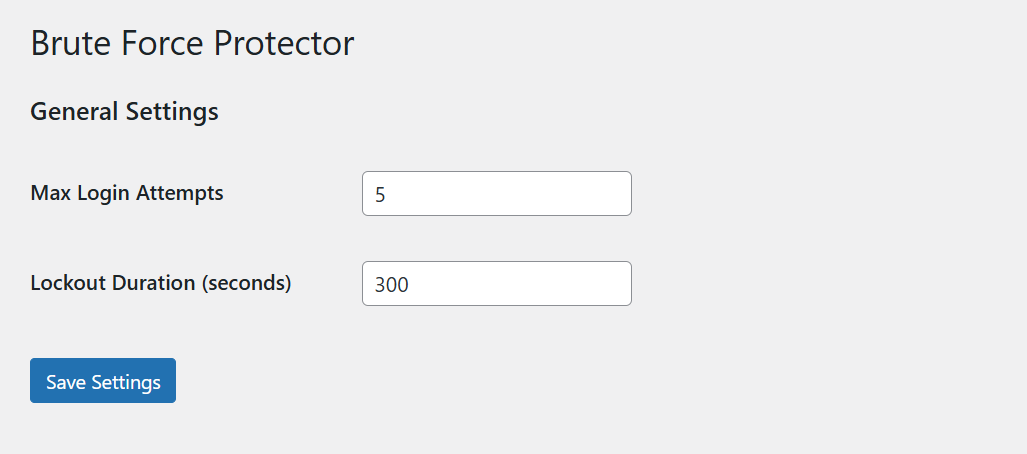
The settings page where you can configure the plugin.
Pag-install
- Upload the
brute-force-protectorfolder to the/wp-content/plugins/directory. - Activate the plugin through the ‘Plugins’ menu in WordPress.
- Navigate to “Settings” > “Brute Force Protector” to configure the settings.
FAQ
-
How do I know if an IP is blocked?
-
When an IP is blocked, any attempt to access the login page from that IP will result in a “Too many failed login attempts” error screen, and they will be prevented from accessing the site.
-
Can I change the number of allowed attempts?
-
Yes, you can easily change the maximum number of attempts and the lockout duration from the plugin’s settings page, located at “Settings” > “Brute Force Protector”.
-
Is this plugin heavy on my server?
-
No. The plugin is designed to be extremely lightweight. It uses WordPress transients to temporarily store failed login data, which is a highly efficient method that has a negligible impact on server resources.
-
Does this plugin help with WordPress admin login security?
-
Yes. This plugin provides strong WordPress admin login security by monitoring and blocking suspicious IP addresses that repeatedly fail authentication. It acts as a login guard to protect wp-admin and wp-login.php from automated bots and hackers.
-
Can this plugin hide or protect the admin login page?
-
While this plugin does not rename or move the login URL, it effectively protects your admin login page by blocking brute force attackers after a set number of failed attempts. For full login page hiding or custom login URL functionality, this plugin’s login protection works alongside plugins that obscure or rename the login page.
-
Does this plugin prevent hack attempts and bot attacks?
-
Yes. It is designed for hack prevention and bot protection. Automated attack prevention is at its core — the plugin detects and blocks spam bots and credential-stuffing attacks that try to break into your WordPress site.
-
Is this plugin a WordPress firewall or web application firewall (WAF)?
-
This plugin functions as a login-level firewall. It provides rate limiting and IP blocking at the login page, acting as an intrusion prevention layer. For a full web application firewall (WAF), you may pair it with a dedicated WordPress firewall plugin.
-
Does it protect against credential stuffing and password guessing?
-
Yes. It limits login attempts to stop credential stuffing, password guessing, and dictionary attacks. By enforcing a login lockdown after too many failed login attempts, it effectively prevents unauthorized access from malicious IPs.
-
Can it help with site hardening?
-
Absolutely. Login hardening is one of the most important aspects of site hardening and WordPress security. This plugin secures your login page and reduces the attack surface by blocking IPs that exhibit brute force behavior, complementing other security measures like two-factor authentication.
-
Does it work with custom admin URLs or renamed login pages?
-
Yes. If you use a plugin to move or rename your wp-login.php to a custom admin URL (login URL change), Brute Force Protector will still protect that login endpoint by monitoring failed login attempts through WordPress’s native authentication hooks.
-
Yes. It is built specifically to prevent unauthorized access by blocking IPs after repeated failed login attempts. This makes it an essential WordPress protection and cyber security tool for any site that wants to block hackers and secure its admin area.
Mga Review
Wala pang reviews para sa plugin na ito.
Mga Contributor at Developer
Ang “Brute Force Protector” ay open source software. Ang mga sumusunod na tao ay nag-ambag sa plugin na ito.
Mga Contributor
Isalin ang “Brute Force Protector” sa iyong wika.
Interesado sa development?
Tingnan ang code, i-check ang SVN repository, o mag-subscribe sa development log sa pamamagitan ng RSS.
Changelog
1.0.0 – 2026-05-25
- Initial release.
- Tracks failed login attempts by IP.
- Temporarily blocks IPs that exceed the failure threshold.
- Adds a settings page to configure max attempts and lockout duration.