Key Bindings
Posted by Rob Camick on October 10, 2008
All Swing components use Key Bindings, but what are they? Well, have you ever wondered how the “copy” functionality of a text component works? The KeyStroke (Ctrl+C) is used to invoke an Action (copy). So a key binding is simply the mapping of a KeyStroke to an Action.
Swing uses an InputMap (well actually it uses three of them), to contain the KeyStrokes and an ActionMap to contain the Actions. The InputMap and ActionMap are linked together so that when a key on the keyboard is invoked the action is performed. The Swing tutorial on “How to Use Key Bindings” gives a much better description of this process then I can provide here, so I suggest you read it for more detail, as it is important to understand the usage of the three different InputMaps.
After reading the tutorial, hopefully you will realize that key bindings are an easy way to customize the behaviour of a component. A summary of the basic code for different key binding features would be something like:
- add new functionality by adding a new key binding:
Action action = new AbstractAction() {...};

String keyStrokeAndKey = "control Z";

KeyStroke keyStroke = KeyStroke.getKeyStroke(keyStrokeAndKey);

component.getInputMap(...).put(keyStroke, keyStrokeAndKey);

component.getActionMap().put(keyStrokeAndKey, action);
- change existing functionality by replacing the Action of an existing binding:
Action action = new AbstractAction() {...};

KeyStroke keyStroke = KeyStroke.getKeyStroke("control Z");

InputMap im = component.getInputMap(...);

component.getActionMap().put(im.get(keyStroke), action);
- share an Action with a different KeyStroke:
KeyStroke existingKeyStroke = KeyStroke.getKeyStroke("ENTER");

KeyStroke addedKeyStroke = KeyStroke.getKeyStroke("control Z");

InputMap im = component.getInputMap(...);

im.put(addedKeyStroke, im.get(existingKeyStroke));
- bind an Action to a KeyStroke:
KeyStroke addedKeyStroke = KeyStroke.getKeyStroke("control Z");

InputMap im = component.getInputMap(...);

im.put(addedKeyStroke, "caret-end-word"); // from the "Action" column below
- remove a key binding:
KeyStroke remove = KeyStroke.getKeyStroke(...);

InputMap im = component.getInputMap(...);

im.put(remove, "none");
Note, the above examples are for adding bindings to individual components. To add a binding at the frame or dialog level you need to use the InputMap and ActionMap of the root pane:
frame.getRootPane()
    .getInputMap(JComponent.WHEN_ANCESTOR_OF_FOCUSED_COMPONENT)...
frame.getRootPane().getActionMap()...
So, now that you know that key bindings exist, you are probably wondering what the default key bindings are for each component, right? Well, if you are curious, then the Key Bindings application is a good starting point to find this information.
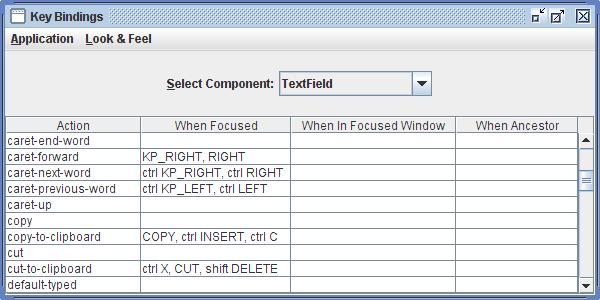
The above discussion deals with changing the bindings for an individual component. But there may be times when you need to change a binding for all components of a given class. In this case the UIManager can help you out. It has access to the InputMap that is used by all components. So if you modify that InputMap it will be changed for all components. You access this InputMap with code like the following (using a JTextField as an example):
InputMap im = (InputMap)UIManager.get("TextField.focusInputMap");
Remember that there are potentially 3 different InputMaps for any given component so you should use the UIManager Defaults program (link below) to determine the appropriate InputMap to update.
There is also a shared ActionMap that you can access (again using a JTextField as an example):
ActionMap am = (ActionMap)UIManager.get("TextField.actionMap");
You should only try to access these shared maps after an instance of the component has been created.
 Java Tips Weblog
Torgil Zethson said
This is an awesome little program! I wish had it (or had the good sense of writing something like it myself…) years ago.
Cheers,
– Torgil
camickr said
Thanks. Writing the code helped me better understand how key binding worked and it sure beats looking at the code to find action names.
Torgil Zethson said
> and it sure beats looking at the code to find action names
Definitely. It is very useful (in fact, I’ve used it already at work).
Christian Ortiz said
Hi. i want to put a different keystroke to a JButton. in my case ENTER because default inputmap is space. i am trying but no success. i want to add a actionperformed to a button and when it´s focus i can press enter and the action for button response.
please help.
this is the code i am coding.
KeyStroke existingKeyStroke = KeyStroke.getKeyStroke(“SPACE”);
KeyStroke addedKeyStroke = KeyStroke.getKeyStroke(“ENTER”);
InputMap im = jButton1.getInputMap((JComponent.WHEN_FOCUSED));
im.put(addedKeyStroke, im.get(existingKeyStroke));
thanks a lot. sorry by my poor english.
Christian Ortiz said
perfect you got a solution at. https://tips4java.wordpress.com/2008/10/25/enter-key-and-button/ exactly what i was looking for. i will try for all buttons the same things thanks a lot
nondescript1 said
Excellent post. I knew JTable supported copy out of the box, but I didn’t know why. Thanks to your post on Action Map Action, I can easily create a context menu option to copy out of the table as well. Thanks!
Rob Camick said
Glad this posting was able to solve the mystery of built in support for certain functions. Actions are a great time saver.
Steve Cohen said
Tremendous! I’ve been beating my head against the wall with this stuff.
Rob Camick said
Glad I could help save a few walls :)
Anonymous said
This is wonderful, as I’ve said before, however, now Java 6 is past end of life and security settings won’t let me launch this. Yet I need to see the information that I know is here. Help!
Anonymous said
No biggy, I just got the source, compiled and ran it. But it might be worthwhile for you to update the page to not require an obsolete version of java.
Rob Camick said
As far as I know it should run on any version of Java from 1.6 and above. I think the security message is the browser. I must admit I don’t really understand the security implications of using Web Start and what is necessary to fix the problem. I have been using JDK1.7.u10 for over a year with no problems (that I can remember). However yesterday I did upgrade to JDK1.7.60 and am now having problems. So, yes, I will try to look into this. All code can be freely downloaded as you did so it is not a big issue. I just though I would include the WebStart apps to demonstrate some of the features of the code without you needing to write you own little test app. Thanks for the feedback.
Phil Longenecker said
Senior moment here, what is KP, as in KP_DOWN?
Rob Camick said
Keypad down arrow. If you keyboard has a keyboard number pad.