
Overview➣ This article explores the best WordPress automotion plugins, covering lead capture, AI workflows, SEO optimization, social scheduling, data syncing, and WooCommerce search to streamline tasks and improve productivity.
In 2026, WordPress site owners face more complex demands, AI-driven content generation, flawless multi-platform integrations, and truly hands-free workflows.
Automation plugins cut through repetitive tasks, save dozens of hours weekly, and help scale businesses without coding expertise or pricey automation plugins.
Why Automation Plugins Matter Now
These no-code & low-code plugins connect WordPress to external services.
They automate SEO and content optimization, capture and route leads, handle social sharing, enhance site search and discovery, and much more.
In an AI-first web era, these automation plugins increase productivity by triggering actions on events. Like form submissions or new orders, and even incorporating AI agents for smarter, more intelligent processing.
Top 6 WordPress Automation Plugins in 2026
This post reviews the top 6 automation plugins standing out right now (as of early 2026).
We evaluated them on features, breadth of integrations, AI capabilities, performance, speed, and real-user value from reviews and adoption trends.
Check the quick comparison table below for an at-a-glance overview, then dive into detailed breakdowns of each plugin’s strengths, use cases, and why it shines this year.
Comparison Table: Quick Overview of the Best Automation Plugins in 2026
This table lets readers compare quickly before reading the details.
| Plugins | Primary Automation Focus | Key Integrations | AI features | Best for |
|---|---|---|---|---|
| Lead Form Builder | Lead capture & notification workflows | Email marketing, CRMs | NO | Form-based lead gen & routing |
| Advance Product Search | AJAX product search & discovery | WooCommerce-focused | NO | Social media auto-posting |
| Bit Integrations | Data transfer from WordPress to external platforms with some rules | 320+ Integrations include (CRM, spreadsheets, messaging app, and more) | NO | Simple data syncing & lead routing |
| Bit Flows | Multi-step workflow automation with AI agents | 270+ Integrations, including OpenAI, Gemini, Claude, Perplexity, and more | YES | Complex AI-driven automations |
| Yoast SEO | SEO optimization & technical automation | 11+ Integrations, including SEMrush, Elementor, and more | YES | Content, technical & on-page SEO automation |
| Bit Social | Auto-posting & scheduling WordPress to social media | 13+ platforms | YES | eCommerce search enhancement |
Lead Form Builder: Lead Capture & Notification Automation
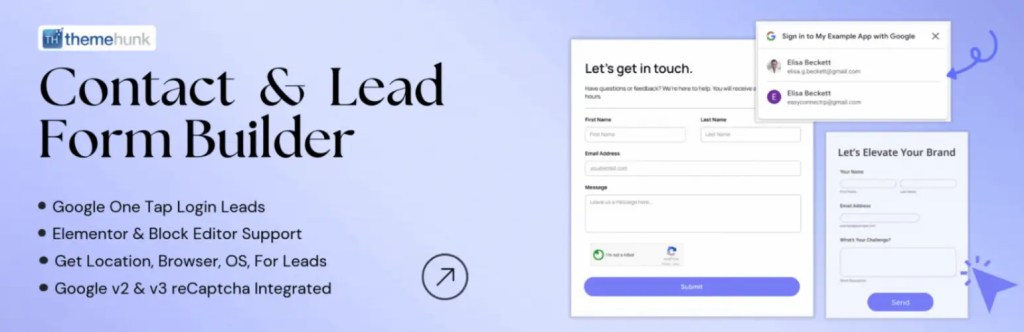
Lead Form Builder (by ThemeHunk) makes it simple to create beautiful, high-converting forms that automatically capture and route leads.
You design the form visually once, set up notifications, conditions, and integrations, and every submission triggers the right follow-up automatically.
No more manual tracking or spreadsheet updates. If you want forms that turn visitors into leads with minimal ongoing effort, Lead Form Builder does the heavy lifting.
- Drag-and-drop form builder with custom fields
- Conditional logic for smart field display
- Auto email notifications and autoresponders
- Integrations with email marketing tools and CRMs
- Analytics dashboard for submission tracking
- Page builder compatibility (Elementor, Gutenberg, etc.)
- Spam protection and reCAPTCHA support
How it automates: On submission, leads are emailed, added to lists, routed to CRMs, or tagged based on rules, with no manual work after setup.
Use cases: Auto-send personalized welcome emails to new subscribers, route high-value leads to the sales team via CRM, or track form performance in real time.
Advance Product Search: AJAX eCommerce Search Enhancement

Advance Product Search (by ThemeHunk) transforms the default WooCommerce search into a fast, intelligent, AJAX-powered experience.
You enable the plugin, customize appearance and behavior once, and it instantly improves how customers find products, with no ongoing maintenance.
It reduces bounce rates and increases conversions by making search smarter and more user-friendly. If you want better product discovery without constant tweaks, Advanced Product Search does the heavy lifting.
- Instant AJAX search with autocomplete
- Fuzzy matching and voice search support
- Product image previews in results
- Trending/popular search suggestions
- Index optimization for speed
- Customizable layout and styling
- Smart search logic
How it automates: Search queries are processed live with smart matching and visuals; results appear instantly as users type, no page reloads or manual curation.
Use cases: Help customers find products even with typos or partial names, show trending searches to guide browsing, or reduce support tickets about hard-to-find items.
Bit Integrations: No Code WordPress Automation Plugin
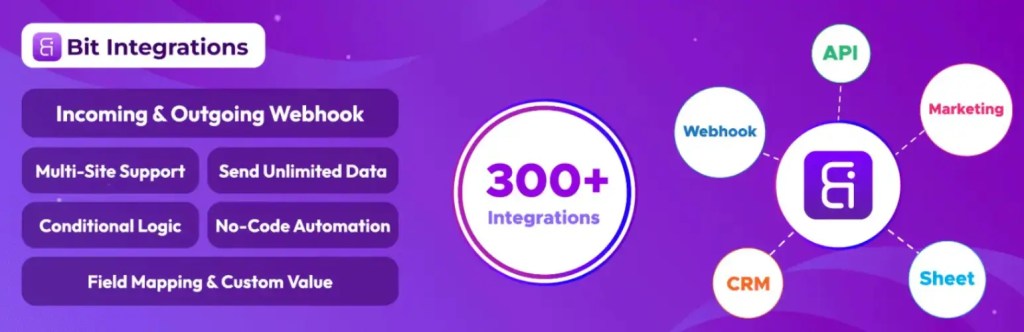
Bit Integrations is a no-code WordPress automation plugin that easily transfers data from WordPress forms, WooCommerce data, page builders, LMS, and more to over 320 external platforms like Google Sheets, CRMs, email tools, and databases.
It runs natively on your WordPress site for fast, unlimited sends without SaaS dependencies.
Key Automation Features
- Limitless data sending
- Conditional logic for smart routing
- Easy field mapping and custom values
- Unlimited webhook support
- Custom API support
- Custom trigger support
- Action Hook support
- Real-time data transfer with no task limits
How it automates: Triggers fire instantly on site events, conditions are checked, and data is sent or processed automatically, no manual intervention required.
Bit Flows: AI-Powered Multi-Step Workflow Automation Plugin with AI Agent
Use cases: Automatically send new leads from contact forms to your CRM and Google Sheets at the same time. Or push every WooCommerce order to accounting software and a reporting dashboard.

Bit Flows lets you build powerful, multi-step automations inside WordPress with a visual drag-and-drop interface and built-in AI agents.
You design the workflow once, adding triggers, actions, conditions, delays, loops, and AI steps, then it runs unlimited times without external services or per-task costs.
It replaces complex Zapier/N8N setups while keeping everything self-hosted. If you want intelligent, agentic automations that go far beyond simple triggers, Bit Flows does the heavy lifting.
- Multi-step flows with routers, delays, iterators, and conditions
- 270+ native integrations + custom webhook support
- AI agents for content generation, summarization, and data analysis (ChatGPT, Gemini, Claude, Grok)
- Unlimited workflows and tasks (no caps)
- Custom APP automation support
- Branching and looping capabilities
- Native execution for speed and data privacy
How it automates: Entire sequences trigger on site events, run step-by-step (including AI decisions), and complete actions across tools without manual oversight.Use cases: Auto-generate a blog post from a form submission, optimize it with AI for SEO, then publish and share to social media, all in one flow.
Yoast SEO: On-Page & Technical SEO Automation

Yoast SEO helps your content rank better by automatically handling technical SEO elements and providing real-time optimization guidance.
You configure global settings, enable features, and let it run. It applies schema markup, manages redirects, suggests internal links, and analyzes content as you write, no constant manual checks.
With built-in AI in Premium, it even generates titles, metas, and optimization suggestions. If you want SEO to happen mostly in the background while you focus on creating content, Yoast SEO does the heavy lifting.
- Automatic schema (structured data) markup generation
- Redirect manager for 301 / 302 redirects
- Internal linking suggestions and orphaned content detection
- Real-time content analysis (readability + SEO score)
- AI title/meta generation, content optimization, and summarization
- Breadcrumbs, canonical URLs, and technical fixes applied automatically
- Multilingual and multi-site support
How it automates: Technical elements are added site-wide or per post, content gets scored, and improved suggestions appear instantly as you edit.
Use cases: Auto-generate proper schema for products or articles to improve rich results, or get AI-optimized titles and metas for new blog posts in seconds.
Bit Social: Auto-Posting & Social Scheduling

Bit Social automates sharing your WordPress posts and WooCommerce products across multiple social networks so your content reaches audiences consistently.
You connect accounts once, configure posting rules and schedules, and new content is shared or queued automatically, with no daily manual posting.
It keeps your social presence active without extra tools or logins. If you want reliable, hands-free social publishing, Bit Social does the heavy lifting.
- One-click connections to 12+ platforms (Facebook, X/Twitter, Instagram, LinkedIn, Pinterest, etc.)
- Auto-post on publish or update
- Advanced scheduling with calendars and time slots
- Multi-image and carousel support
- Deep WooCommerce product integration
- Custom captions and hashtags per platform
- AI prompt content generation
How it automates: Triggers fire when content is published or reaches the scheduled time; posts go live across networks with platform-specific formatting.
Use cases: Automatically share new blog posts to all social channels at optimal times, or promote WooCommerce products with images and links right after they go live.
How to Choose the Right Automation Plugin for Your Needs in 2026
In early 2026, WordPress automation plugins have evolved significantly, with a strong emphasis on no-code/low-code tools, native site execution (for speed and privacy), AI integrations (especially for content and workflows), and lifetime/one-time pricing to avoid SaaS subscriptions.
Popular options include self-hosted alternatives such as Bit Flows (for advanced AI-driven flows) and various specialized tools focused on data syncing, SEO, forms, social sharing, and eCommerce search.
The key is matching the plugin to your specific pain points rather than chasing “the best” overall. Here’s a straightforward guide to help you decide quickly:
Match the Plugin to Your Core Needs
- Simple data syncing and lead routing – (like, forms/WooCommerce, LMS, or data to Google Sheets, CRMs, email tools): Go with Bit Integrations. It’s beginner-friendly, offers 320+ native integrations, unlimited sends in Pro, and excels at single-step, reliable transfers without complexity.
- Deep multi-step workflows and AI agents (like conditional logic, delays, AI content generation/summarization, branching flows): Choose Bit Flows. As a visual workflow builder running natively on WordPress, it supports 270+ integrations, unlimited tasks, and powerful AI (ChatGPT, Gemini, Claude) for agentic automations, ideal for complex, hands-free processes.
- On-page SEO and content optimization (for example: auto schema, redirects, real-time analysis, AI-generated titles/metas/summaries): Yoast SEO is still the leader. Its Premium AI features (Generate, Optimize, Summarize) align perfectly with 2026’s AI-influenced search trends, where structured data and content clarity help AI systems select your site.
- Lead capture forms with notifications and basic routing (for example: custom forms, conditional fields, auto-emails, CRM/email integrations): Lead Form Builder (from ThemeHunk) fits best. The drag-and-drop builder plus analytics makes it great for marketing funnels and quick lead gen without overkill.
- Social media auto-posting and scheduling (like, share posts/products across platforms on publish or timed): Bit Social handles this reliably. With 12+ platforms (Facebook, X, Instagram, LinkedIn, etc.), auto-triggers, calendars, and WooCommerce support, it’s a solid Buffer alternative for consistent presence.
- WooCommerce product search and discovery UX (like, AJAX autocomplete, fuzzy/voice search, previews to reduce bounces): Advance Product Search shines here. It automates smarter search results with trending suggestions and analytics, directly boosting eCommerce conversions.
Practical Tips for Choosing and Implementing
- Start with free/lite versions: Almost all (Bit Integrations, Bit Flows, Yoast, Lead Form Builder, Advanced Product Search) offer solid free tiers on WordPress.org. Test compatibility and core features before upgrading.
- Check compatibility and updates: WordPress core and WooCommerce evolve quickly in 2026; verify the plugin’s last update date, active installs, and ratings.
- Combine plugins strategically for maximum impact:
- Use Bit Flows + Yoast → AI-generate content → auto-optimize with Yoast AI → publish and share via Bit Social.
- Pair Bit Integrations with Lead Form Builder for form data → instant CRM/Sheets sync.
- Add Advanced Product Search to any WooCommerce setup for better UX without conflicting automations.
- Consider your scale: For simple/single-site needs, start with free or low-cost options. For agencies or multi-site, look for unlimited/agency licenses in lifetime deals.
Budget Considerations
Prioritize lifetime/one-time deals (widely available for Bit Integrations, Bit Flows, Bit Social, Lead Form Builders, and advanced product search plugins) to lock in long-term value, often $39–$200+ one-time vs. recurring $100+/year elsewhere.
This avoids subscription fatigue, especially as AI features add value without extra per-task costs. Always check official sites for current 2026 promotions (like New Year deals) and trial periods.
By focusing on your primary bottleneck (data, SEO, leads, social, search, or complex flows), you’ll save time and avoid tool overload.
Test one or two that align closest; most setups take under an hour to prototype. If your needs evolve (like, more AI), Bit Flows often becomes the scalable choice for 2026’s automation landscape.
Common Mistakes to Avoid
When setting up WordPress automation, avoid installing too many overlapping plugins, as this can cause conflicts, slow down your site, and create security risks.
Always test your automations in staging before going live and ensure your plugins are regularly updated to prevent issues. Additionally, avoid relying on a single tool without backups; automation can fail, and manual processes are crucial for ensuring safety.
Choosing plugins solely based on price or hype can lead to bugs and security issues. Make sure to prioritize active developers and good support.
Regularly monitor performance and logs to catch any issues early, and avoid jumping straight into complex tools like Bit Flows without understanding the basics first. Keep it simple to avoid frustration.
FAQ
Q: What is the best automation plugin for WordPress?
Ans: The best automation plugin depends on your needs. For advanced multi-step workflows, Bit Flows is a top choice. For SEO automation, Yoast SEO shines, while Bit Integrations is ideal for syncing data across platforms.
Q: How do automation plugins improve my WordPress website?
Ans: Automation plugins save you time by automating repetitive tasks like content creation, SEO optimization, social media posting, and lead capture. They help smooth processes and improve productivity without requiring coding knowledge.
Q: Can automation plugins integrate with my CRM system?
Ans: Yes, plugins like Bit Integrations / Bit Flows allow easy data syncing with CRMs, email marketing tools, and more, helping you automate workflows and improve customer management.
Q: What is the role of AI in WordPress automation plugins?
Ans: AI helps enhance automation by making processes smarter. For instance, Bit Flows uses an AI agent to generate content, summarize data, and improve decision-making in workflows. Yoast SEO also utilizes AI to generate SEO-friendly content titles and meta descriptions.
Q: Are there free versions of these automation plugins?
Ans: Yes, most of the plugins mentioned, like Bit Integrations, Yoast SEO, and Lead Form Builder, offer free versions with core functionalities, allowing you to test before upgrading to premium features.
Q: Can automation plugins help with e-commerce sites?
Ans: Absolutely! Plugins like Advance Product Search optimize product discovery through AJAX-based search, while Bit Social automates social media sharing for eCommerce products, helping boost visibility and sales. Bit Flows and Bit Integrations automate WooCommerce inventory and other tasks.
Q: Do I need technical skills to use these automation plugins?
Ans: No, most of the automation plugins are designed to be user-friendly with no-code or low-code interfaces. Plugins like Bit Integrations and Lead Form Builder allow you to automate tasks without any coding expertise.
Conclusion
These six plugins can make your WordPress site run more smoothly in 2026. Bit Integrations helps with data movement and lead routing. Yoast SEO handles on-page SEO and content improvements. Bit Flows manages multi-step workflows with AI assistance. Lead Form Builder captures and follows up on leads.
Bit Social automates your social media posts. Advance Product Search speeds up WooCommerce browsing. Together, they save you time and cut out repetitive tasks, letting you focus on growth.
If you find these plugins useful, check out their official pages. You can find Lead Form Builder and Advance Product Search at themehunk.com, and the others at their respective sites: bit-integrations.com, bit-flows.com, bit-social.com, and yoast.com.
Many offer free versions and live demos, so test them out and start working smarter today. Your future self will thank you.
Thanks for reading this blog. If you find this article helpful, do share it with your friends. If you have any questions regarding this, do not hesitate to comment below. We will help you to solve your problem.
We hope this article will help you find the best general store website template.
Please consider subscribing to our YouTube Channel, where we regularly upload great content, and also Do Follow us on Instagram and Twitter.
More Helpful Read –


