
Overview ➣ This blog highlights the Best Drone websites that combine sleek design, sharp visuals, and smart navigation. From cinematic styles to mission-ready layouts, each site reflects the brand’s identity and audience, whether you’re into filmmaking, industrial UAVs, or aerial mapping.
Are you looking for some great Drone website Examples? You’ve come to the right place! In this blog, we have curated a list of some incredible websites that showcase the best in drone technology, design, and user experience, perfect for inspiration or just to stay updated on the latest trends.
If you’re a fan of drones or even just mildly curious about flying technology, or want to create your drone website, this blog is for you.
You already know that a fantastic website does more than just display products or services. It creates an impression, builds trust, and engages visitors in a way that keeps them coming back for more.
A perfect drone website isn’t solely about featuring high-quality images and videos. It’s equally about crafting an immersive experience, the visual aesthetics, innovative layouts, captivating colours, and intuitive navigation, all working together to tell a compelling story about the brand or business.
In today’s competitive market, your Drone website reflects the cutting-edge spirit of drones.
Whether it’s showcasing stunning aerial footage, providing useful information, or offering seamless shopping, your Drone website needs to be both visually impressive and highly functional.
So, stay tuned to the blog to learn more about the drone website.
Best Drone Website Examples You Have To Check Right Now
Drone
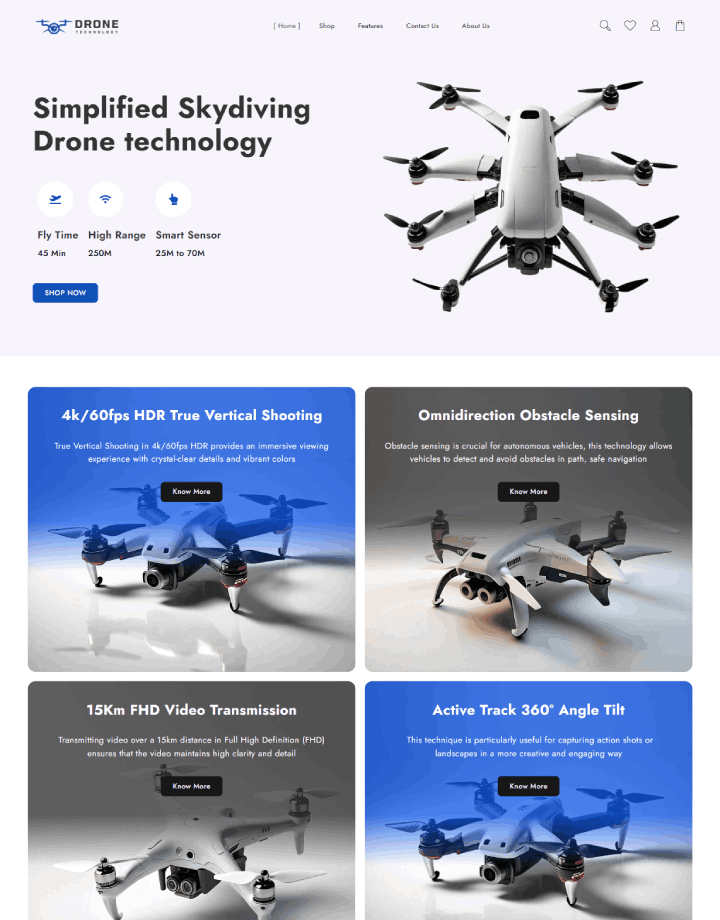
First impression: Clean, bold, and product-focused.
Drone Template delivers a robust, e-commerce-friendly structure well suited for highlighting trendy tech products.
Its roomy layout, high definition images, and thoughtful CTAS (Call to action) make it a high-end, retail-ready affair.
Its simple colour palette and well-ordered typography provide a professional and credible look, perfect for highlighting Drones or comparable electronics.
Why it’s an excellent option:
- Important Pages – Elegant Home page, About us Page, Working Shop page, Features, Contact us page.
- One-click demo import – Have your site up in minutes
- Page builder support – Integrates perfectly with Elementor, Brizy, Divi, and others
- WooCommerce ready – Perfect for selling drones and accessories online
- Translation-friendly – Quickly build a multilingual store
- SEO-optimised – Clean, search-friendly code
DJI

First impression: Clean, professional, and futuristic.
DJI is essentially the Apple of the Drone world, and their site has the same feel. Clean design, stunning full-width pictures, and silky smooth animation give the impression that you’re already flying something awesome.
And it’s a breeze to use, with intelligent menus encouraging you to dig deeper.
DJI’s website beautifully showcases their drone technology with sleek visuals and intuitive navigation, inspiring creativity and exploration. It effectively reflects their leadership in the industry and commitment to quality.
Airdata

First impression: Data-driven, professional, and user-friendly.
Airdata site is like a command centre for drone pilots. The design is simple and intuitive, so even complicated analytics is easy to grasp.
Its light colour scheme, paired with clear fonts and interactive dashboards, provides a smooth experience for pilots and fleet managers alike.
Whether you’re monitoring battery health, reviewing flight logs, or creating compliance reports, the site makes it all seem easy and efficient.
Parrot

First impression: Bright, bold, and colourful.
Parrot’s website is lively and new. Its fancy scrolling effects get you to click around. Its product pages are very visual, presenting big images and clear descriptions, and you immediately feel the fun and creative vibe of its brand.
Parrot’s website impresses with its vibrant design, user-friendly layout, and clear focus on their versatile drone and tech products, highlighting innovation and fun.
Flyability

First impression: Smart, clean, and a little adventurous.
Flyability’s website is tech-sounding but exceptionally human. It does an exceptional job of relating stories about its drones and the issue its drones remedy.
With shiny scrolling sections, gorgeous photography utilisation, and neat organisation, it’s a nice experience to both look at and learn from.
DroneDeploy

First impression: Modern, polished, and data-driven.
DroneDeploy’s site immediately feels professional but not unfriendly. You’re presented with a lot of aerial imagery up front, and it all works well together without being overwhelming.
Their light blue and green colour scheme makes it feel like “tech meets nature,” very appropriate for mapping and surveying!
DroneDeploy’s site offers a professional, clean look that properly highlights its robust drone software solutions, making sophisticated workflows accessible and desirable.
Freely

First impression: Sleek, innovative, and cinematic.
Freely site looks new and professional, designed just right for a community of filmmakers. drone operators and creators.
The minimalistic design focuses on their beautiful high-definition product photos and videos.
The clear fonts and tidy layout make navigation easy and inspiring, creating an energetic but sophisticated feel throughout the site.
Insitu

First impression: Strategic, mission-focused, and industrial.
Insitu’s website is a professional online experience for defense and government users. The sleek design and orderly menus simplify viewing their UAV vehicles, such as the Integrator and ScanEagle.
The website’s use of crisp text and high-quality photos of drones in operation instills confidence that they deliver only operational excellence.
It’s a website that’s directly addressed to mission planners and decision makers by highlighting reliability and actual performance in the field.
Map Made Easy

First impression: Practical, data-focused, and user-friendly.
Maps Made Easy’s website presents a clean and streamlined experience for drone mapping professionals.
The simple design, paired with easy-to-use navigation, makes it simple to find features such as the generation of orthophotomaps and 3D modeling.
The adoption of soft grey and highlightings offers a soothing and concentrated setting, enabling users to focus on the technicalities of their projects.
As a whole, the site demonstrates dedication to usability and simplicity, accommodating novice and veteran users alike within the drone mapping category.
How To Setup Drone Website with Shopmania’s Drone Template Easily
Step:1 Download and Install the Theme
To use the Drone Template for creating your excellent Drone website, first install Shop Mania. This theme includes demo import functionality.
Buy and download the Shop Mania Theme.
Click the button below

Log in to your Member’s Area and access your purchased themes.
You can log in to your >> Member’s area from here

You can find and download your purchased themes and plugins on this page.
Step: 2 Installing Shop Mania Pro Plugin
Log in to your WordPress Dashboard

Log in to your WordPress dashboard with your credentials.
Go to Plugins and click on Add New Plugin

To install a new plugin, hover over Plugins and click on Add New Plugin.
You’ll see the Upload Plugin option at the top left of the page. Click on it.

Upload the Shop Mania Pro plugin and click on Install now.
And then activate the Plugin.

Click on ‘Activate Plugin.’ Once activated, you’ll be redirected to the plugin page where you can access the Shop Mania Pro plugin.
Generate and Activate License
To fully utilise Shop Mania Pro, activate the license after installing the theme. This will unlock all premium features.
Navigate to Appearance and click on License

Find your Key, and enter your license key.

Now, Log in with Member’s Area Credentials.

The license key is displayed on this page. Click ‘Copy’ to copy it.

Copy the License Key to the clipboard. You can then paste the key into the box on the License Page.

After pasting the License Key, click on Activate
Step: 3 Go to Appearance and click on Demo Import Sites
Go to Appearance and click on Demo Import Sites
Open Appearance > Demo Import Sites

On the following page, you will see the Shop Mania version with the button that states View All Starter Sites. Click the button.
Step 4: Click “View All Starter Sites”.

Explore all Shop Mania templates listed below. Sort by category or page builder to locate what you are looking for. To see the Drone Template, search for it and click.

Step 5: Click “Continue” After clicking on Drone Templates.

Step 6: After clicking Continue, hit the “Build my website” button.

Your website is now ready you can review your site by clicking “Preview” or customise it accordingly by clicking “Customize”.

Your drone website has been successfully created.

Tips to Set Up a Brilliant Drone Website
- Use striking visuals – Include high-resolution drone images and videos that highlight performance and design.
- Highlight specs – Create clean, easy-to-read feature blocks that explain battery life, camera quality, flight range, etc.
- Add a video banner – Get your drone airborne on the homepage so buyers can see it right away.
- Use customer reviews/testimonials – Social proof establishes trust quickly, particularly in tech categories.
- Optimise for mobile – Ensure it looks great on tablets and phones, most drone buyers browse on mobile.
- Add a blog – Post drone tutorials, news, or industry information to enhance SEO and establish credibility.
FAQ
Q: What makes a drone website “good”?
Ans: A mix of things! A good drone website should:
1. Be easy to navigate
2. Clearly showcase products or services
3. Include high-quality visuals (especially drone footage)
4. Load quickly and be mobile-friendly
5. Feel aligned with the brand’s audience
Q: How can I ensure my drone website is visually appealing and professional?
Ans: Use high-resolution images and videos, consistent branding, modern fonts, and clean UI/UX design principles. Incorporate interactive elements like hover effects and scrolling animations to enhance user experience.
Q: What steps should I take to optimise my drone website for speed?
Ans: Compress images and videos, implement lazy loading, utilize a CDN, CSS, and JavaScript, and optimise server response times.
Regular performance testing with tools like Google PageSpeed Insights is also recommended.
Final words
There you have it – Drone website that doesn’t merely fly; they soar in design, clarity, and vibe. Whether you’re in the drone business yourself or simply love great web design, each of these examples demonstrates how the proper digital presence can take a brand to new heights.
From a cinematic point of view, freely, to data-driven accuracy, Airdata, these sites are not merely pretty – they are built for purpose.
Have a look, get inspired, and perhaps even bookmark a few favorites for your next project.
I hope this blog will help you. Still, if you have any queries or suggestions, then let me know in the comment section.
You can subscribe to our YouTube Channel, we also upload great content there, also Do Follow us on Facebook and Twitter.
More Helpful Reads:


