

Description
SMT Toolkit for WooCommerce is a modular automation and management toolkit designed for WooCommerce-based stores.
The plugin provides a collection of independent modules that can be enabled or disabled as needed, allowing store owners to build flexible workflows without unnecessary features or performance overhead.
SMT Toolkit focuses on automation, data consistency, and repeatable processes — especially for stores that rely on bulk imports, scheduled updates, and advanced pricing logic.
Available Modules
Google Drive Importer
Import products, images, and updates directly from Google Drive using CSV files.
Features:
– Import products and images from Google Drive folders
– Batch processing with progress tracking
– Detailed logs and safety checks
– Update rules for existing products
– Optional cron-based automation
Setup note:
To use this module, you must create a Google API project and obtain OAuth credentials.
Official documentation:
https://developers.google.com/drive/api/guides/enable-drive-api
Automation:
For scheduled or unattended imports, a WordPress cron task is required.
CSV File Structure
The importer uses CSV files to create or update products.
Required fields:
– id or sku (at least one is required)
Optional fields:
– type
– barcode
– short_description
– description
– sale_start
– sale_end
– in_stock
– price
– sale_price
– categories
– tags
– custom meta fields (any column name will be treated as a meta key)
– image
– alt_text
Custom meta fields are stored as product meta keys without overwriting protected WooCommerce core fields.
The CSV structure is flexible. Only the required identifier field must be present.
All other fields are optional and processed only if provided.
Discount Engine
Create flexible discount profiles with conditions, priorities, schedules, and visual indicators.
Features:
– Rule-based discount profiles
– Support for scheduled discounts
– Priority handling and conflict resolution
– Customizable discount badges
– Cron-based recalculation support
Automation:
A cron task is required to automatically apply, update, or expire scheduled discounts.
Theme compatibility note:
To replace the default sale badge, the theme must include a span.onsale element (the wrapper does not matter, but the onsale class must be present).
Transliteration
Automatically transliterate non-Latin product URLs and filenames.
Features:
– URL and filename transliteration
– Custom rule editor
– Testing and preview tools
– Bulk conversion and rollback support
Language support:
Predefined rules are included for:
– Ukrainian
– Russian
– Bulgarian
For other languages, custom transliteration rules can be added manually.
This module does not require cron configuration.
Store Settings
The Store Settings module centralizes WooCommerce configuration in one place — no need to edit theme files or functions.php.
It allows you to safely manage store behavior, performance tweaks, product badges, and Classic checkout fields through a clean admin interface.
Key Features
– Disable unused frontend scripts and styles
– Add context-based inline CSS and JavaScript
– Clean up unnecessary WordPress and WooCommerce head output
– Configure product badges (Sale, New, Sold Out, Featured, Best Seller)
– Customize Classic WooCommerce checkout fields
– Define custom product fields with tab display support
Checkout customization works with Classic WooCommerce checkout (shortcode).
Blocks checkout is automatically detected.
Ajax Archive Engine
AJAX-powered WooCommerce archive system with:
– AJAX pagination
– AJAX sorting
– Lazy-loaded filters sidebar
– Clean URL handling
– History (back/forward) state support
– Mobile-first optimized behavior
Centralized SVG Registry
Secure SVG management module:
– Centralized SVG storage
– Sanitized SVG processing
– Automatic CSS generation
– Base64 background rendering
– Hash-based file versioning
– Automatic cleanup of old files
– Security-hardened SVG sanitizer
Role-Based Pricing
Assign custom prices or percentage discounts based on the customer’s WordPress user role.
Features:
– Per-role price overrides (fixed price or percentage discount)
– Works with simple and variable products
– Role-specific prices visible only to the matching role
– Per-product manual price override via product edit screen
– Fully integrated with WooCommerce cart and checkout totals
– Compatible with WooCommerce price display hooks
Setup note:
Role configurations are managed globally from the plugin settings.
Per-product price overrides are set directly on each product’s edit screen.
Modular Architecture
Each module operates independently and can be enabled or disabled at any time.
This allows you to use only the functionality you need while keeping the system lightweight and predictable.
Planned Modules
The following modules are planned for future releases:
– BOGO (Buy One Get One) pricing rules
– Quick View for WooCommerce products
These modules will follow the same modular design and automation principles.
External Services
This plugin connects to external services to provide its functionality.
Google Drive API
The Google Drive Importer module connects to the Google Drive API to allow users to import files and images from their own Google Drive accounts into WooCommerce.
What data is sent:
– Google Drive file IDs
– OAuth access tokens provided by the user
When data is sent:
– Only when the user explicitly initiates an import action from the plugin interface
Why data is sent:
– To retrieve selected files and images from the user’s Google Drive account
Service provider:
– Google LLC
Terms of Service:
https://policies.google.com/terms
Privacy Policy:
https://policies.google.com/privacy
Screenshots

Modules management screen 
Google Drive Importer profiles 
Import progress and logs 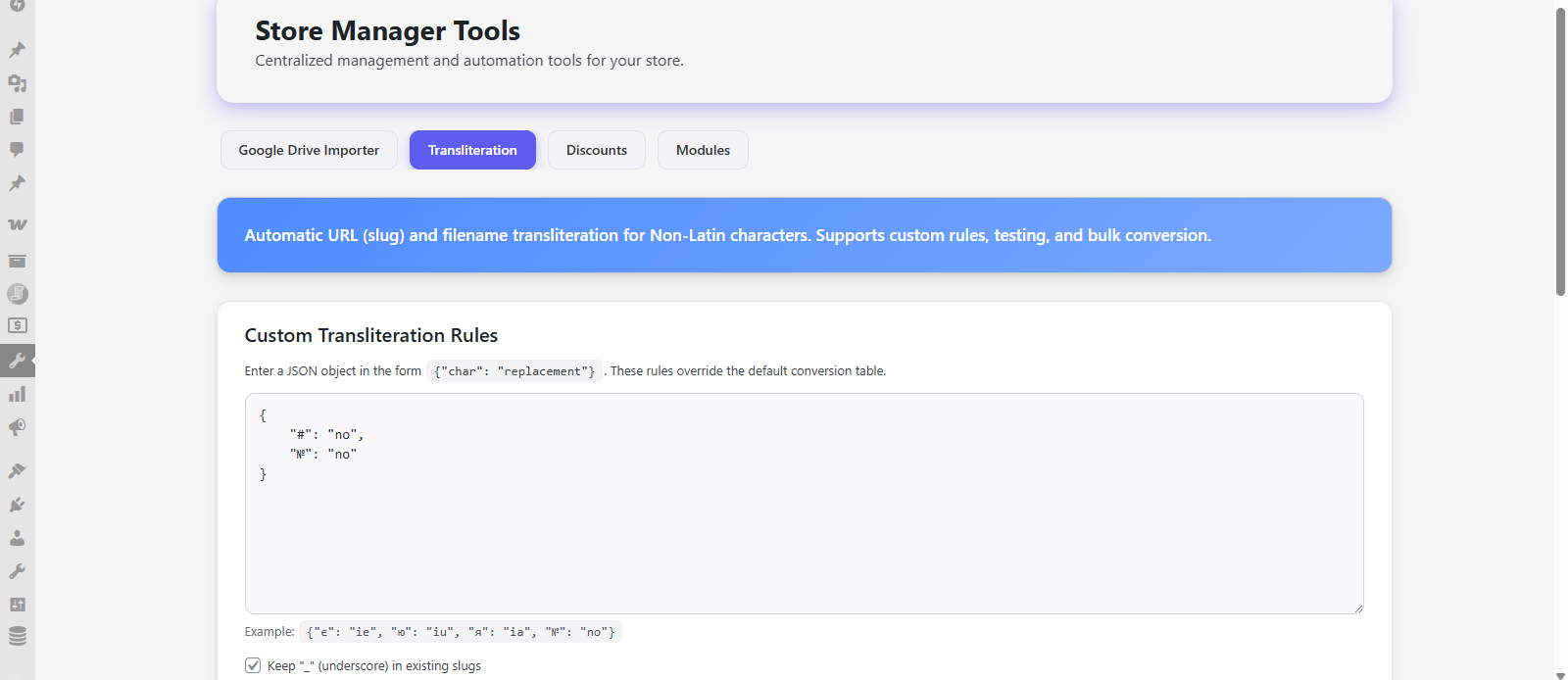
Discount profiles and rules 
Transliteration tools
FAQ
-
Is this plugin free?
-
Yes. All features are fully available without restrictions. If you find it useful and want to support further development, you can do so via the donation link.
-
Can I disable unused modules?
-
Yes. Each module can be enabled or disabled independently.
-
Does it work only with WooCommerce?
-
Currently optimized for WooCommerce stores, but the architecture allows future expansion.
-
Is it safe to run imports automatically?
-
Yes. Imports use batch processing, logging, and safety checks.
-
Where can I find Google API setup instructions?
-
Official Google Drive API documentation is available at:
https://developers.google.com/drive/api/guides/enable-drive-api -
Do I need cron to use this plugin?
-
Cron is required only for automated imports and scheduled discounts.
Manual operations work without cron. -
Does Role-Based Pricing work with variable products?
-
Yes. Role-based prices apply to both simple and variable products. Per-product manual overrides are also supported on the product edit screen.
Reviews
There are no reviews for this plugin.
Contributors & Developers
“SMT Toolkit for WooCommerce” is open source software. The following people have contributed to this plugin.
Contributors
Translate “SMT Toolkit for WooCommerce” into your language.
Interested in development?
Browse the code, check out the SVN repository, or subscribe to the development log by RSS.
Changelog
1.1.0
- NEW: Role-Based Pricing module (per-role fixed price or percentage discount, per-product overrides)
- NEW: Unified data layer — SMT_Data_Provider centralizes all option reads and writes
- NEW: SMT_Cache — three-tier caching (in-memory, WP object cache, transients) with a unified API
- IMPROVED: Lazy module initialization — Admin/Frontend/Ajax classes load only in the context where they are needed
- IMPROVED: Active discount profiles query cached per request (reduces DB load during cron runs)
- IMPROVED: Inline context detection cached per request (was computed three times per page)
- FIX: Discount badge always fell back to woocommerce_sale_flash due to incorrect module status check
- FIX: get_profile() and get_rules_for_profile() now use the table name helpers consistently
- FIX: Admin page classes were not loaded when render_admin() was called after lazy init
- FIX: Transient cleanup in uninstall.php now uses wpdb::prepare()
1.0.4
- NEW: Ajax Archive Engine module
- NEW: Centralized SVG Registry module
- NEW: SVG background support for Discounts and Store Settings badges
- IMPROVED: Badge rendering performance
- IMPROVED: Centralized SVG CSS compilation system
- IMPROVED: 10% faster initial page load (SVG optimization)
- SECURITY: Improved JSON input sanitization
- FIX: Nonce verification improvements
- FIX: Plugin Check warnings resolved
- REMOVED: inline SVG
1.0.3
- Fixed missing store-settings module in release package
- Minor stability improvements
1.0.2
- Fixed undefined variable in Discounts cron handler
1.0.1
- Added Store Settings module (assets control, cleanup, inline CSS/JS, checkout fields)
- Checkout customization refactored (Classic checkout only, Block checkout detection added)
- Fixed WooCommerce checkout field re-rendering (wc-checkout handling)
- Improved checkout field diff-based saving (no translation overwrite)
- Added reset option for checkout fields
- Enhanced badge system (heavy SVG handling, template injection, mutation observer)
- Optimized best-seller query with transient caching
- Improved security sanitization (wp_unslash handling, SVG hardening)
- Added advanced cleanup options (WooCommerce blocks, cart fragments, brands)
- Performance improvements and codebase stabilization
- Multiple security and Plugin Check compliance fixes
1.0.0
- Initial public release
- Google Drive Importer module
- Discount Engine module
- Transliteration module
- Modular system and cron support