
Description
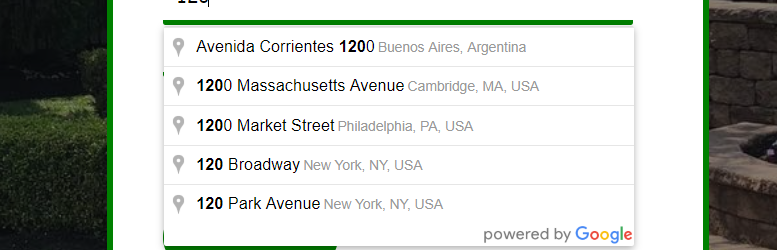
Tired of manually typing addresses? Autocomplete Google Address integrates the power of Google Places Autocomplete with any form on your WordPress site.
This plugin doesn’t force you to create new forms. Instead, it provides a powerful, selector-based “form builder” that lets you map Google’s rich address data to your existing form fields. It’s compatible with WooCommerce, Contact Form 7, WPForms, Gravity Forms, and virtually any other form.
Key Features:
- Works with Any Form: Add address autocomplete to checkout fields, contact forms, registration forms, and more.
- Selector-Based Mapping: A simple but powerful UI lets you connect Google Address components to your form fields using CSS selectors (like
#billing_addressor.shipping-street). - Two Powerful Modes:
- Single Line Mode: A single field autocompletes the full, formatted address. Perfect for simple address fields.
- Smart Mapping Mode: One field triggers the autocomplete, and the plugin intelligently fills multiple fields like Street, City, State, Zip, and Country.
- Unlimited Configurations: Create as many mapping configurations as you need. You can have different setups for your checkout form and your contact form on the same site.
- Developer Friendly: Use the
[aga_form id="123"]shortcode or theaga_render_form_config(123)PHP function to apply configurations exactly where you need them. - Conflict Prevention: Includes an option to prevent the plugin from loading the Google Maps API if another plugin or your theme already does.
Installation
- Upload the
autocomplete-google-addressfolder to the/wp-content/plugins/directory. - Activate the plugin through the ‘Plugins’ menu in WordPress.
- Go to Google Address > Settings and enter your Google Maps API Key. You must enable the Places API and Maps JavaScript API for your key in the Google Cloud Console.
- Go to Google Address > Add New to create your first form configuration.
- Follow the instructions on the Help page (Google Address > Help) to find your form field selectors and set up your mapping.
- Place the generated shortcode (e.g.,
[aga_form id="123"]) on the page where your form is located.
FAQ
-
Does this work with WooCommerce checkout?
-
Yes. You can use the “Smart Mapping” mode to map the address components to the WooCommerce billing and shipping address fields.
-
Do I need a Google Maps API Key?
-
Yes, a Google Maps API key is required. You can get one from the Google Cloud Platform Console. You must enable the “Places API” and “Maps JavaScript API” for your key.
-
Can I restrict results to a specific country?
-
Yes. You can set a default country restriction in the plugin’s global Settings page.
Reviews


Contributors & Developers
“Autocomplete Google Address” is open source software. The following people have contributed to this plugin.
Contributors

“Autocomplete Google Address” has been translated into 2 locales. Thank you to the translators for their contributions.
Translate “Autocomplete Google Address” into your language.
Interested in development?
Browse the code, check out the SVN repository, or subscribe to the development log by RSS.
Changelog
1.0.0
- Initial release.