

விளக்கம்
AboveWP Tweaks Optimizer is a comprehensive WordPress plugin designed to help improve your website’s performance by allowing you to disable unnecessary features and remove WordPress bloat. It provides an easy-to-use interface with organized sections for different types of optimizations.
Key Features
WordPress Functionality Tweaks:
* Post Revisions Control – Limit the number of post revisions to keep
* Autosave Interval – Adjust automatic save frequency
* Admin Heartbeat Control – Manage WordPress admin heartbeat API
* WordPress Cron – Disable default WordPress cron for better performance
* Admin UI Cleanup – Remove unnecessary widgets and metaboxes
* Admin Notices Control – Hide non-essential admin notices
* Login Security – Limit login attempts to protect against brute force attacks
* Media Trash – Enable WordPress media trash functionality
WordPress Bloat Removal:
* Disable Gutenberg Editor – Use classic editor instead
* Disable WordPress Embeds – Remove external content embedding
* Restrict REST API – Limit access to logged-in users only
* Disable Feed Links – Remove RSS feed links
* Disable All RSS/Atom Feeds – Completely disable feeds
* Disable Author Archives – Improve security by disabling author pages
* Disable Dashicons on Frontend – Remove icons for non-logged users
* Disable Shortlinks – Remove shortlink metadata
* Disable WLW Manifest – Remove Windows Live Writer support
* Disable RSD Link – Remove Really Simple Discovery link
* Remove WordPress Version – Hide version numbers for security
* Disable Admin Bar on Frontend – Remove admin bar for all users
* Disable Emoji Release Script – Remove extra emoji handling
* Enable Classic Widgets – Use traditional widget interface
* Remove Query Strings – Improve caching by removing version strings
* Disable Self Pingbacks – Stop WordPress self-linking notifications
* Disable XML-RPC – Disable XML-RPC API
WooCommerce Tweaks:
* Disable Password Strength Meter – Remove meter on checkout
* Disable Product Tabs – Remove Reviews, Description, or Additional Information tabs
Why Use AboveWP Tweaks Optimizer?
- Improved Performance – Remove unnecessary scripts and features that slow down your site
- Enhanced Security – Hide WordPress version and disable potentially vulnerable features
- Cleaner Admin Interface – Remove clutter from your WordPress dashboard
- Better Caching – Optimize for better cache performance
- Reduced Bloat – Keep only the features you actually need
- Easy to Use – Simple checkboxes to enable/disable features
- Safe Implementation – Each feature can be toggled independently
- No Coding Required – User-friendly interface for all skill levels
Perfect For
- Website owners looking to optimize WordPress performance
- Developers building custom WordPress sites
- Agencies managing multiple WordPress installations
- Users who want a cleaner, faster WordPress experience
- Sites that don’t need all of WordPress’s default features
Developer Information
About AboveWP
AboveWP is dedicated to creating high-quality WordPress plugins that help website owners optimize their sites for better performance, security, and user experience. Visit us at AboveWP.com for more tools and resources.
Support
For support, feature requests, or bug reports, please visit our support page or contact us through our website.
Contributing
We welcome contributions! If you’re a developer and want to contribute to this plugin, please check our GitHub repository or contact us directly.
Technical Details
- Minimum WordPress Version: 5.0
- Minimum PHP Version: 7.2
- Tested up to WordPress: 6.9
- Text Domain: abovewp-tweaks-optimizer
- Domain Path: /languages
- Network: Compatible with WordPress Multisite
Privacy Policy
This plugin does not collect, store, or transmit any user data. All settings are stored locally in your WordPress database and are not shared with any external services.
Screenshots

Functionality Tweaks tab – Control WordPress core functionality 
Bloat Remover tab – Remove unnecessary WordPress features 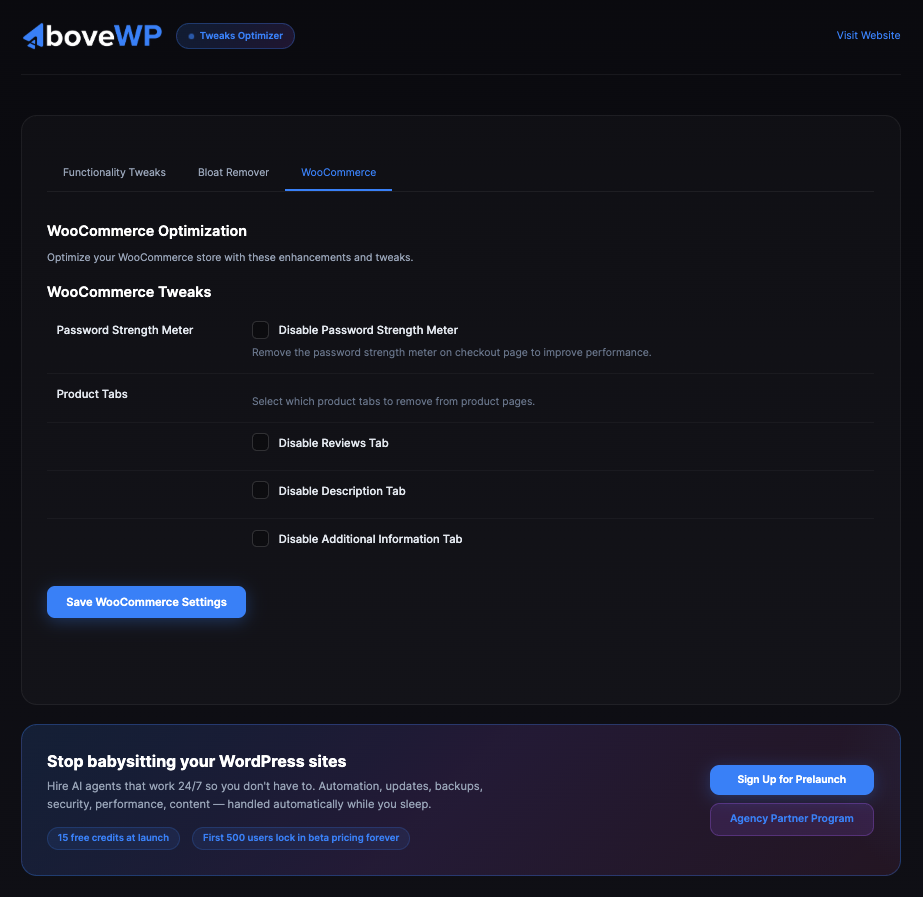
WooCommerce tab – Optimize your WooCommerce store
Installation
Automatic Installation
- Log in to your WordPress admin dashboard
- Navigate to Plugins > Add New
- Search for “AboveWP Tweaks Optimizer”
- Click “Install Now” and then “Activate”
- Go to AboveWP > Tweaks Optimizer to configure settings
Manual Installation
- Download the plugin zip file
- Upload the
abovewp-tweaks-optimizerfolder to the/wp-content/plugins/directory - Activate the plugin through the ‘Plugins’ menu in WordPress
- Go to AboveWP > Tweaks Optimizer to configure the settings
After Installation
- Navigate to AboveWP > Tweaks Optimizer in your WordPress admin
- Choose from three tabs: Functionality Tweaks, Bloat Remover, WooCommerce
- Enable or disable features based on your needs
- Save your settings
- Test your site to ensure everything works as expected
அடிக்கடி கேட்கப்படும் கேள்விகள்
-
Will this plugin break my site?
-
The plugin has been designed to be safe to use on most WordPress sites. However, some features might affect third-party plugins or themes that rely on specific WordPress functionality. It’s always recommended to test changes on a staging site before implementing them on a production site.
-
Do I need to configure everything?
-
No, all settings are optional. The plugin comes with sensible defaults that keep WordPress functioning normally. You can enable or disable specific tweaks based on your needs. Start with a few tweaks and gradually add more as you become comfortable.
-
Will this plugin affect my SEO?
-
Most tweaks will have no impact on SEO. However, disabling the REST API or Feed Links may affect some SEO tools that rely on these features. If you use specific SEO plugins, we recommend testing the compatibility before enabling these options.
-
Can I undo changes made by this plugin?
-
Yes, all changes can be reversed by simply unchecking the options and saving the settings. The plugin doesn’t permanently modify your WordPress installation.
-
Does this work with WooCommerce?
-
Yes! The plugin includes specific optimizations for WooCommerce stores, including options to disable the password strength meter and remove unnecessary product tabs.
-
Will this plugin slow down my admin area?
-
No, the plugin is designed to improve performance. The admin interface tweaks actually help speed up the WordPress admin by removing unnecessary elements.
-
Is this plugin compatible with caching plugins?
-
Yes, AboveWP Tweaks Optimizer works well with caching plugins and actually includes features that can improve caching performance, such as removing query strings from static resources.
-
Can I use this with other optimization plugins?
-
Yes, this plugin focuses on WordPress core tweaks and bloat removal, which complements other optimization plugins that handle things like image optimization, minification, and caching.
Reviews
இந்த செருகுநிரலுக்கு மதிப்புரைகள் எதுவும் இல்லை.
பங்களிப்பாளர்கள் & உருவாக்குனர்கள்
“AboveWP Tweaks Optimizer” is open source software. The following people have contributed to this plugin.
பங்களிப்பாளர்கள்

Translate “AboveWP Tweaks Optimizer” into your language.
Interested in development?
Browse the code, check out the SVN repository, or subscribe to the development log by RSS.
Changelog
1.1.0
- Design update
1.0.1
- Fixed frontend styling issues caused by overly aggressive CSS/JS removal
- Fixed missing handlers for several bloat removal options
- Fixed settings not saving correctly for some options
- General stability improvements
1.0.0
- Initial release
- WordPress Functionality Tweaks section
- WordPress Bloat Removal section
- WooCommerce optimization section
- Post revisions control
- Autosave interval adjustment
- Admin heartbeat management
- WordPress cron control
- Admin UI cleanup options
- Login security features
- Media trash functionality
- Gutenberg editor disable option
- WordPress embeds control
- REST API restrictions
- Feed links management
- Author archives control
- Dashicons frontend removal
- Shortlinks removal
- Version hiding for security
- Admin bar frontend control
- Classic widgets support
- Query strings removal
- Self pingbacks control
- XML-RPC management
- WooCommerce password strength meter control
- WooCommerce product tabs management
- Multi-language support (Bulgarian translation included)