

Beskrivning
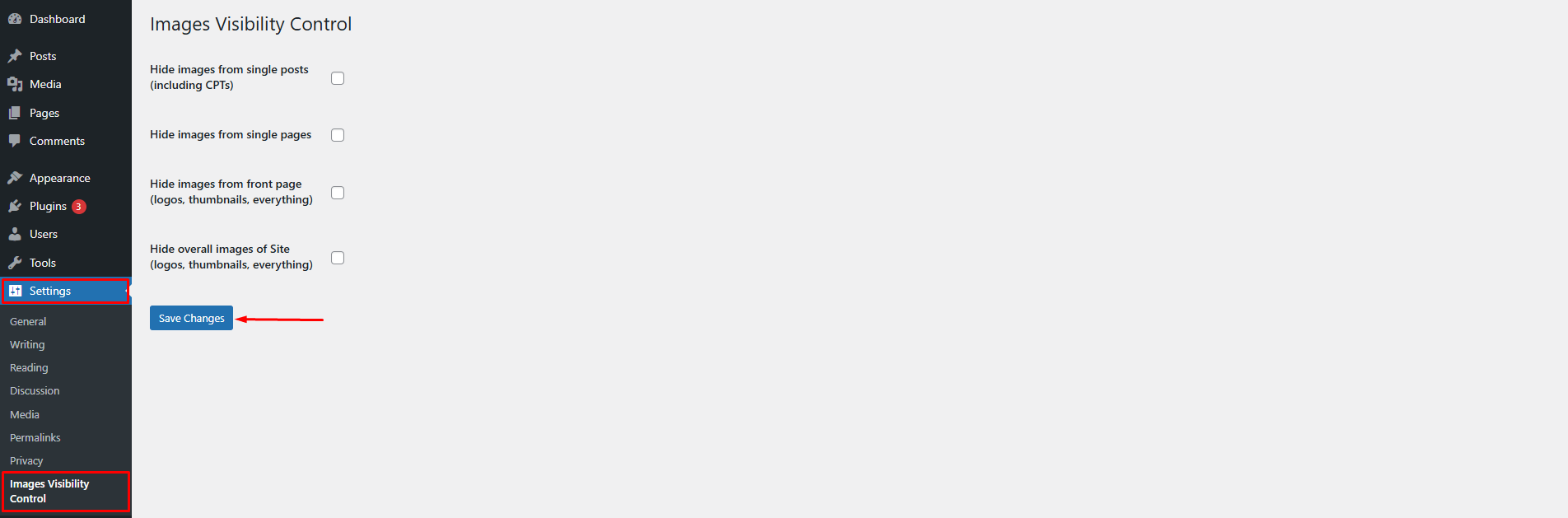
The Images Visibility Control plugin lets you easily hide or show featured images and post content images across your WordPress site. To configure the plugin, go to Settings > Images Visibility Control.
You can choose to:
* Hide images from all posts (including custom post types)
* Hide images from all pages
* Hide all images from frontpage (logos, featured images, content images, etc.)
* Hide all images on the site (logos, featured images, content images, etc.)
Features
- Hide featured images and post content images from all single posts (including CPTs)
- Hide images from all single pages
- Hide all images across the entire site (logos, thumbnails, media images, etc.)
- Easy settings panel under Settings Images Visibility Control
Skärmdumpar
Installation
- Upload the plugin folder to
/wp-content/plugins/enable-disable-wp-imagesor install the plugin through the WordPress plugin repository. - Activate the plugin via the ’Plugins’ menu in WordPress.
- Go to
Settings > Images Visibility Controlto configure the plugin.
Vanliga frågor
-
How can I hide images from all posts or pages?
-
Go to
Settings > Images Visibility Control, then check the appropriate option to hide images from posts or pages. -
Can I hide all images on the site including logos and thumbnails?
-
Yes. Enable the “Hide all images” setting and it will apply site-wide, overriding the other options.
-
Will this affect SEO or image loading speed?
-
Images are hidden using CSS. They’re still loaded in the DOM but not visible to users. For SEO-related image handling, consider using dedicated SEO/image optimization plugins.
-
Plugin settings page under Settings > Images Visibility Control
Recensioner
Detta tillägg har inga recensioner.
Bidragsgivare och utvecklare
”Images Visibility Control” är programvara med öppen källkod. Följande personer har bidragit till detta tillägg.
Bidragande personer
Översätt ”Images Visibility Control” till ditt språk.
Intresserad av programutveckling?
Läs programkoden, kika på SVN-filförvaret eller prenumerera på utvecklarloggen via RSS.
Ändringslogg
1.2.1
- Updated contributor name
1.2.0
- Renaming the plugin from ”Hide Show Images” to ”Images Control Visibility”
1.1.0
- Renaming the plugin from ”Hide Show WP Images” to ”Hide Show Images”
1.0.1
- Fixed mismatch text domain.
- Fixed issues.
1.0.0
- First stable version of the plugin.