

Description
Create complex product configurators and customizers in WordPress and WooCommerce without having to touch any line of code
WP Configurator Builder (WCB in short) is a standalone Gutenberg-based product configurator builder plugin for WordPress, giving you a familiar drag-and-drop admin interface.
The plugin does not require any coding knowledge to set up. Simply create your choices, design your form and upload your product images.
Key features of WP Configurator Builder include:
- Stackable image layers: layer transparent PNGs on top of each other to automatically generate the final product render
- 3D model viewer: built-in support for 3D viewer to create 3D product configurators based on 3D models
- Real-time updates: the configuration images and prices update in real time as the customer changes options
- Extra product options: extend WooCommerce products with custom add-ons and options. Includes support for swatches, text inputs, buttons and more.
- Request quotes: link configuration to WordPress form to capture leads
- WooCommerce integration: use the WooCommerce checkout system to purchase customized products
- Shortcode display: display configurator forms on any post or page using shortcode display
- Drag and drop form builder: use the Gutenberg drag-and-drop form editor to structure your configuration forms
- Multi language: built-in multi language plugin support
You can use this product configurator builder to highlight your product variants in WordPress, collect leads using request a quote feature or drive sales through the checkout system of WooCommerce.
Quick links:
Confused about how to get started? Watch our get started video:
Places where the WP Configurator Builder plugin has been featured
🏆 WP Configurator Builder featured on WP Hive
🏆 WP Configurator Builder featured on WP Mayor
🏆 WP Configurator Builder featured on WP Daily Themes
Why is WP Configurator Builder free?
With the rise of personalization in e-commerce, we wanted to contribute to the WordPress and WooCommerce community by providing a plugin which allows you to create product configurator and customizer forms in a simple way for free.
Why should I use this plugin?
The WCB Configurator builder is a multi-functional product configurator plugin that can be used for various use-cases, including but not limited to:
- Extra product options and WooCommerce product add-ons
- Visual product configurators
- 3D product configurators
- Request quotes for custom products
- Guided selling forms
- Composite products
- WooCommerce product bundles
- Product customizations
- Measurement and cost calculators
Example products:
- Custom furniture and interior design
- Electronics (phones, wearables, etc)
- Computers and gaming
- Printed apparel and custom clothing
- Shoes and bags
- Music instruments
- Vehicles and parts
- Custom sheds and modular homes
- Tools and equipment
- Handmade items
- Accessoires
- Digital product customization
Drag and drop configurator builder
Create and manage configuration fields with a drag-and-drop editor:
- Add unlimited fields
- Drag and hold to reorder fields
- Apply each configurator to any WooCommerce product or display on any page
Live product image updates
Automatically update your product visuals:
- Preview image changes
- Dynamic main image replacement
- Multiple image product views supported (showcase your product from various angles)
- Apply custom text styles
Stackable PNG image layers
Combine multiple images (layers) into a single live preview:
- Ideal for furniture, apparel, vehicle parts, and custom sets
- Layer-by-layer visibility control
- Support for transparent PNGs (and SVGs)
Customize products in 3D
Create stunning 360 degree configuration experiences:
- Based on 3D GLB models
- Show and hide specific parts
- Update textures and colors
- Add custom text and images
- Update 3D model background scenes
- Play or loop 3D animations
- AR support (on compatible devices)
Visual drag and resize controls
Customers can easily drag, rotate and resize elements on the product image:
- Drag custom text and images in the product image
- Resize and scale text and image uploads
- Rotate image uploads and texts
Flexible extra product fields
Create unlimited custom option fields:
- Color swatches
- Image swatches
- Button groups
- Tab fields
- Text fields
- Number fields
- Radio buttons
Request quotes
Allow customers to request quotes via forms or email:
Dynamic price rules
Supports:
- Live price recalculation
- Per-option pricing
- Fixed price increases
- Sale prices
- Unit prices (charge per character or per numeric value)
Built-in WooCommerce integration
Sends all configuration data to:
- Add configurations to cart
- Checkout
- Order confirmation
- Multi currency support
Block theme and page builder support
Insert configurators anywhere using:
- Gutenberg block
- Shortcode block
- Pre-built templates
Build unlimited configurators
The WP Configurator Builder plugin has no limit on the amount of configurations you can create. You can use it on:
- Any number of products
- Any product type
- Any store size
Custom CSS and design controls
Style the configurator visually:
- Buttons, borders, spacing
- Fonts and colors
- Step indicators
- Form elements
- Global styling
- Custom styles and scripts
Developer friendly
Includes:
- Hooks
- Filters
Multi-language and RTL-display support
The plugin is fully compatible with multi language plugins:
- WPML
- Polylang
- LocoTranslate
- And more
Paid plugin features
Upgrade to WCB Configurator Builder Pro bundle for more advanced customization capabilities.
Advanced configuration form fields
Extend your configuration form with advanced fields:
- Image dropdown
- Date picker field
- Color picker field
- Range slider field
- File upload field
- Field sliders
- Repeater field
- Panel options field
Conditional field display
Take customization further with conditional display:
- Multi-condition rules
- AND/OR logic rules support
- Disable single options
- Show or hide fields
Create multi-step configuration forms
Convert the configurator into a guided multi step wizard:
- Mandatory steps
- Next/Previous navigation
- Configuration summary page
Save and resume configurations
Allow customers to:
- Save their progress and resume later
- Add configurations to a wishlist
- Load saved designs
Create advanced pricing rules
Pro-level pricing flexibility:
Enable configuration PDF downloads
Customers can easily download a PDF file containing:
- Configuration price
- Company details
- Selected options
- Generated images
Customer wishlists
Customers can easily save their favorite designs to their wishlist
- Save configurations to wishlist
- Load designs from wishlist
- Set WooCommerce account-based wishlist
Inventory management
Store owners can easily manage their configurations options:
Linked WooCommerce products
Store owners can easily build composite or bundled products using the linked products field:
- Link WooCommerce products to configuration options
- Add products to cart separately
- Manage product details (like title, stock, sku and price) in WooCommerce
Configuration analytics
Store owners can easily see best performing configuration options:
- See conversion rates
- Explore most selected configuration options
- Collect emails for customer retargeting
WooCommerce visual product customizer plugin
Build visual product configurators with our product configurator builder tool. Add image layers, customize text and upload images.
You can also allow your customers to drag and resize text and images on the product images using the visual control settings provided in our plugin.
3D product configurator plugin
Step up your visual game with GLB 3D models. Change colors, update model parts and even show the 3D model in your own room using AR capabilities.
Change the visual display to 3D model in WCB > Settings and start creating stunning 3D configurations inside the WCB configurator plugin.
WooCommerce product configurator
If you are running a WooCommerce store, you can also use this plugin to extend your regular WooCommerce products and add extra product options, like input fields, swatches, and more.
This product configurator plugin integrates seemlessly with the WooCommerce plugin. Connect your configurations to WooCommerce products and build stunning product configurators and customizers with ease.
You can choose to extend simple products or variation products.
Use the WooCommerce checkout system to handle the online purchasing process.
WordPress CPQ configurator (Configure, Price, Quote)
Allow your customers to ask for specific pricings using the request a quote feature of our plugin.
Simply link your configurator to your favourite form plugin or use the email button action and start collecting leads.
Supported form plugins include:
- WP Forms
- Forminator
- Fluent Forms
- Formidable Forms
- Gravity Forms
- Ninja Forms
- Contact Form 7
Note: basically any form plugin is supported as long as it allows you to set custom classes for input fields.
WooCommerce Cost Calculator
Get the advanced calculations add-on and create advanced price calculations using formula’s and tiered table prices
This allows you to perform advanced calculations based on numeric inputs and allows you to create a measurements cost calculator for example.
WordPress Product Configurator
The WP Configurator Builder plugin is designed as a standalone plugin. You can use the shortcode to display your product configurator on any page you like.
About
This plugin is developed and maintained by Dons Digital.
Screenshots

Classic template with visual text controls 
3D classic template with texture update 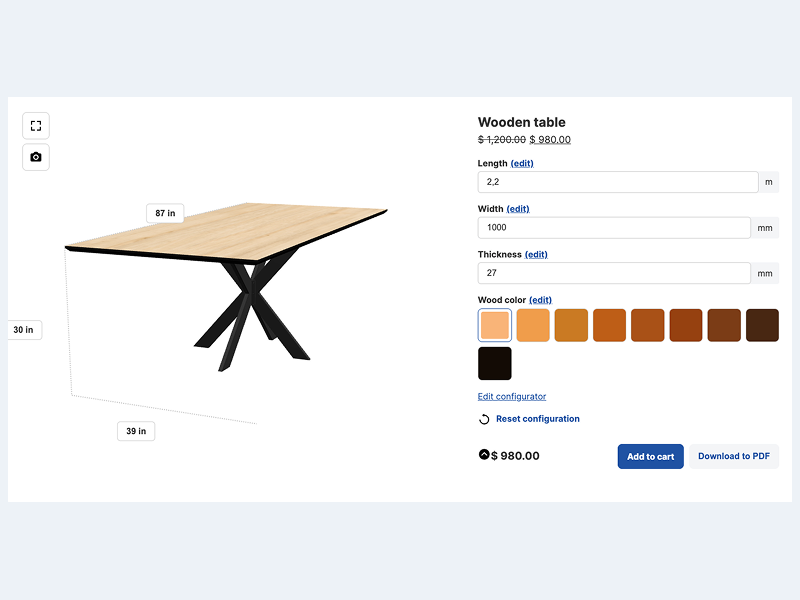
3D full template with measurements and color update 
Configurator popup template 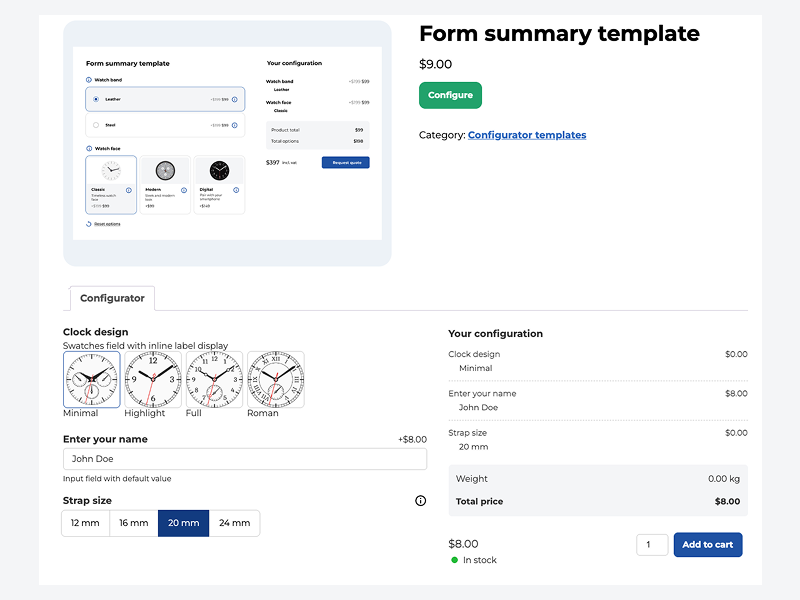
Configurator in WooCommerce product tab 
Tabbed configurator form display 
Field description panel 
Request quote popup 
WooCommerce cart page 
WooCommerce order page 
Gutenberg configurator editor 
Choice edit page 
Visuals edit page 
Settings page
Installation
- Upload
wcb-configurator-builder.zipto the/wp-content/plugins/directory - Activate the plugin through the ‘Plugins’ menu in WordPress
- Go to WCB in the dashboard
- Add your fields
- Create a new configurator
- Assign it to a WooCommerce product
- Upload your visuals and create new visuals group in WCB > Visuals
- Save and test it on the frontend
FAQ
-
Will this plugin work with my theme?
-
Yes, the plugin will work fine in all well-coded (block) themes
-
Does this plugin work with page builders like Elementor?
-
Yes, the plugin works fine in page builders too.
-
Does the plugin include real-time previews?
-
Yes. Live preview and real-time updates are fully included.
-
Can I add text and images to the product image?
-
Absolutely! You can personalize the product image with text and images using the text visual controls. For image uploads you need our Advanced fields add-on.
-
Can I create configurators for different products?
-
Yes, unlimited configurators can be created.
-
Do you have a limit on the options?
-
No, the plugin has no limit to the amount of options you can add.
-
Does the plugin slow down my site?
-
No. It’s optimized for speed and lightweight in design.
-
Why do my configuration options not appear on WooCommerce products?
-
Make sure your product is purchasable. This means the WooCommerce product has a regular price set. If you want to start at 0, simply put 0 in the regular price field.
-
Are configuration details sent to the order?
-
Yes. All selected options appear in the cart, checkout, and order details.
-
Can I use this plugin without WooCommerce?
-
Yes! This plugin can be used in WordPress-based websites. You don’t need WooCommerce to build a product configuration.
-
What’s included in the Pro version?
-
Advanced features such as save and continue, conditional logic, tiered pricing, and more (see Pro Features section above).
-
Is support available?
-
Free users have community support; Pro users receive priority support.
-
Where can I find documentation?
-
You can find extensive documentation of our plugin on https://wpconfiguratorbuilder.com/docs/
Reviews


Contributors & Developers
“WCB | WP Configurator Builder – Product Configurators Made Simple” is open source software. The following people have contributed to this plugin.
Contributors
Translate “WCB | WP Configurator Builder – Product Configurators Made Simple” into your language.
Interested in development?
Browse the code, check out the SVN repository, or subscribe to the development log by RSS.
Changelog
1.4.0
- Library updates
- Performance improvements and bug fixes
- Add 3D example demo to import
- Add support for pre-defined field templates (pro)
1.3.0
- Add support for field description gallery
- Add setting to disable default plugin zoom function
- Add example product import in setup form
- Improve product sale display
- Improve product tax calculations
- Improve multi language support
- Add WooCommerce wishlist account page (pro)
- Change import/export format to JSON (pro)
- Fix save configuration with special characters (pro)
1.2.1
- Add support for product tag display
- Display configuration in child category product when parent is selected
- Manage access to WCB admin pages for specific user roles
- Add visual image edit popup (pro)
- Minor bug fixes and improvements
1.2.0
- Add support for WooCommerce Request quotes plugin integration (YITH and Addify)
- Minor bug fixes and improvements
1.1.0
- Add guided plugin setup page
- Add taxes and multi currency support
1.0.0
- Product launch