

Description
Peeps – People Directory is a WordPress plugin that helps you create and manage a directory of people on your website. Perfect for displaying staff members, team rosters, or employee directories.
Features:
- Custom post type for managing people profiles
- Block templates for single person posts and archive pages
- Configurable phone number formatting
- Custom URL structure for people profiles
- Public/private directory option
Screenshots

Example of a person post displayed on the frontend 
Fields available when editing a person post 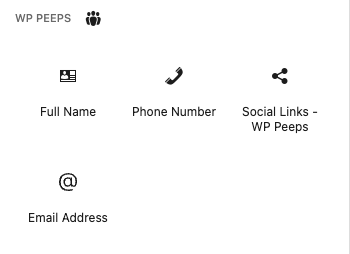
Available Peeps blocks in the block inserter 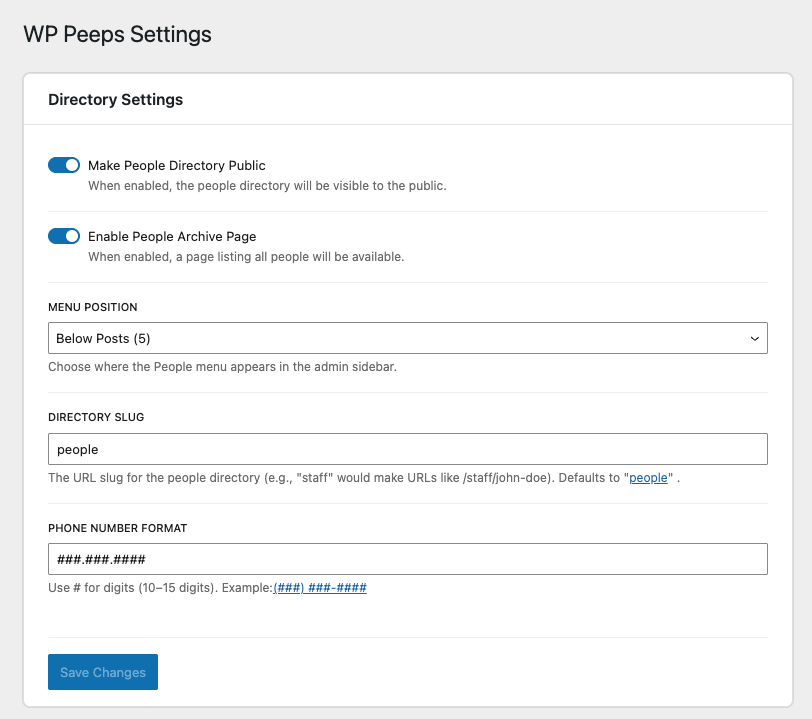
Peeps – People Directory settings page
Blocks
This plugin provides 4 blocks.
- Phone Number Display a person's phone number
- Email Address Display a person's email address
- Social Links – WP Peeps Add and customize social media links.
- Full Name Display a person's full name with configurable parts
Installation
- Download the latest release from GitHub
- Upload the plugin files to the
/wp-content/plugins/peepsdirectory - Activate the plugin through the ‘Plugins’ screen in WordPress
- Go to People Settings to configure the plugin options
FAQ
-
How do I change the URL structure for people profiles?
-
Go to People Settings and update the “Directory Slug” field. After saving, visit the WordPress Permalinks page and click “Save Changes” to update your URLs.
-
Can I make the directory private?
-
Yes, in People Settings you can disable the “Make People Directory Public” option to make the directory visible only to logged-in users.
-
How do I format phone numbers?
-
Go to People Settings and update the “Phone Number Format” field. Use # symbols where you want digits to appear. For example: (###) ###-####
Reviews
There are no reviews for this plugin.
Contributors & Developers
“Peeps – People Directory” is open source software. The following people have contributed to this plugin.
Contributors
Translate “Peeps – People Directory” into your language.
Interested in development?
Browse the code, check out the SVN repository, or subscribe to the development log by RSS.
Changelog
2.2.2
- Added Developer Docs tab to the settings page with reference tables for the post type key, meta keys, available blocks, and settings options
- Fixed phone block displaying empty in the editor when no phone number is set — now shows the configured format as a placeholder
2.2.0
- Added 9 missing social platform detections: Discord, TikTok, Threads, Patreon, VK, 500px, RSS/Atom feeds, Gravatar, and mailto links
- Full Name block now prevents disabling the last active name part
- Full Name block now shows an editor warning when no name parts are selected
- Fixed email meta validation to trim whitespace before checking validity
- Fixed redundant text alignment class being manually applied in phone and email blocks (now handled automatically by WordPress block supports)
- Fixed brittle email block placeholder check (was comparing against a hardcoded string)
- Centralized default values for phone format, CPT slug, and menu position into a single source of truth
- Consolidated multiple useSelect calls in the editor panel into one
- Removed duplicate constants and utility functions across block files
2.1.0
- People post type is now always available in the Query Loop block, regardless of the “Make People Directory Public” setting
- Single person profile pages return 404 when the directory is set to private
- Social links block preview now updates immediately when links are added, removed, or reordered without requiring a post save
- Fixed editor sidebar styles not applying correctly in the admin page
- Fixed spacing between fields in the Person Name, Contact Information, and Social Links editor panels
- Fixed TextControl deprecation warnings for WordPress 7 compatibility
- Added phone extension field to the Contact Information panel
2.0.0
- BREAKING: Updated all prefixes from “wp_peeps” to “ph_peeps” for WordPress Directory compliance
- BREAKING: Post type changed from “wp_peeps_people” to “ph_peeps_people”
- BREAKING: All meta keys changed from “wp_peeps_” to “ph_peeps_“
- BREAKING: All option names changed from “wp_peeps_” to “ph_peeps_“
- BREAKING: Block names changed from “wp-peeps/” to “ph-peeps/“
- Updated plugin name to “Peeps – People Directory”
- Updated namespaces from “WP_Peeps” to “PH_Peeps”
- Updated text domain from “wp-peeps” to “peeps-people-directory”
- Added sanitization callbacks for boolean settings
- Note: Existing posts and settings will need to be migrated or re-entered
1.3.1
- Updated plugin name from “WP Peeps” to “Peeps” for WordPress Directory compliance
1.3.0
- Added block template for archive pages
- Archive template includes featured image, name, contact information, and social links
1.2.0
- Automatic permalink flush on plugin activation
- Automatic permalink flush on plugin deactivation
- Added notice when changing settings that affect permalinks (slug, public status, archive)
1.1.0
- Added block template registration for single person posts
- Default template includes featured image, full name, contact information, and social links
- Template is customizable through the Site Editor
1.0.0
- Stable release
- Comprehensive code audit and security improvements
- Fixed XSS vulnerabilities
- Added proper validation and sanitization
- Improved error handling and logging
- Code quality improvements and documentation
- Performance optimizations
0.1.1
- Disable post title editing
0.1.0
- Initial release
- People directory custom post type
- Admin settings page
- Phone number formatting
- Required name fields
- Contact information fields