

27 May Python Tuples Tutorial with Examples
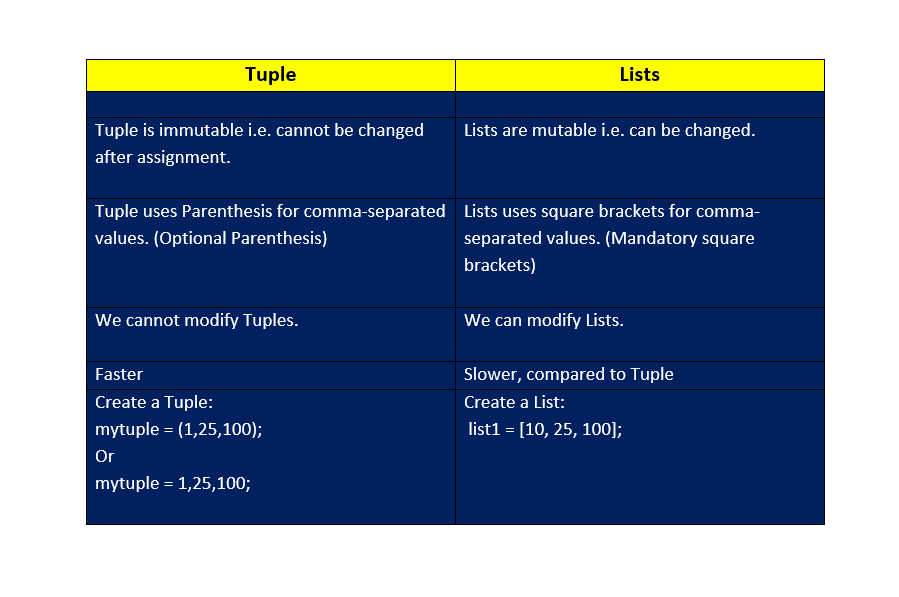
Tuple is a sequence in Python, a collection of objects. Also, Python Tuples are immutable i.e. you cannot update a tuple or any of its elements. Often, Lists and Tuples are confused in Python. Let us see the difference between Tuple and Lists in Python.
The elements of a list can be changed after assignment, whereas this is not the case with Python Tuples. Another difference is, Tuple use parenthesis, whereas Lists in Python use Square Brackets. In other words, different comma-separated values between square brackets in a list, whereas, different comma-separated values between parenthesis is Tuple.
Tuple vs Lists: Difference between Tuple and Lists in Python
How to create a Tuple?
To create a Tuple, set the elements inside parentheses separated by command. The parentheses are optional and feel free to remove them. Let us see an example wherein we will create a Tuple with and without using parentheses:
Demo89.py
# Creating Tuples in Python

mytuple = ("Amit", "Craig", "Ronaldo", "Messi")
print(mytuple)

mytuple = (10, 20, 50, 100)
print(mytuple)

mytuple = (5.4, 8.9, 15.2, 20.5)
print(mytuple)

mytuple = ("Ronaldo", 20, 5.8)
print(mytuple)

#creating Tuple without parentheses
mytuple = "A", "B"
print(mytuple)
The output is as follows:
('Amit', 'Craig', 'Ronaldo', 'Messi')
(10, 20, 50, 100)
(5.4, 8.9, 15.2, 20.5)
('Ronaldo', 20, 5.8)
('A', 'B')
Create an empty Tuple in Python
To create an empty Tuple in Python, only set two parentheses with no element in it as in the below example:
Demo90.py
# Creating Tuple in Python

mytuple = (10, 20, 50, 100)
print(mytuple)

# Creating empty Tuple in Python
mytuple = ()
print(mytuple)
The output is as follows:
(10, 20, 50, 100)
()
Let us now move further and perform operations on Python Tuples.
How to access values in a Tuple?
To access a value in Tuple, set the index for which you want the value in square brackets, like:
#First item
mytuple[0]

#Second item
mytuple[1]
Let us see an example to access values in Tuple:
Demo91.py
# tuple
mytuple = ("ronaldo", "messi", "neymar", "maradona")
print("Tuple = ",mytuple)

#First Item
print("First Item = ",mytuple[0]);

#Second Item
print("Second Item = ",mytuple[1]);

#Third Item
print("Third Item = ",mytuple[2]);
The output is as follows:
Tuple =  ('ronaldo', 'messi', 'neymar', 'maradona')
First Item =  ronaldo
Second Item =  messi
Third Item =  neymar
Check the existence of an item in a Python Tuple
The in keyword is used to check the existence of an item in a Tuple. Let us see an example:
Demo92.py
#tuple
mytuple = ("eddie", "anthony", "aran", "blake", "alyson", "rechelle")
print("Tuple = ",mytuple)

if "anthony" in mytuple:
  print("Found!")
The output is as follows:
Tuple =  ('eddie', 'anthony', 'aran', 'blake', 'alyson', 'rechelle')
Found!
Indexing in Python Tuples
Indexing in Python Tuples begins from 0. The last item is tuple length – 1. Set the index in square brackets and fetch a specific element at the same index. With that, if you want to count from the right, use negative indexing. The slice operator can also be used to fetch a specific set of sub-elements. This is achieved with the colon operator and allows to fetch multiple items. Let us see them one by one.
Fetch a specific element with indexing in Tuples
To fetch a specific element, just set the index in a square bracket i.e. refer to the index number:
Fetch a specific element at 1st position: mytuple[0]
Fetch a specific element at 2nd position: mytuple[1]
Fetch a specific element at 3rd position: mytuple[2]
Fetch a specific element at 4th position: mytuple[3]
Let us now see an example to fetch a specific element:
Demo93.py
#tuple
mytuple = ("ronaldo", "messi", "neymar", "maradona")
print("Tuple = ",mytuple)

print("Tuple element at position 1 (index 0) = ",mytuple[0])
print("Tuple element at position 2 (index 1) = ",mytuple[1])
print("Tuple element at position 3 (index 2) = ",mytuple[2])
print("Tuple element at position 4 (index 3) = ",mytuple[3])
The output is as follows:
Tuple =  ('ronaldo', 'messi', 'neymar', 'maradona')
Tuple element at position 1 (index 0) =  ronaldo
Tuple element at position 2 (index 1) =  messi
Tuple element at position 3 (index 2) =  neymar
Tuple element at position 4 (index 3) =  Maradona
Negative indexing in Tuples
Left-to-right traversal of Tuple elements is possible with negative indexing. For example, index -1 is the last item. Let us see an example of negative indexing in Tuples:
Demo94.py
#negative indexing in tuple
mytuple = ("ronaldo", "messi", "neymar", "maradona")
print("Tuple = ",mytuple)

print("Tuple element at last position = ",mytuple[-1])
print("Tuple element at 2nd last position = ",mytuple[-2])
print("Tuple element at 3rd last position = ",mytuple[-3])
print("Tuple element at 4th last position = ",mytuple[-4])
Slicing in Tuple
The slice operator can also be used to fetch a specific set of sub-elements, i.e., slicing. This is achieved with the colon operator and allows to fetch multiple items. Let us see an example:
Demo95.py
#tuple slicing
mytuple = ("ronaldo", "messi", "neymar", "maradona")
print("Tuple = ",mytuple)

print("Tuple element at last position = ",mytuple[-1])

print(mytuple[1:])
print(mytuple[::-1])
print(mytuple[1:2])
print(mytuple[1:4])
The output is as follows:
Tuple =  ('ronaldo', 'messi', 'neymar', 'maradona')
Tuple element at last position =  maradona
('messi', 'neymar', 'maradona')
('maradona', 'neymar', 'messi', 'ronaldo')
('messi',)
('messi', 'neymar', 'maradona')
Range of indexes
By specifying the start and end range, we can specify the range of indexes in Python. Let us see an example:
Demo96.py
#tuple
mytuple = ("eddie", "anthony", "aran", "blake", "alyson", "rechelle")
print("Tuple = ",mytuple)

#range
print(mytuple[1:2])
print(mytuple[1:4])
print(mytuple[1:5])
print(mytuple[3:5])
The output is as follows:
Tuple =  ('eddie', 'anthony', 'aran', 'blake', 'alyson', 'rechelle')
('anthony',)
('anthony', 'aran', 'blake')
('anthony', 'aran', 'blake', 'alyson')
('blake', 'alyson')
In the above example, [1:2] means the search starts from index 1 (including) and ends at index 2 (excluding). In the same way, [1:4] means the search starts from 1 (including) and ends at index 4 (excluding).
Range of negative indexes
To begin the search from the end, set negative indexes. In a range, set a negative range, such as:
print(mytuple[-3:-1])
Let us now see an example and set the range of negative indexes:
Demo97.py
#tuple
mytuple = ("eddie", "anthony", "aran", "blake", "alyson", "rechelle")
print("Tuple = ",mytuple)

#range of negative indexes
print(mytuple[-3:-1])
print(mytuple[-5:-2])

#range of indexes
print(mytuple[1:5])
print(mytuple[3:5])
The output is as follows:
Tuple =  ('eddie', 'anthony', 'aran', 'blake', 'alyson', 'rechelle')
('blake', 'alyson')
('anthony', 'aran', 'blake')
('anthony', 'aran', 'blake', 'alyson')
('blake', 'alyson')
Can we update Tuple values?
No, we cannot since Tuples are Immutable. However, we can convert it to list, update and then convert the list to a tuple. This will update and change the value of Tuple elements as in the example below:
Demo98.py
#tuple
mytuple = ("ronaldo", "messi", "neymar", "maradona")
print("Tuple = ",mytuple)

#list
mylist = list(mytuple)
print("List (from Tuple) = ",mylist)

mylist[0] = "Zidane "
mylist[1] = "Beckham"
mylist[2] = "Rooney"
print("Updated List = ",mylist)

mytuple = tuple(mylist)

print("Updated Tuple = ",mytuple)
The output is as follows:
Tuple =  ('ronaldo', 'messi', 'neymar', 'maradona')
List (from Tuple) =  ['ronaldo', 'messi', 'neymar', 'maradona']
Updated List =  ['Zidane ', 'Beckham', 'Rooney', 'maradona']
Updated Tuple =  ('Zidane ', 'Beckham', 'Rooney', 'maradona')
Get the total length of the Tuple
To get the total length of a Tuple in Python, use the len() method:
Demo99.py
#tuple1
mytuple1 = (20, 40, 80, 150, 200);
print("Tuple1 = ",mytuple1)
print("Tuple1 Length = ",len(mytuple1))

#tuple2
mytuple2 = (300, 450, 500);
print("Tuple2 = ",mytuple2)
print("Tuple2 Length = ",len(mytuple2))

#tuple3
mytuple3 = (650, 800, 1000);
print("Tuple3 = ",mytuple3)
print("Tuple3 Length = ",len(mytuple3))

print("Joining two tuples = ",mytuple1 + mytuple2)
print("Joining three tuples = ",mytuple1 + mytuple2 + mytuple3)
The output is as follows:
Tuple1 =  (20, 40, 80, 150, 200)
Tuple1 Length =  5
Tuple2 =  (300, 450, 500)
Tuple2 Length =  3
Tuple3 =  (650, 800, 1000)
Tuple3 Length =  3
Joining two tuples =  (20, 40, 80, 150, 200, 300, 450, 500)
Joining three tuples =  (20, 40, 80, 150, 200, 300, 450, 500, 650, 800, 1000)
Concatenate two Python tuples
Let us see how to concatenate two/three tuples in Python:
Demo100.py
#Tuple1
mytuple1 = (10, 20, 50, 100)
print(mytuple1)

#Tuple2
mytuple2 = ("Ronaldo","Neymar")
print(mytuple2)

#Tuple3
mytuple3 = (5.7,8.9)
print(mytuple3)

#Concatenate
print(mytuple1 + mytuple2)

#Concatenate
print(mytuple1 + mytuple2 + mytuple3)
The output is as follows:
(10, 20, 50, 100)
('Ronaldo', 'Neymar')
(5.7, 8.9)
(10, 20, 50, 100, 'Ronaldo', 'Neymar')
(10, 20, 50, 100, 'Ronaldo', 'Neymar', 5.7, 8.9)
Get the maximum value from the Tuple
To get the maximum value from a Tuple, use the max():
Demo101.py
mytuple = (150, 100, 350, 800, 500)
print (max(mytuple));
The output is as follows:
800
Get the minimum value from the Tuple
To get the minimum value from Tuple, use the min():
Demo102.py
mytuple1 = (150, 100, 350, 800, 500)
print (min(mytuple1));

mytuple2 = (5.9, 7.9, 1.2, 5.8, 9.9, 6.3)
print (min(mytuple2));
The output is as follows:
100
1.2
Convert List into Tuple
To convert a List into a Tuple, use the tuple(list) method and set the list as the parameter. Let us see an example:
Demo103.py
mylist = ["Neymar", "Messi", 3.5, 50]
print ("List = ", mylist)

mytuple = tuple(mylist)

print ("Tuple = ", mytuple)
The output is as follows:
List =  ['Neymar', 'Messi', 3.5, 50]
Tuple =  ('Neymar', 'Messi', 3.5, 50)
Delete items from Tuple
Since a Tuple is immutable, i.e., we cannot modify/update/delete items from a Tuple. However, we can delete items using the del keyword:
Demo104.py
mytuple = (20, 40, 80, 150, 200);
del mytuple

# error will occur since we deleted the Tuple above
print(mytuple)
The output is as follows, displaying an error:
Traceback (most recent call last):
  File "./prog.py", line 4, in <module>
NameError: name 'mytuple' is not defined
Join two or more Python Tuples
The + operator is used to join two or more tuples in Python:
Demo105.py
#tuple1
mytuple1 = (20, 40, 80, 150, 200);

#tuple2
mytuple2 = (300, 450, 500);

#tuple3
mytuple3 = (650, 800, 1000);

print("Joining two tuples = ",mytuple1 + mytuple2)
print("Joining three tuples = ",mytuple1 + mytuple2 + mytuple3)
The output is as follows:
Joining two tuples =  (20, 40, 80, 150, 200, 300, 450, 500)
Joining three tuples =  (20, 40, 80, 150, 200, 300, 450, 500, 650, 800, 1000)
Python Tutorial (English)
If you liked the tutorial, spread the word and share the link and our website Studyopedia with others.
For Videos, Join Our YouTube Channel: Join Now
Read More

No Comments