

09 Jul Vectors in Java
Vectors are growable arrays that need to be initialized before it is used. Vector is a Java class and to use it, import the java.util package like this,
import java.util.*;
The size is to be mentioned in Java Arrays before being used, and once set, it cannot be changed, unlike Vectors. Therefore, Vectors implement a dynamic array.
The following are the methods provided by Vectors,
Methods
Let us learn about the methods in Vectors,
| Method | Description |
|---|---|
| void addElement(Object elements) | Add an element to the vector. |
| void insertElementAt(Object element, int index) | Insert an element at a specified index. |
| boolean removeElement(Object element) | Remove the first occurrence of the element. |
| void removeElementAt(int index) | Remove an element from a given index. |
| void removeAllElements() | Remove all the elements. Empties the vector and the size is set to 0. |
| Object firstElement() | Returns the first element. |
| Object lastElement() | Returns the last element. |
| Object ElementAt(int index) | Returns the element at a specified index. |
| int indexOf(Object element) | Returns the index of the first occurrence of the element |
| int lastIndexOf(Object element) | Returns the index of the last occurrence of the element |
| boolean contains(Object a[]) | Returns true if the vector has elements. |
| boolean isEmpty() | True is returned if the vector is empty. |
| Object clone() | Returns the clone of the vector. |
| int capacity() | Returns the capacity of the vector. |
| int size() | Returns the count of elements in the vector |
| void trimToSize() | Sets capacity to the elements it currently holds |
| void setsize(int s) | Set a new size for the vector. |
Now let us see an example to understand the working of Vectors in Java,
Example
import java.util.*;

public class StudyopediaDemo {

   public static void main(String args[]) {

	 Vector vc = new Vector();

	 System.out.println("\nLearning the usage of Vectors - Studyopedia ");
	 System.out.println("Elements (COUNT) in the Vector vc = "+vc.size());

	 Vector subjects = new Vector (10);
	 System.out.println("Elements (COUNT) in the Vector subjects = "+subjects.size());

	 subjects.addElement("PHP");
	 subjects.addElement("Maths");
	 subjects.addElement("Java");
	 subjects.addElement("English");
	 subjects.addElement("Science");
	 subjects.addElement("Fundamentals of IT");
	 subjects.addElement("Data Structures");
	 subjects.addElement("Algorithms");
	 subjects.addElement("Physics");
	 subjects.addElement("Artificial Inetlligence");
	 subjects.addElement("Theory of Computation");

         System.out.println("Elements (COUNT) in the Vector subjects = "+subjects.size());

	 System.out.println("");

	 for(int i=0; i<subjects.size();i++)
	   System.out.println("Element at index "+i+" = "+subjects.elementAt(i));

         // Inserting element at index 2
	 subjects.insertElementAt("Digital Electronics",2);

	 System.out.println("");
	 System.out.println("After adding a new element in the Vector!");
	 for(int i=0; i<subjects.size();i++)
           System.out.println("Element at index "+i+" = "+subjects.elementAt(i));

	 // removing elements
	 subjects.removeElementAt(3);
	 subjects.removeElementAt(4);
	 subjects.removeElementAt(5);

         System.out.println("");
	 System.out.println("After removing three elements from the Vector!");

	 System.out.println("");
	 for(int i=0; i<subjects.size();i++)
	   System.out.println("Element at index "+i+" = "+subjects.elementAt(i));

         // checking the size of the Vector now
         System.out.println("\nElements (COUNT) in the Vector subjects = "+subjects.size());

	 // finding the subject Maths
	 System.out.println("\nDoes your vector has subject Maths = "+subjects.contains("Maths"));
  }
}
The following is the output,
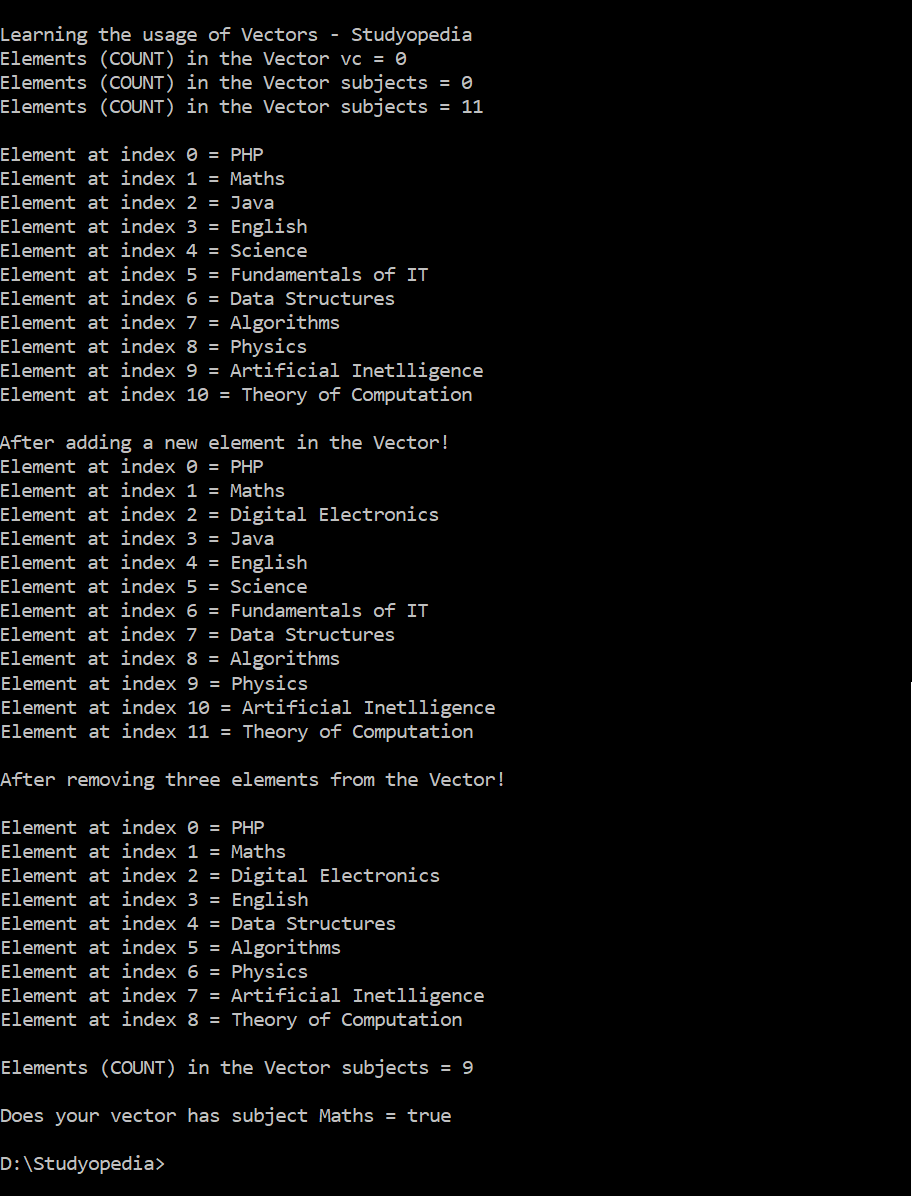
In this lesson, we learned about Vectors and the usage of its methods.

No Comments