

19 Jan Java Regular Expressions
To perform search and manipulation on strings in Java, use Regex i.e., Regular Expressions. To form a search pattern, match or find strings, and search and edit strings, we use Regular Expressions as a sequence of characters. To work with regex in Java, import the java.util.regex package:
- Pattern Class
- Matcher Class
Pattern Class
A Pattern class is a compiled representation of a regular expression to define a pattern. For a pattern, call its compile() method to return a Pattern object.
Matcher Class
The Matcher Class performs match operations on a character sequence by interpreting a Pattern. For a Matcher object, call the matcher() method on a Pattern object.
How to write a Regular Expression in Java
To write a Regex in Java, we used both the Pattern and Matcher class. Let us see two examples.
Example 1
In this first example, we will search for a letter in a word with Regular Expressions in Java. If it is found, True gets displayed. The pattern is case insensitive, set using the Flag Pattern.CASE_INSENSITIVE:
import java.util.regex.Matcher;
import java.util.regex.Pattern;

class Studyopedia {

   public static void main(String args[]){

  // Here . means a single character
   Pattern pattern = Pattern.compile(".k", Pattern.CASE_INSENSITIVE);
   Matcher match = pattern.matcher("tK");
   boolean res = match.matches();

   System.out.println("Match Found: "+res);
  }
}
Output
Match Found: true
Example 2
In the next example, we will find a letter in a word with Regular Expressions in Java:
import java.util.regex.Matcher;
import java.util.regex.Pattern;

class Studyopedia {

   public static void main(String args[]){

   // Here . means a single character
   boolean res = Pattern.compile(".k").matcher("tk").matches();

   System.out.println("Match Found: "+res);
  }
}
Output
Match Found: true
Regex Quantifiers
To define quantities i.e., the occurrences of a character, Regex in Java has Quantifiers. Here is the list of Quantifiers in Java that matches any string containing,
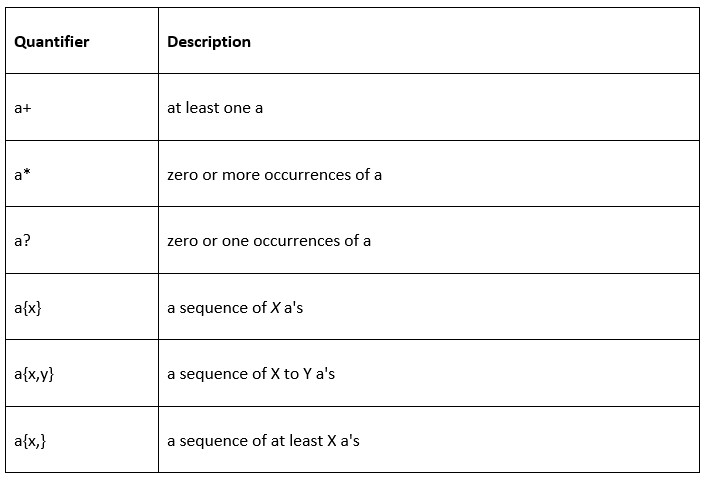
Let us now see an example of Quantifiers in Regular Expressions:
import java.util.regex.Matcher;
import java.util.regex.Pattern;

class Studyopedia {

   public static void main(String args[]){

     System.out.println("Quantifier example...");

     // Returns true since p or q or r or s appears once
     System.out.println(Pattern.matches("[pqrs]?", "p"));

     // Returns false since r appears more than one times
     System.out.println(Pattern.matches("[pqrs]?", "rrrr"));

     // Returns false since p, q, r and s appears more than one times
     System.out.println(Pattern.matches("[pqrs]?", "ppqqrrss"));
  }
}
Output
Quantifier example...
true
false
false
Regex Metacharacters
The following are the metacharacters in Regular Expressions and finds,

Let us now see an example of Metacharacters in Regular Expressions:
import java.util.regex.Matcher;
import java.util.regex.Pattern;

class Studyopedia {

   public static void main(String args[]){

     System.out.println("Metacharacters example...");

     // Returns false since it is a non-digit
     System.out.println(Pattern.matches("\\d", "pqrst"));

     // Returnstrue since it is a digit and appears once
     System.out.println(Pattern.matches("\\d", "5"));

     // Returns false since it is a digit and appears more than once
     System.out.println(Pattern.matches("\\d", "228"));

     // Returns false since it is a non-digit and appears more than once
     System.out.println(Pattern.matches("\\D", "pqrst"));
   }
}
Output
Metacharacters example...
false
true
false
false
If you liked the tutorial, spread the word and share the link and our website Studyopedia with others.
For Videos, Join Our YouTube Channel: Join Now

No Comments