


30 Jul C++ Cheat Sheet
C++ Cheat Sheet will guide you to work on C++ with basics and advanced topics. Cheat Sheet for students, engineers, and professionals.
Introduction
Bjarne Stroustrup came up with the idea of creating a powerful language that combines Simula67 and C. As a result, at AT&T Bell Laboratories developed C++ that supports object-oriented features, with the power of both languages. C++ was also initially known as “C with Classes”, since classes were added, also considering it as an extension of C.
Features
- Polymorphism
- Classes
- Objects
- Encapsulation
- Abstraction
- Inheritance
- OOPs Overview
Object oriented was introduced to solve the issues with traditional programming. OOP protects data from accidental modification by considering data as a critical element. Objects are what OOP makes it different. Programs are divided into objects.
Data Types

Variables
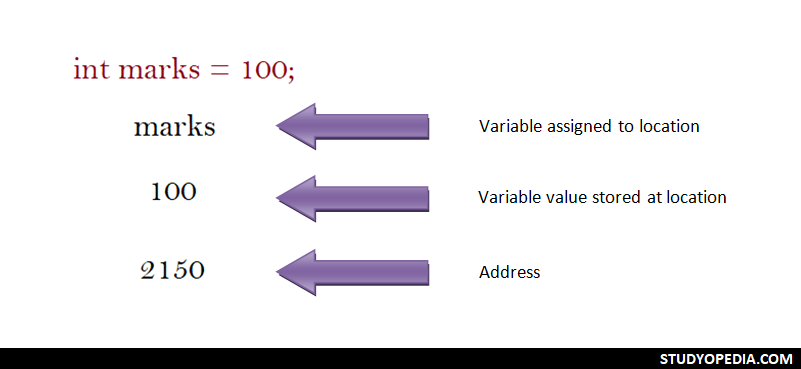
Variable names in C++ are the names given to locations in memory. These locations can be an integer, characters, or real constants. The following examples demonstrate the usage of variables in C++:
User Input
The cin is used in C++ for User Input. It is used to read the data input by the user on the console:
#include <iostream>
using namespace std;

int main() {

  // Declaring Variables
  string str;

  # Asks the user to enter a string
  cout << "Enter a string = ";
  cin >> str;

  # Displays the string entered by the user above
  cout <<"\nThe string entered by user = "<< str;

  return 0;
}
Output
Enter a string = amit
The string entered by user = amit
Decision Making Statements
With C++ decision making statements, easily make decisions based on different conditions:
- if: The if decision making statement executes the code, if the condition is true:
if (condition is true)
   // code will execute if the condition is true
- if…else: The if…else decision making statement executes some code if the condition is true and another code if the condition is false:
if (condition is true) // code will execute if the condition is true else // code will execute if the condition is false - if…else if…else: The if…elseif…else statement executes code for different conditions. If more than 2 conditions are true, you can use else for the false condition:
if (condition1 is true)
   // code will execute if the condition is true
else if (condition2 is true)
   // code will execute if another condition is true
else if (condition3 is true)
   // code will execute if above conditions aren’t true
else
   // code will execute if all the above given conditions are false
Loops
C++ loops execute a block of code and this code executes while the condition is true:
- while loop: The block of code executes only when the condition is true:
while (condition is true)
  statement;
- do…while loop: The condition is checked at the bottom of the loop:
do{ statement; } while(condition); - for loop: The for loop is used when you can set how many times a statement is to be executed.
for (initialization; condition; increment) {
  statement;
}
Arrays
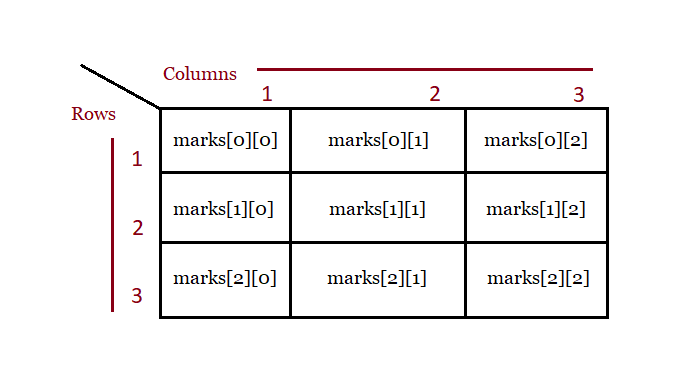
An array is a collection of elements, of fixed size and type, for example, a collection of 5 elements of type int:
- Declare an array:
int marks[3];
- Initialize an array:
int marks[3] = {90, 75, 88} ; - Two-Dimensional Arrays:
int marks[3][3];
Functions
A function is an organized block of reusable code that avoids repeating the tasks again and again:
- Create a Function:
void demoFunction() { // write the code } - Call a Function:
demoFunction();
- Function Parameters:
void demoFunction(int rank) { } - Multiple Parameters:
void demoFunction(char player[], int rank, int points) { }
Recursion
When a function calls itself, it is called Recursion in C Language. In another sense, with Recursion, a defined function can call itself. Recursion is a programming approach, that makes code efficient and reduces LOC. The following figure demonstrates how recursion works when we calculate Factorial:

Overloading
In C++, we can easily create more than one function with a similar name but different parameters. Let’s say we have the following function:
int demoAdd(int a, int b)
We can create more functions with the same name:
int demoAdd(int a, int b)
double demoAdd(double a, double b)
Above, we have different types and numbers of parameters for functions with similar names. The 1st will add two integers and the 2nd two doubles. This is called Function Overloading.
Structures
Structures in C++ allow you to store data of different types. You can easily store variables of types, such as int, float, char, etc:
- Define a Structure:
struct emp { char name[15]; int age; char zone[10]; float salary; }; - Declare a Structure while defining it:
struct emp { char name[15]; int age; char zone[10]; float salary; }; e1, e2, e3; - Declare a Structure with struct:
struct emp
{
    char name[15];
    int age;
    char zone[10];
    float salary;
};
Declare e1, e2, and e3 of type emp:
struct emp e1, e2;
- Access Structure Members:
e1.name
e1.age
e1.zone
e1.salary
Classes and Objects
A class is a template for an object, whereas an object is an instance of a class.
- Create a Class: To create a class, use the class keyword in C++. The public is an access specifier in C++. For the public access specifier, the members can be accessed from outside the class easily. In the below example, the class is Rectangle and the class members are length and width:
class Rectangle { public: double length; double width; } - Create an Object: An object is an instance of a class i.e., an object is created from a class. Object represents real-life entities, for example, a Bike is an object. Let us create three objects of the above class Rectangle in C++:
// Create objects of class Rectangle

// Declaring rect1, rect2, rect3 of type Rectangle
Rectangle rct1;
Rectangle rct2;
Rectangle rct3;
Constructors
A Constructor in C++ is always public and has the same name as the class name. Constructor gets called automatically when we create an object of a class.
- Create a Constructor:
Studyopedia() {     // Constructor
   // Code comes here
}
Destructors
A Destructor in C++ destructs an object. It has the same name as the class name and gets automatically called when an object gets created like Constructors. Let us see the syntax of Destructors with our class name Studyopedia. It is prefixed by a tilde sign as shown below:
Studyopedia() {     // Constructor
   // Code comes here
}

~Studyopedia() {     // Destructor
   // Code comes here
}
Remember, the following points about Destructors:
- Define Destructor only once in a class
- The access specifier concept does not work on Destructors in C++
- The Destructors cannot have parameters, unlike Constructors.
Inheritance
The Inheritance concept in C++ brings the code reuse functionality by using the inherit feature. In Inheritance:
- Base class: The base class is the parent class.
- Derived class: The derived class is the child class since it is derived from the parent class.
The Father Class i.e. the Base class:
// The Father class i.e. the base class
class Father {
  public:
    void demo1() {
      cout << "This is the Parent class." ;
    }
};
The Kid class i.e. the Derived class:
// The Kid class i.e. the derived class
class Kid: public Father {
 public:
  void demo2() {
    cout << "\nThis is the Child class." ;
  }
};
Access members:
// The Kid class object
Kid obj;

// Accessing members of the base and derived class
obj.demo1();
obj.demo2();
Types of Inheritance:
- Multilevel Inheritance
FATHER -> KID -> GRANDKID
- Multiple Inheritance
class Kid: public Father, public Mother {
  // code
}
Pointers
The Pointer is a variable that is used to store the memory address as its value. However, to get the memory address of a variable, use the & operator:
- The Address Operator: Access the address of a variable. Defined by &, the ampersand sign.
- The Indirection Operator: Access the value of an address. Defined by *, the asterisk sign.
Create and Declare a Pointer:
int* a;
Example
#include <iostream>
using namespace std;

int main() {

  // Our integer variable i
  int i = 10;

  // A pointer variable j storing the address of the variable i
  int* j = &i;

  cout <<"Integer Value = "<<i;

  cout <<"\nThe memory address of the variable str = "<<&i;

  cout <<"\nDisplays the memory address of the variable i with the pointer = "<<j;
  return 0;
}
Output
Integer Value = 10
The memory address of the variable str = 0x7fff1fe951f4
Displays the memory address of the variable i with the pointer = 0x7fff1fe951f4
What next?
After completing C++, follow the below tutorials:
If you liked the tutorial, spread the word and share the link and our website Studyopedia with others.
For Videos, Join Our YouTube Channel: Join Now

No Comments